45
WiFi Settings
The Apollo 5K can be controlled from anywhere using the Hysolis App.
Download the App by searching for “Hysolis” on the App Store or the Google
Play Store.
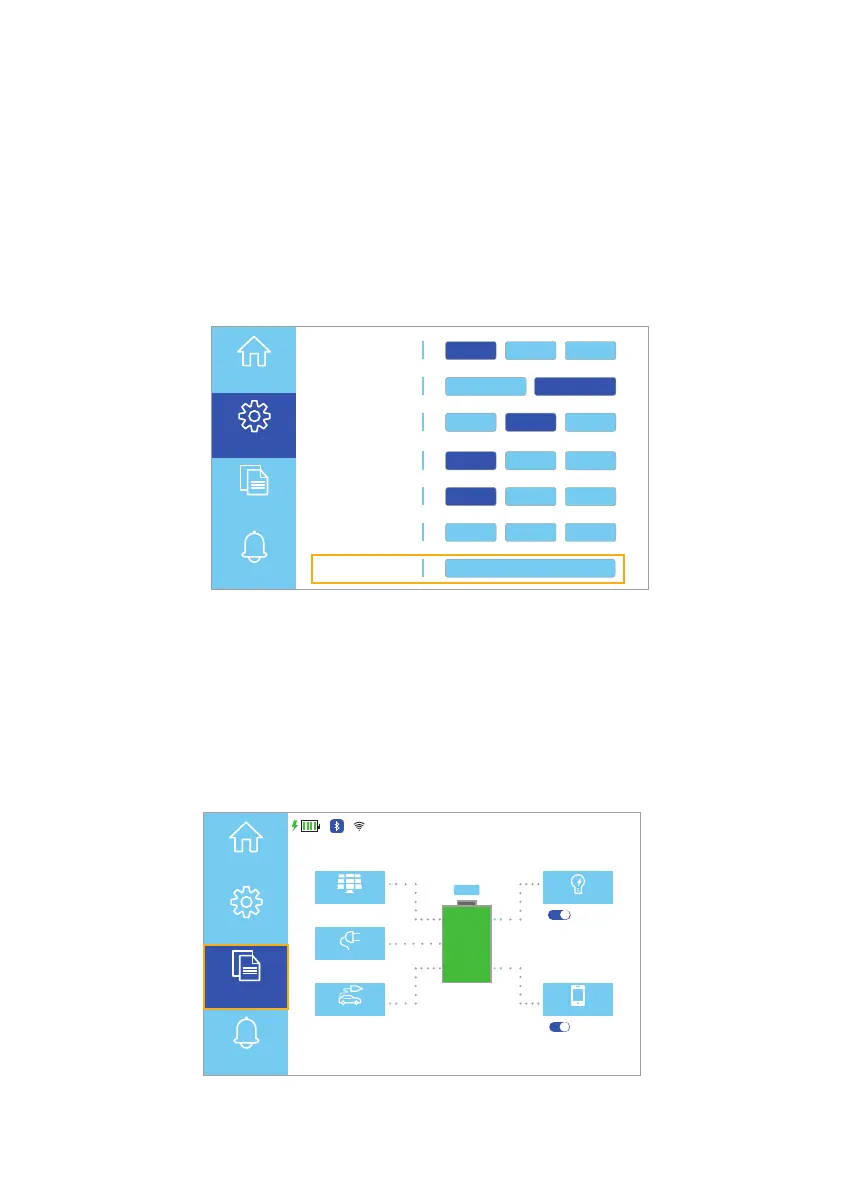
You may need to reset the Apollo 5K WiFi module in some instances if the
Apollo 5K loses connection to the WiFi network. In these instances, press the
Reset button to reset the WiFi connection (Fig. 6.33).
Note: After resetting the WiFi, you will need to reconnect the Apollo 5K to the
network via the phone app.
Fig. 6.33 WiFi reset button
Working Mode UPS AC F.C. Bat First
Unattended 90% ON OFF
Language English España
Display Settings
Date/Time Brightness
Sound
WiFi
Reset
ON OFFEnergy Saver
Parallel Mode Single P. Split P. 3 Phase
Home
Settings
Information
Alerts
中文
6.2.2 Information Touchscreens
Selecting the Information button (Fig. 6.34) on the Homepage UI touchscreen
opens the Information touchscreen options. The options include information
About the product, the Power Generated by the dierent sources, and the
Alert History.
Fig. 6.34 Select information button
120VAC
PV
12VDC
AC Load
DC Load
11/15/XXXX 15:15
2560 W 2560 W
2500 W
120 W 330 W
AC ON
DC OFF
100%
ECO
Home
Settings
Information
Alerts



 To Next Page