7
Before Use
Adjusting the Volume
+
-
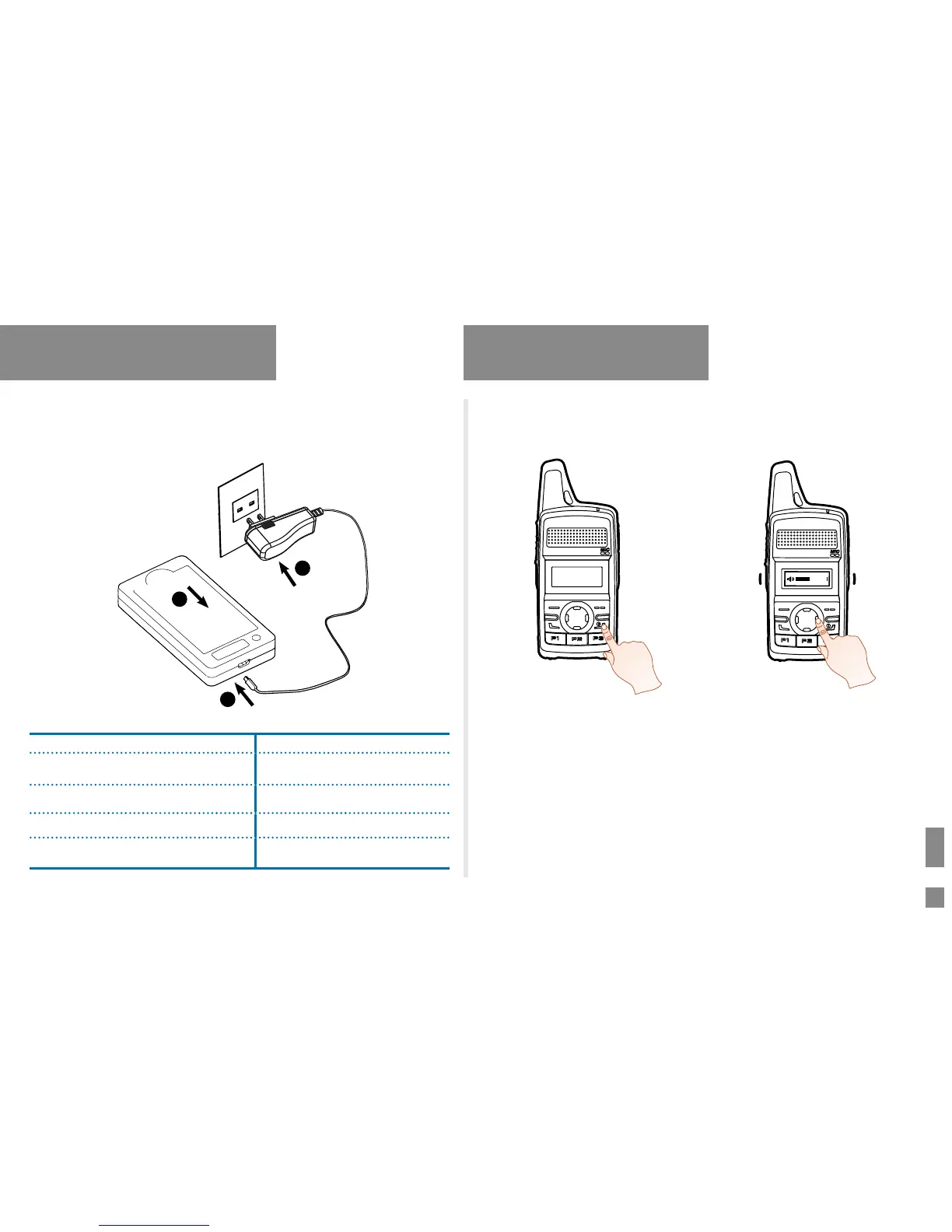
Using the Rapid-rate Charger (Optional)
Please use the charger specied by the Company to charge the battery.
Charging Diagram is as follows.
1
2
3
Charging Status Indication (on charger):
LED Indicator Charging Status
The LED indicator flashes red slowly. Standby (no load)
The LED indicator glows red. Charging
The LED indicator glows green. Fully charged
The LED indicator flashes red rapidly. Charging failed
Basic Operation
Turning the Radio On/Off
Long press the Power On/Off/ESC key
Selecting a Zone
A zone is a group of channels with the same property, which can facilitate
convenient management over the channels. The radio supports 16 zones,
each of which consists of up to 16 channels.
You can select a zone through any of the following ways:
●
Menu Operation: Go to “Menu -> Zone”, press the
Up
or
Down
key
to select an appropriate zone, and then press the
OK/Menu
key to
conrm it.


 To Next Page