EasyManua.ls Logo

Hytera RD98X series - User Manual

Hytera RD98X series
25 pages
Print Icon
To Next Page IconTo Next Page
Loading...
Preface
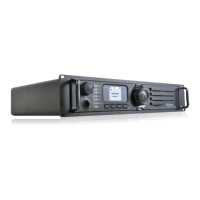
Thank you for purchasing Hytera RD98X series DMR digital repeater.
As a product built to the DMR standard, RD98X is endowed with
ergonomic design, reliable performance and comprehensive digi-
tal functions to deliver an advanced communication solution. With
RD98X, you can make use of digital advantages to top the competi-
tion!
To ensure you get maximum benet from the product, please read
this manual carefully before use.

Other manuals for Hytera RD98X series

Questions and Answers

  • C
    catherinemcintyreAug 9, 2025
    Why group members cannot talk to each other via Hytera Repeater?
    • M
      Martha IbarraAug 9, 2025
      If group members can't communicate or the Hytera Repeater won't communicate with a subscriber radio, the issue could be due to several reasons. First, the TX/RX frequency of the repeater might not match that of the portable/mobile terminals; if so, try resetting the frequencies. Second, strong interference could be preventing signal repeating; if removing the interference source isn't possible, try operating on different frequencies. Finally, a group member might be outside the repeater's coverage area; in that case, move within the coverage area.
  • E
    Elizabeth JacksonAug 16, 2025
    How to fix short communication range or poor audio on Hytera Repeater?
    • R
      Robin SanchezAug 16, 2025
      If you are experiencing short communication range or poor audio quality with your Hytera Repeater, it could be due to several reasons. There might be leakage of signal energy due to a damaged connection cable. In this case, replace the cable if necessary. Another potential cause is a loose connection between the antenna connector and the cable, or a complete loss of connection; secure the connection or replace the cable plug if needed. Invisible damage to the cable can also cause this issue, so replacing the cable might resolve the problem. Finally, if a duplexer is mounted, it might not be properly set; contact the manufacturer or your dealer to reset the duplexer.
  • N
    Nina HenryAug 25, 2025
    What to do if Hytera Repeater cannot be powered on?
    • A
      Angela FernandezAug 25, 2025
      If your Hytera Repeater is not powering on, there are a couple of things to check. First, ensure the power cord is properly and securely connected to the outlet. Second, inspect the power cord fuse for damage; if the DC fuse is blown, replace it with a new one.
  • S
    Shannon MartinezAug 31, 2025
    Why group members cannot talk to each other on Hytera Repeater, even with RX indication?
    • E
      Eileen PhillipsAug 31, 2025
      If group members cannot communicate even when an RX indication is present on the Hytera Repeater, the issue could stem from a couple of sources. First, your ID might not match those of other group members; set your ID to match the others. Second, the CTCSS/CDCSS settings might be inconsistent; try resetting the CTCSS/CDCSS.

Summary

Preface

Checking Items in the Package

Repeater Overview - Front and Rear Panels

Front Panel

Overview of the repeater's front panel controls and indicators.

Rear Panel

Details of connectors and ports located on the repeater's rear panel.

Repeater Overview - Internal Parts

Internal Parts

Identification and description of the repeater's internal components.

Installation - Overview and Requirements

Installation Overview

General steps and considerations for installing the repeater.

Installation Requirements

Environmental and site requirements for proper repeater installation.

Installation - Site Preparation and Methods

Equipment Ventilation

Guidelines for ensuring adequate ventilation for the repeater.

Equipment Installation Methods

Various methods for mounting and placing the repeater.

Site Grounding and Lightning Protection

Critical aspects of grounding and lightning protection for site installation.

Installation - Steps and Duplexer Mounting

Installation Steps

Detailed procedures for installing the repeater and its accessories.

Electrical Connections - Power Supply

Power Supply Connections

Guidance on connecting the DC power supply and battery backup.

Electrical Connections - RF Antenna

RF Antenna Connections

Instructions for connecting RF antennas and duplexers for optimal performance.

FCC Licensing Information

Part 15 Compliance

Compliance of the equipment with FCC Part 15 rules for digital devices.

FCC Licensing Requirements

Information regarding the FCC license required for operating the radio.

Post-Installation Checklist

Status Indications - LCD

LCD Icons

Explanation of icons displayed on the repeater's LCD screen.

Status Icons

Icons indicating the repeater's operational status and power levels.

Status Indications - LED Indicator

LED Indicator

Interpretation of LED status lights for repeater operation.

Basic Operations - Panel Controls

Turning the Repeater On;Off

Procedures for powering the repeater on and off.

Adjusting the Volume

How to adjust audio volume for analog mode operation.

Adjusting Power Level

Information on setting transmit power levels (high/low).

Backlight

How to activate and manage the LCD and key backlight.

Locking;Unlocking the Front Panel

Instructions on locking and unlocking the repeater's front panel controls.

Menu Navigation

Radio Info

Viewing basic information about the repeater (serial number, model).

Channel Info

Displaying details of the current channel configuration.

Exit

Procedure to exit the main menu.

Alarm Information - Over Temperature and Fan

Over Temperature Alarm

Causes and solutions for over-temperature alarms in the repeater.

Fan Failure Alarm

Troubleshooting steps for fan failure alerts.

Alarm Information - VSWR and Power

VSWR Alarm

Understanding and resolving high VSWR alarms.

Alarm Information - Voltage

Low Forward Power Alarm

Diagnosing and fixing low forward power alerts.

Over;Low Voltage Alarm

Addressing issues related to over or under voltage conditions.

Care and Cleaning

Repeater Care

Recommendations for maintaining the repeater's condition and longevity.

Repeater Cleaning

Proper methods for cleaning the repeater's exterior and components.

Optional Accessories

Hytera RD98X series Specifications

General IconGeneral
GPSOptional
Channel Capacity1024
Operating Temperature-30°C to +60°C
ModulationFM
4FSK Digital Modulation4FSK

Related product manuals