12
Note: When an alarm indication occurs, the backlight
will remain illuminated until the alarm disappears.
Then it will recover the initial operation mode.
Locking/Unlocking the Front Panel
Your dealer may lock all the front panel keys and knobs, to
prevent accidental operation.
Note: To unlock the front panel, the repeater must
be re-programmed by your dealer.
Basic Operations
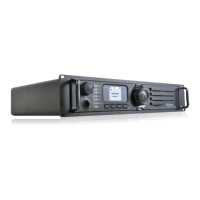
Turning the Repeater On/Off
Connect the repeater to a DC source to turn the repeater
on. At this time, the Power Indicator glows green and the
repeater shows the power-up screen.
To turn the repeater off, disconnect it from the DC source.
Adjusting the Volume
When the repeater operates in analog mode, rotate the
Volume Control knob clockwise to increase the volume
of speaker output audio, or counter-clockwise to decrease
the volume.
When the repeater operates in digital mode, the speaker
cannot output audio, and no volume adjustment through
the knob is available.
Adjusting Power Level
You may request your dealer to set the TX power to high
or low.
The LCD displays icon for high power, and icon
for low power. High power can optimize coverage of the
repeater, to communicate with farther terminals.
Backlight
In insufcient light conditions, activating the backlight can
illuminate the LCD and all the front panel keys, facilitating
user operation.
You dealer may set the backlight to operate in any of the
following modes:
Timed: any key or knob operation or receiving/
transmitting of signals can illuminate the backlight.
If none of the above operations is made within
the specified time period, the backlight will go out
automatically.
Enable: Since the repeater is powered on, the
backlight will remain illuminated all the time.
●
●


 To Next Page
 Loading...