v Follow the suggested actions in the order in which they are listed in the Action column until the problem
is solved.
v See Chapter 3, “Parts listing, Type 8863,” on page 93 to determine which components are customer
replaceable units (CRU) and which components are field replaceable units (FRU).
v If an action step is preceded by “(Trained service technician only)”, that step must be performed only by a
trained service technician.
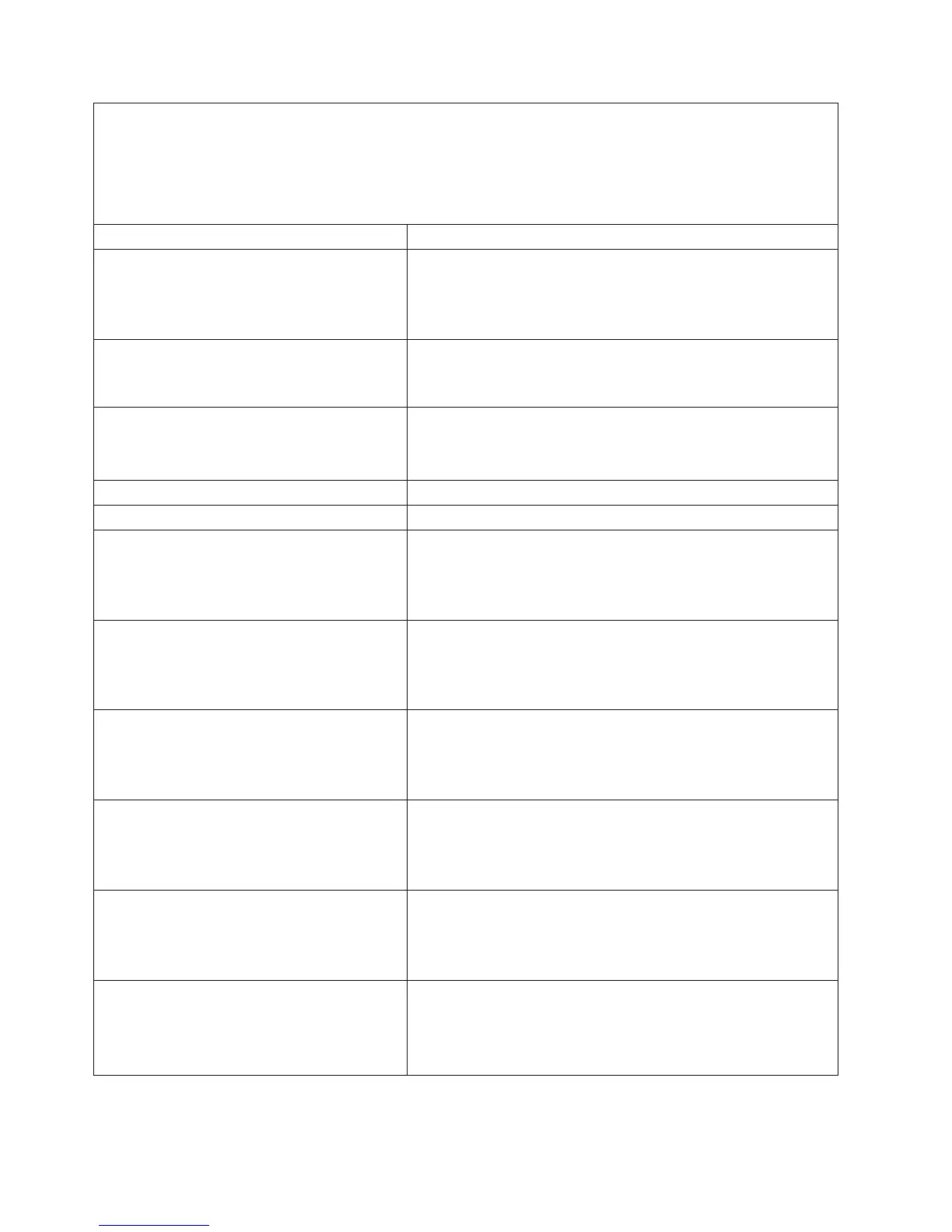
System-error log message Action
Fan X not detected (X of 1-8)
1. Make sure that nothing is blocking the fan or power supply.
2. Check the physical connection and make sure that the fan is
correctly seated.
3. Replace fan X.
Front Panel is not plugged in
1. Make sure that the operator information panel cables are
correctly connected (verify LED activity).
2. Replace the operator information panel.
Hard Drive X Fault
1. Run diagnostics.
2. Hard disk drive
3. SAS backplane
Hard drive X removal detected Reseat hard disk drive X and restart the server.
Hostname set to <value> by user <USERID> Information only
Hot plug card is not plugged in
1. Make sure that the PCI or PCI-X cables are correctly
connected.
2. Reseat the failing hot-plug cable or adapter.
3. Replace the failing hot-plug cable or adapter.
Hurricane SMI 1.2V Power Good Fault
1. Reseat the microprocessor tray.
2. Reseat the memory cards.
3. (Trained service technician only) Replace the microprocessor
tray.
Hurricane Vtt MR 1.5V Power Good Fault
1. Reseat the microprocessor tray.
2. Reseat the memory cards.
3. (Trained service technician only) Replace the microprocessor
tray.
Hvtt IB 1.8V Power Good Fault
1. Reseat the microprocessor tray.
2. Reseat the memory cards.
3. (Trained service technician only) Replace the microprocessor
tray.
Hvtr IB 2.5V Power Good Fault
1. Reseat the microprocessor tray.
2. Reseat the memory cards.
3. (Trained service technician only) Replace the microprocessor
tray.
I/O Card Power Good Fault
1. Reseat the Remote Supervisor Adapter II SlimLine, if present.
2. Reseat the I/O board.
3. Replace the I/O board.
4. (Trained service technician only) Replace the PCI-X board.
82 IBM xSeries 366 Type 8863: Problem Determination and Service Guide


 To Next Page
 Loading...