Home
IBM
Laptop
ThinkPad A30
Page 138
IBM ThinkPad A30 - Page 138
164 pages
Manual
Save Page as PDF
To Next Page
To Next Page
To Previous Page
To Previous Page
Loading...
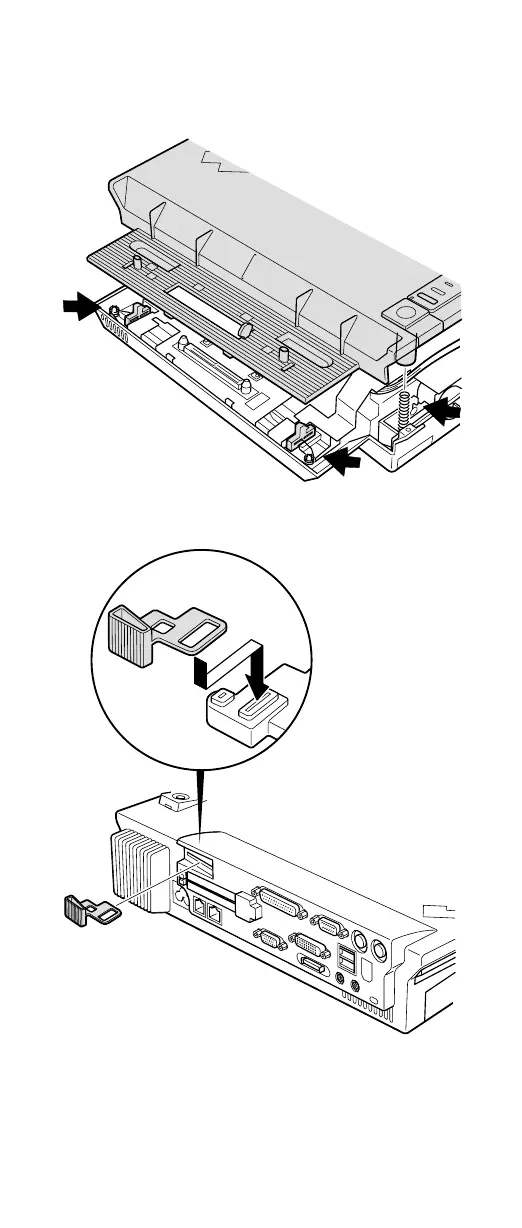
When
replacing
the
top
cover
,
do
the
following:
v
Make
sure
that
the
springs
placed
correctly
.
v
Make
sure
that
the
device
release
lever
is
seated
correctly
.
(continued)
Removing
and
replacing
a
FRU
132
ThinkPad
A30,
A30p
(MT
2652/2653/2654)
137
139
Table of Contents
Main Page
About this Manual
3
Table of Contents
5
Introduction
7
Important Service Information
7
Strategy for Replacing Frus
7
How to Use Error Messages
8
Diskette Compatibility Matrix
8
Safety Notices: Multilingual Translations
9
Safety Information
20
General Safety
20
Electrical Safety
21
Safety Inspection Guide
22
Handling Electrostatic Discharge-Sensitive Devices
23
Grounding Requirements
24
Laser Compliance Statement
24
General Descriptions
29
Read this First
29
What to Do First
29
Related Service Information
31
Service Web Site
31
Product Recovery Program
31
To Create a Recovery Repair Diskette
32
Passwords
33
Supervisor Password
34
Power Management
35
Screen Blank Mode
36
Standby Mode
36
Hibernation Mode
37
Checkout Guide
39
Testing the Computer
39
Detecting System Information with PC-Doctor
41
Power System Checkout
42
Checking Operational Charging
43
Checking the Battery Pack
43
Checking the Backup Battery
44
Thinkpad A30, A30P
45
Product Overview
47
Specifications
47
Status Indicators
49
FRU Tests
51
Fn Key Combinations
52
Symptom-To-FRU Index
54
Numeric Error Codes
54
Error Messages
57
Beep Symptoms
58
No Beep Symptoms
58
LCD-Related Symptoms
59
Intermittent Problems
60
Undetermined Problems
60
FRU Replacement Notices
61
Screw Notices
61
Retaining Serial Numbers
62
Restoring the Serial Number of the System Unit
62
Retaining the UUID
62
Removing and Replacing a FRU
64
1010 Battery Pack
65
1020 Mini PCI Adapter
66
1030 Communication Daughter Card (CDC)
69
Ethernet Daughter Card
70
Modem Daughter Card
72
Bluetooth Daughter Card
74
1040 Backup Battery
76
1050 DIMM
77
1060 Hard-Disk Drive
78
1070 Ultrabay Plus Device
80
1080 Ultrabay 2000 Device
81
1090 Keyboard
82
1100 Keyboard CRU Insulator
86
1110 Keyboard Bezel
87
1120 Hinge Cover
92
1130 Fan Assembly
93
1140 Cpu
95
1150 Ultrabay Plus Slot
97
1160 Ultrabay 2000 Slot
101
1170 Sub Card for PC Card Slot
104
1180 Security Chip
106
1190 LCD Assembly
107
1200 System Board
111
1210 Ultrabay LED Card
116
1220 Speaker Assembly
117
1230 Antenna for Bluetooth
119
2010 Front Bezel
121
Installation of Clear Plate
122
2020 Inverter Card
123
2030 LCD Panel
125
2040 Antenna Assembly
129
3010 Thinkpad Dock PCI Cover
133
3020 Thinkpad Dock Top Cover
135
Locations
140
Front View
140
Rear View
142
Bottom View
143
Parts List
144
A30 and A30P Series Model Matrix
144
Overall
145
AC Adapters
149
LCD Frus
150
14.1-In. XGA TFT
150
In. XGA TFT
151
In. SXGA+ TFT
152
In. SXGA+ IPS TFT
152
15.0-In. UXGA IPS TFT
152
Keyboard
153
Recovery Cds
154
For Windows 98
154
For Windows 2000
155
For Windows 2000/Windows NT
155
For Windows XP
156
Miscellaneous Parts
157
Optional Frus
159
Ultrabay Devices
159
Other Optional Frus
159
Common Parts List
160
Tools
160
Power Cords (System)
160
Power Cords (Docking Station)
161
Notices
162
Trademarks
162
Related product manuals
IBM THINKPAD THINKPAD A30
88 pages
IBM THINKPAD A20M
66 pages
IBM ThinkPad A21m
158 pages
IBM ThinkPad A22m 2628
140 pages
IBM ThinkPad R51
9 pages
IBM ThinkPad T21
182 pages
IBM THINKPAD T60
226 pages
IBM THINKPAD T22
176 pages
IBM ThinkPad T20
72 pages
IBM ThinkPad T43
17 pages
IBM ThinkPad 600X
199 pages
IBM ThinkPad 365X
308 pages










 To Next Page