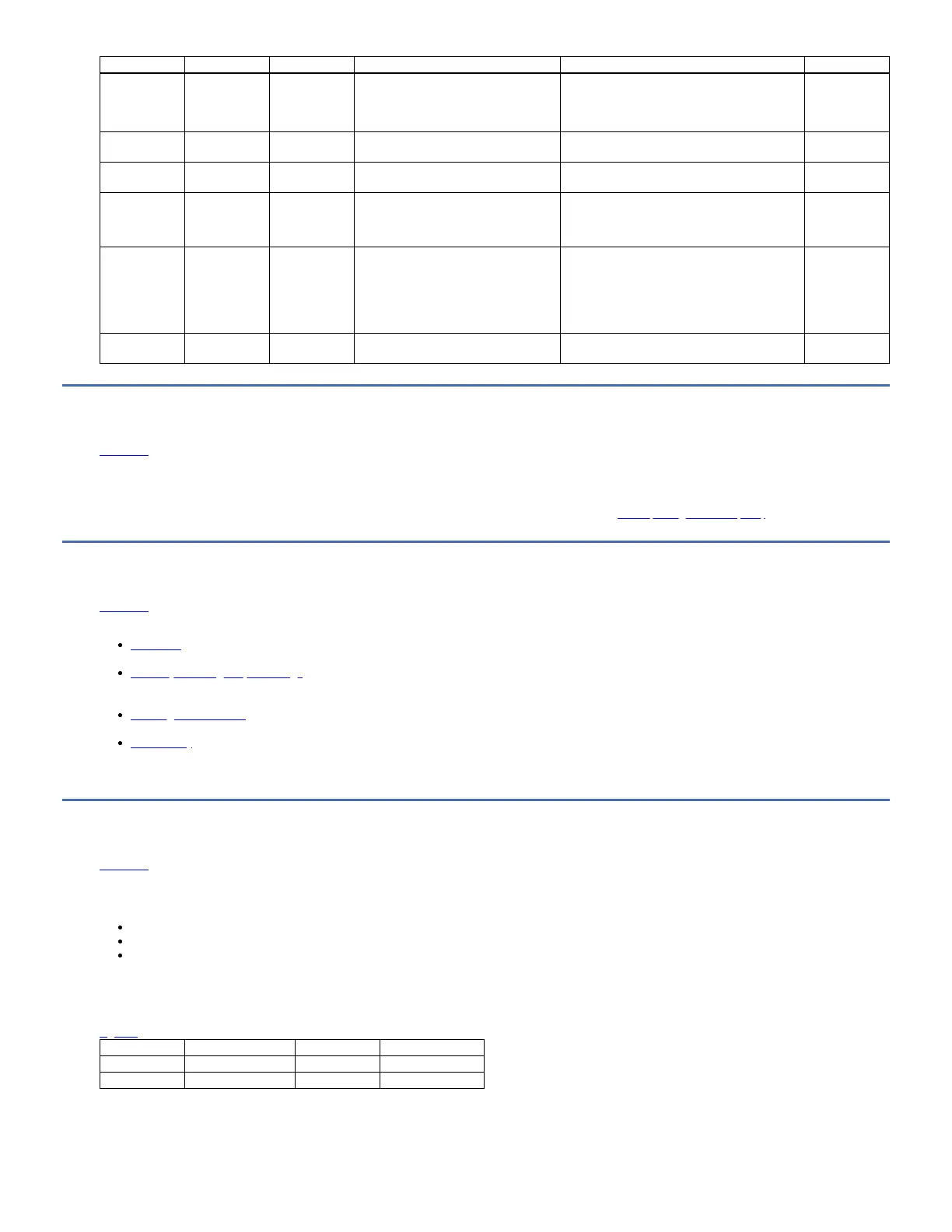
Flag Number Flag Name Hex Code Description Action Required Event
55 Load Failure 37h The operation failed because the media
cannot be loaded and threaded.
Remove the tape and try another. If the problem
persists, contact your IBM® service representative.
Ensure that tape drive firmware is at the latest
version.
Warning Event
56 Unrecoverable
unload failure
38h The operation failed because the media
cannot be unloaded.
Contact your IBM® service representative. Warning Event
58 3Ah A drive panic occurred. Send drive dumps to your IBM Service
Representative.
59 WORM Medium
– integrity check
failed
3Bh Set when the drive determines that the
data on tape is suspect from a WORM
point of view.
1. Copy the data to another WORM tape
cartridge.
2. Discard the faulty WORM tape.
Warning Event
60 WORM Medium
– Overwrite
attempted
3Ch Set when the drive rejects a write
operation because the rules for allowing
WORM writes are not met. Data can be
appended only to WORM media.
Overwrites to WORM media are not
allowed.
Write the data to a WORM tape cartridge or write
the data to a non-WORM tape cartridge.
Warning Event
61 Encryption
policy violation
3Dh The drive is configured to require
encryption, but encryption is not enabled.
Contact your IBM Service Representative.
Sense data
Edit online
When a drive encounters an error, it provides sense data as a response to the host.
Refer to the IBM LTO Ultrium Tape Drive SCSI Reference for tape drive sense data information.
In addition, you can use the IBM Tape Diagnostic Tool (ITDT) to further examine data and determine errors. See IBM Tape Diagnostic tool (ITDT).
Reference
Edit online
This section provides information about the Parts list, publications, and other reference documentation.
LTO media
LTO media is available in various types. Ensure you choose a media type that your drive supports.
Manually removing a tape cartridge
This Procedure is to be performed by IBM service personnel only. The purpose of this section is to assist you in determining the condition of the cartridge or the
magnetic tape and to direct you to the procedure you must follow to remove the cartridge.
Cleaning the drive head
Use an IBM Ultrium cleaning cartridge to clean the tape drive head.
Accessibility
Accessibility features help a user who has a physical disability, such as restricted mobility or limited vision, to use the HTML version of the customer documentation
successfully.
LTO media
Edit online
LTO media is available in various types. Ensure you choose a media type that your drive supports.
IBM® Ultrium media is available in the following types:
Data cartridge
WORM (Write Once, Read Many) cartridge
Cleaning cartridge
To ensure that your IBM Ultrium tape drive conforms to IBM specifications for reliability, use only IBM LTO Ultrium tape cartridges. You can use other LTO-certified data
cartridges, but they might not meet the standards of reliability that are established by IBM. The IBM LTO Ultrium data cartridge cannot be interchanged with the media
used in other IBM non-LTO Ultrium tape products.
Figure 1 shows the IBM LTO Ultrium data cartridge and its components.
1 LTO cartridge memory 4 Write-protect Switch
2 Cartridge door 5 Label area
3 Leader Pin 6 Insertion guide
Figure 1. The IBM LTO Ultrium data cartridge



 To Next Page