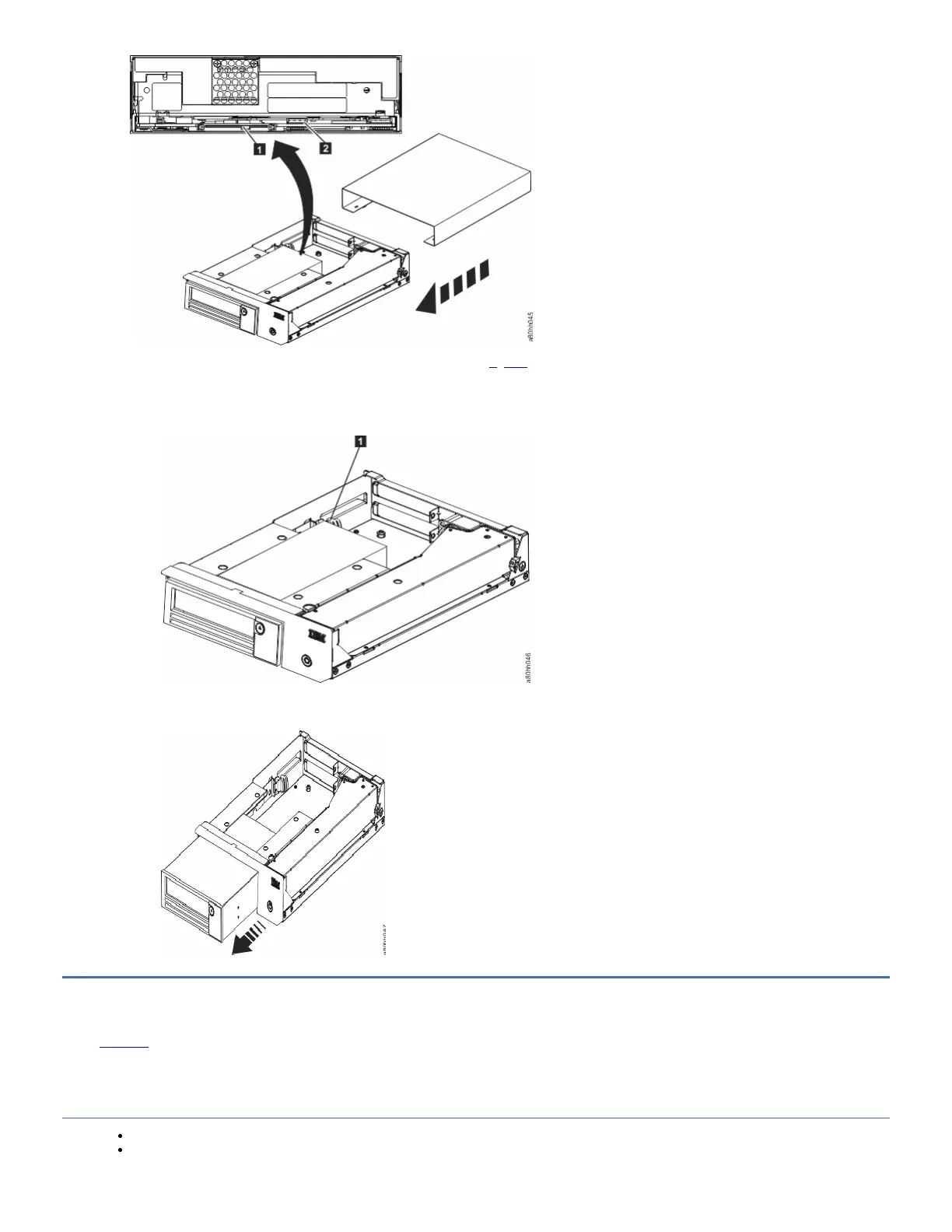
1. Unplug the SAS interface cable and the ethernet interface cable (1 and 2 in Figure 1) from the drive. Disconnecting the internal SAS interface cable disconnects
both the SAS interface and electrical power from the drive.
Attention: DO NOT UNPLUG THE INTERNAL POWER CABLE.
2. Press the latch assembly to release the drive.
Figure 2. Releasing the drive from the chassis
3. Slide the internal drive forward towards the front of the chassis to clear the front bezel.
Figure 3. Sliding the drive forward
Manually removing a tape cartridge
Edit online
This Procedure is to be performed by IBM® service personnel only. The purpose of this section is to assist you in determining the condition of the cartridge or the
magnetic tape and to direct you to the procedure you must follow to remove the cartridge.
Attention
The best solution for recovering data on a damaged cartridge is to send it to IBM for professional data recovery.
Before this procedure is used, you must exhaust all other means of removing the tape cartridge from the drive. Use this procedure only if you cannot remove the
tape cartridge with any other means.



 To Next Page