The SCD dot turns off when you obtain a dump (by using ITDT or a SCSI command) or update the drive firmware.
Note: If the drive memory dump is stored in RAM memory (SCD dot on solid), the memory dump is lost when you turn OFF the power or reset the drive.
Status lights
Edit online
The status lights provide information about the status of the tape drive.
The status lights (in Front panels of the drives) are light-emitting diodes (LEDs) that provide information about the state of the drive.
The Ready status light is green and the Fault status light is amber, and (when lit) solid or flashing. The Encryption status light is white.
Mode SCD Ready LED (green) Fault LED (amber)
Operational Blank On Off
Activity (tape movement) in Operational Mode Blank Flashing Off
Maintenance Solid character Flashing On
Executing Maintenance Selection Flashing character Off On
Error Condition Solid character Off Flashing
Power on / Reset Initialization Random segments Off On
Note: The white Encryption status light is ON when the tape drive has a cartridge that is loaded and all data on this cartridge is encrypted (excluding the label). Applicable
to LTO Ultrium 7 and later cartridges only.
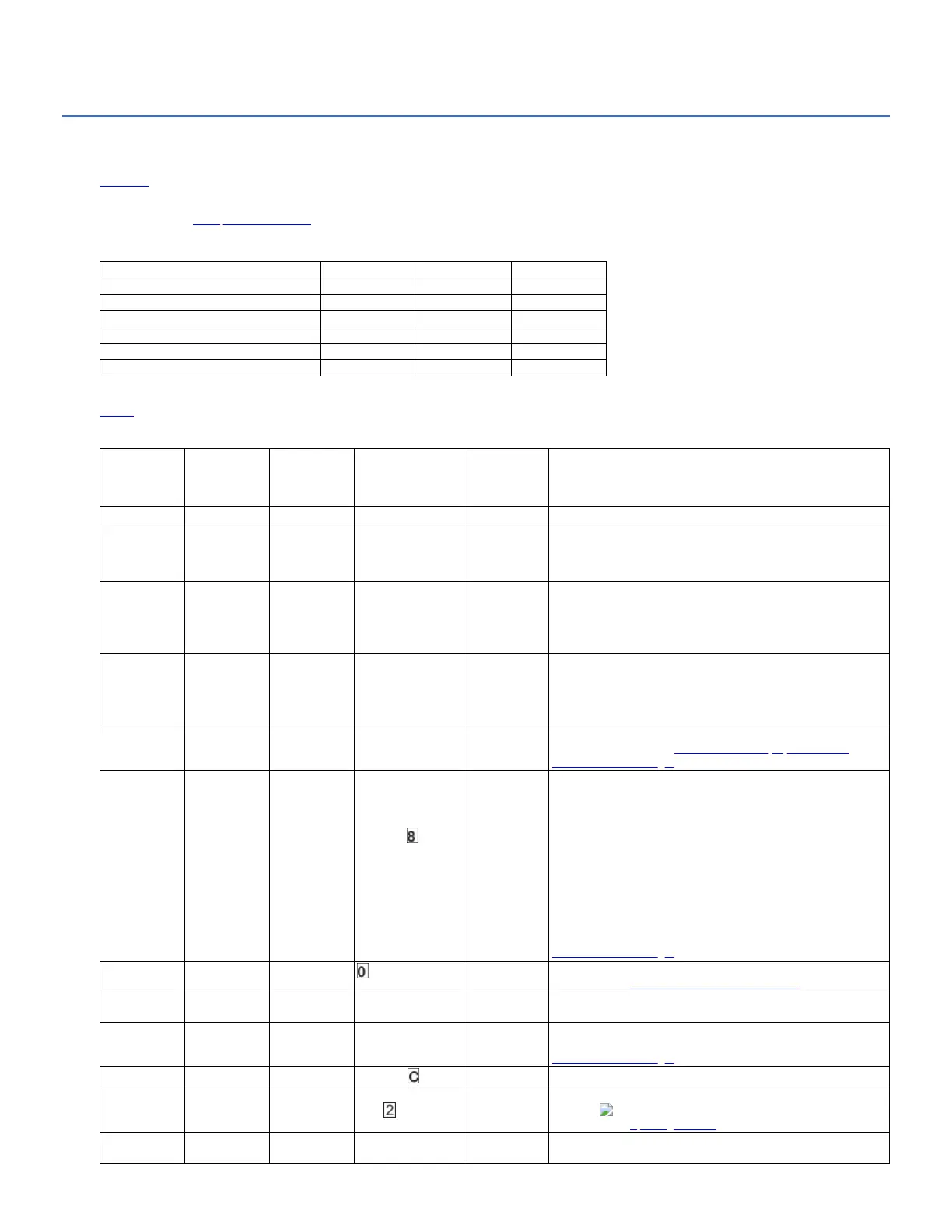
Table 1 lists the conditions of the status lights and Single-character Display (SCD) and provides an explanation of what each condition means.
Table 1. Meaning of status lights and single-character display (SCD)
If the green
Ready Status
Light is...
And the amber
Fault Status
Light is...
And the
Encryption
Status Light
is...
And the SCD is...
And the SCD
dot is...
Meaning
Off Off Off Off Off The drive has no power or is powered off.
On Off On/Off Off Off The drive is powered on and in an idle state.
Note: If a cartridge is loaded, the white Encryption status light is on
when all the data on the cartridge is encrypted (excluding the label).
LTO Ultrium 7 and later cartridges only.
Flashing (once
per second)
Off On/Off Off Off The drive is reading from the tape, writing to the tape, rewinding the
tape, locating data on the tape, loading the tape, or unloading the tape.
Note: The white Encryption status light is on when all the data on the
cartridge is encrypted (excluding the label). LTO Ultrium 7 and later
cartridges only.
Flashing (once
per second)
Off Off Off Off If the drive contains a cartridge during the power-on cycle, the drive
completes POST and slowly rewinds the tape. The process might take
up to 13 minutes. The light stops flashing and becomes solid when the
drive completes the recovery and is ready for a read or write operation.
To eject the cartridge, press Unload.
Off On Off Displaying an error
code or Maintenance
Mode Function
On/Off The drive is displaying error codes from the error code log on the SCD.
For more information, see Function code 9: Display error code log and
Error codes and messages.
On/Off On/Off On/Off Displaying random
segments/
Blank/displaying
random segments/
displaying /Blank
On/Off During power-on, or a drive reset, the drive front panel displays drive
progress as follows:
1. SCD displays random segments (no Lights ON).
2. SCD displays random segments (Ready light ON).
3. SCD displays random segments (Fault light ON).
4. SCD displays [8] (Ready, Fault, Encryption, and SCD dot lights
ON).
5. SCD goes blank (Ready light ON) after a successful power-on or
reset.
If an error is detected during the power-on or reset, the tape drive posts
an error code to the SCD. To determine the error, locate the code in
Error codes and messages.
Off On Off On/Off The drive is entering or exiting from Maintenance mode. For more
information, see Function code 0: Maintenance mode.
Off On Off Flashing selected
function
On/Off The drive is running the selected function while in Maintenance mode.
Off Flashing (once
per second)
Off Displaying error code Off An error occurred and the drive or media might require service, or it
might require cleaning. Make a note of the code on the SCD, then see
Error codes and messages to determine the action that is required.
Off Flashing Off
Displaying
Off The drive needs cleaning.
Off Flashing Off Displaying Function
Code or Flashing
Off
The drive is updating firmware.
1
With an FMR cartridge the SCD
displays a 2. The SCD is off with the host interface. For more
information, see Updating firmware.
Off Flashing (twice
per second)
Off Off Off The drive detected an error and is completing a firmware recovery. It
resets automatically.



 To Next Page