Support for WORM (Write Once Read Many) on WORM cartridge types
Read and write compatibility with Ultrium 8 and Ultrium 9 media
1 GB read-and-write cache
Support for encryption on Ultrium 8 and Ultrium 9 tape cartridges
Single Character Display (SCD) operator panel
Ready, Fault, and Encryption status lights
Maintenance Mode functions
1 Gbps Ethernet port for drive status and service
IBM Spectrum® Archive (LTFS) capable
Front panels of the drives
Edit online
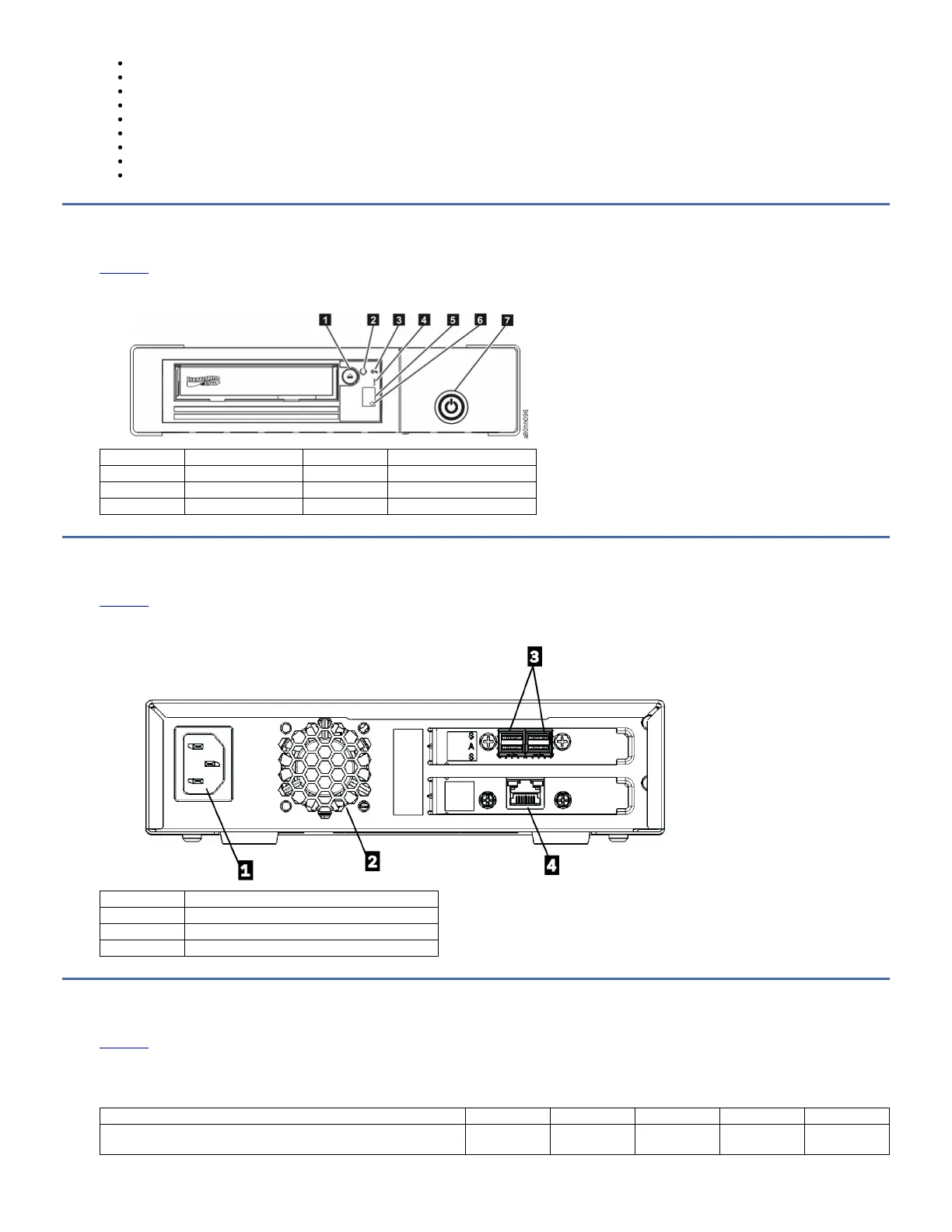
The front panel of the half-height tape drive houses the power button, unload button, and some indicator lights.
Figure 1. Half-height front panel element descriptions
1 Cartridge unload button 5 Single-character display (SCD)
2 Ready light (Green) 6 SCD dot
3 Encryption light (white) 7 Drive power button
4 Fault light (amber)
Rear panel of the drive
Edit online
The rear panel of the drive - element description
Figure 1. Drive rear panel with dual SAS ports
1 Power receptacle
2 Fan vent
3 SAS connectors
4 Ethernet connector (for drive status and service only)
Drive performance
Edit online
If you run applications that are highly dependent on tape-processing speed, take advantage of the significant performance improvements that are provided by this tape
drive.
Table 1. Drive information and performance specification
Generation LTO 9 LTO 8 LTO 7 LTO 6 LTO 5
Inquiry ULT3580-HH9
ULTRIUM-HH9
ULT3580-HH8
ULTRIUM-HH8
ULT3580-HH7
ULTRIUM-HH7
ULT3580-HH6
ULTRIUM-HH6
ULT3580-HH5
ULTRIUM-HH5



 To Next Page