12
Instruction Manual IMBus
2. Electrical connection :
- Connect the IMB-232 to IMBus as described under 2.2.
- Connect the free end of the connection cable to a COM-Port of the PC.
- Switch the IMB power supply module on.
3. Installation / Configuration :
- For using the IMB-232 no driver installation on the PC is necessary.
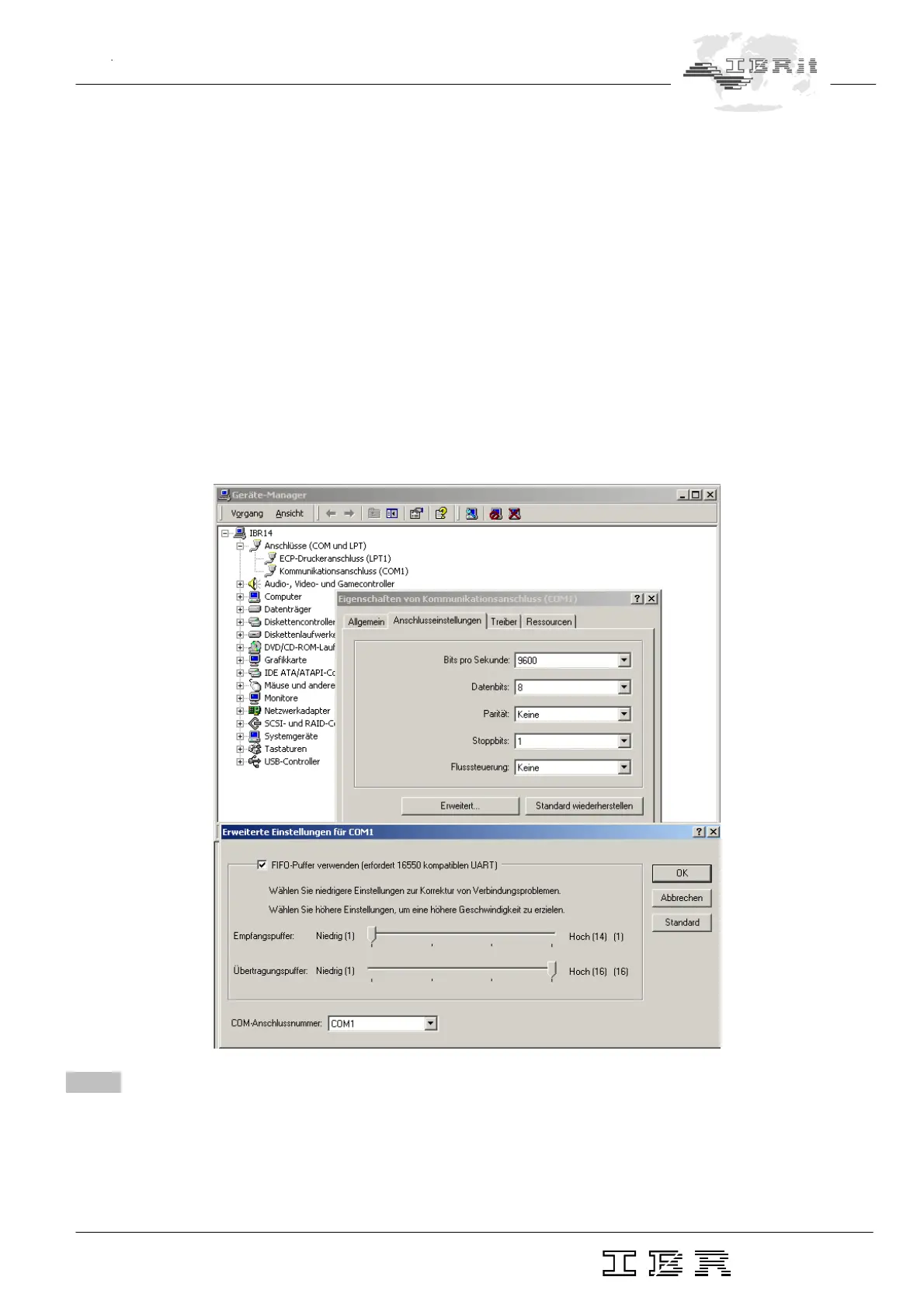
- For very fast dynamic measurements with IMBus the receiver buffer of the COM-Port FIFO must be
set to 1, otherwise the RS232 interface has a latency time of 400 µsec, which reduces the measuring
data rate noticeable :
Æ Call „Start / Settings / Control Panel / System“
Æ Select register card „Hardware“ and press button „Device-Manager“
Æ Select the COM-Port under Ports (COM and LPT )
Æ Press Button Properties
Æ Select Register card „Port settings“ and press Button „Advanced“
Æ Set receiver buffer to 1
4.3 Start-up of IMB-usb connection cables
1. Advantages of USB-interface :
- Standard interface on all PCs
- Power supply of external devices over USB


 To Next Page