11
Instruction Manual IMBus
3. Test of IMBus modules
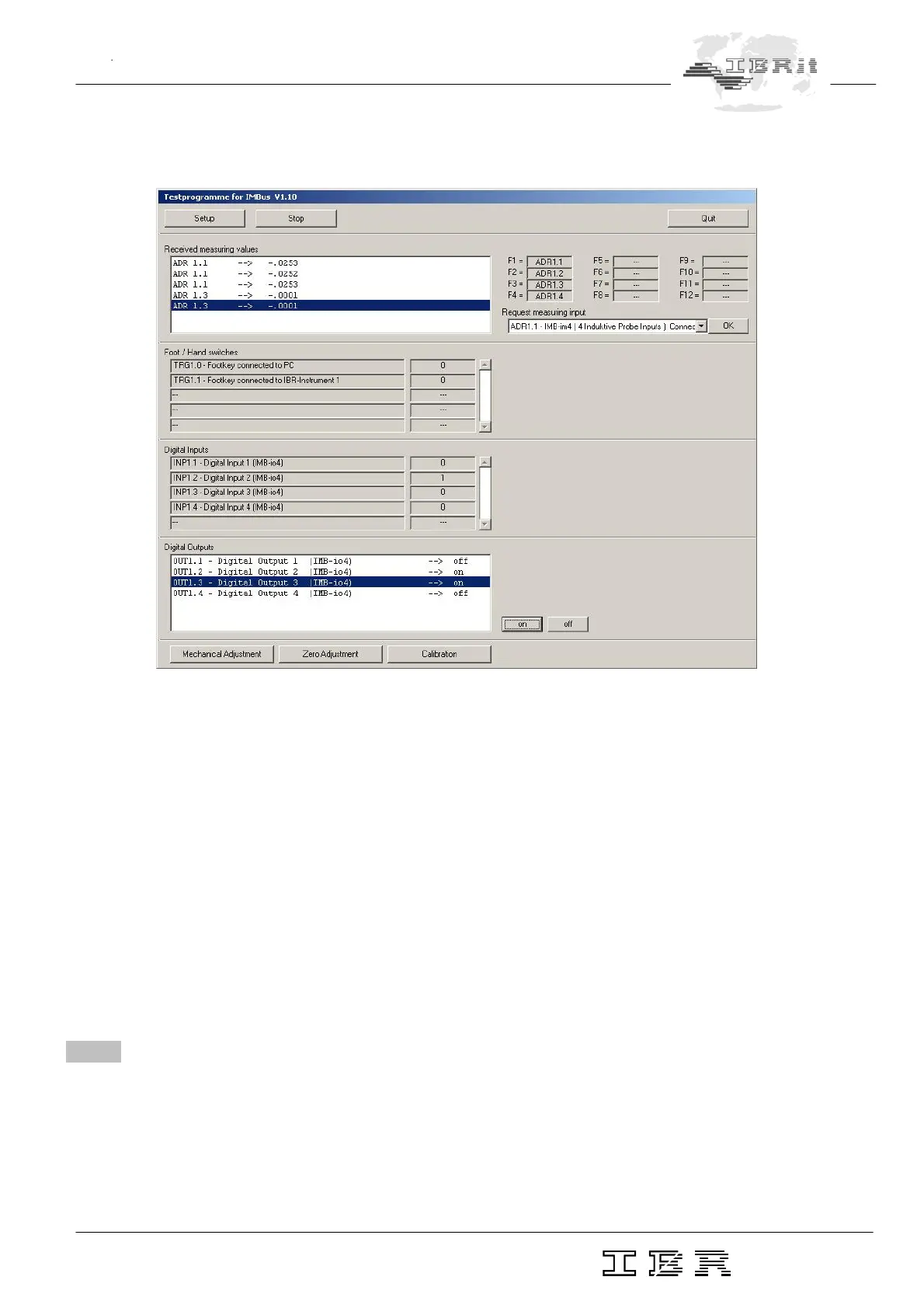
After pressing the Start button the test window appears :
Received measurement values :
- Display of transferred measuring value in the list ( which are i.e. transferred by data key of gauge )
- Display of the measuring values requested from PC
( i.e. by the function keys F1..12 or by OK-Button )
- In the upper right corner the assignment of the function keys to the inputs is displayed
Foot / Hand switches :
- Display of the state ( 0=not pressed / 1=pressed ) of the hand / foot switches
( see 2.4 )
Digital Inputs :
- Display of the state ( 0=not set / 1=set ) of the digit inputs
Digital Outputs :
- By the on / off Buttons the digital outputs can be set
Mechanical Adjustment / Zeroadjustment / Calibration :
- are described in chapter 5.1.3 ... 5.1.5.
4.2 Start-up of IMB-232 connection cables
1. Advantages of RS232-interface ( COM-Port ) :
- Because the RS232 is the only interrupt controlled interface, it is the most suitable interface for Real-
time applications
- There are no latency times on data transmission and so with the RS232 the highest measuring data
rate is reached in combination with IMBus


 To Next Page