DX8
Dual Balance Charger/Discharger/DC Power
The charger first charges with constant current (CC) according to the user setting, then turns to constant voltage (CV)
when the charging voltage reaches the peak point. In the CV phase the current gradually falls, and the charger will
terminate charging when the current falls below the percentage of the configured charge current.
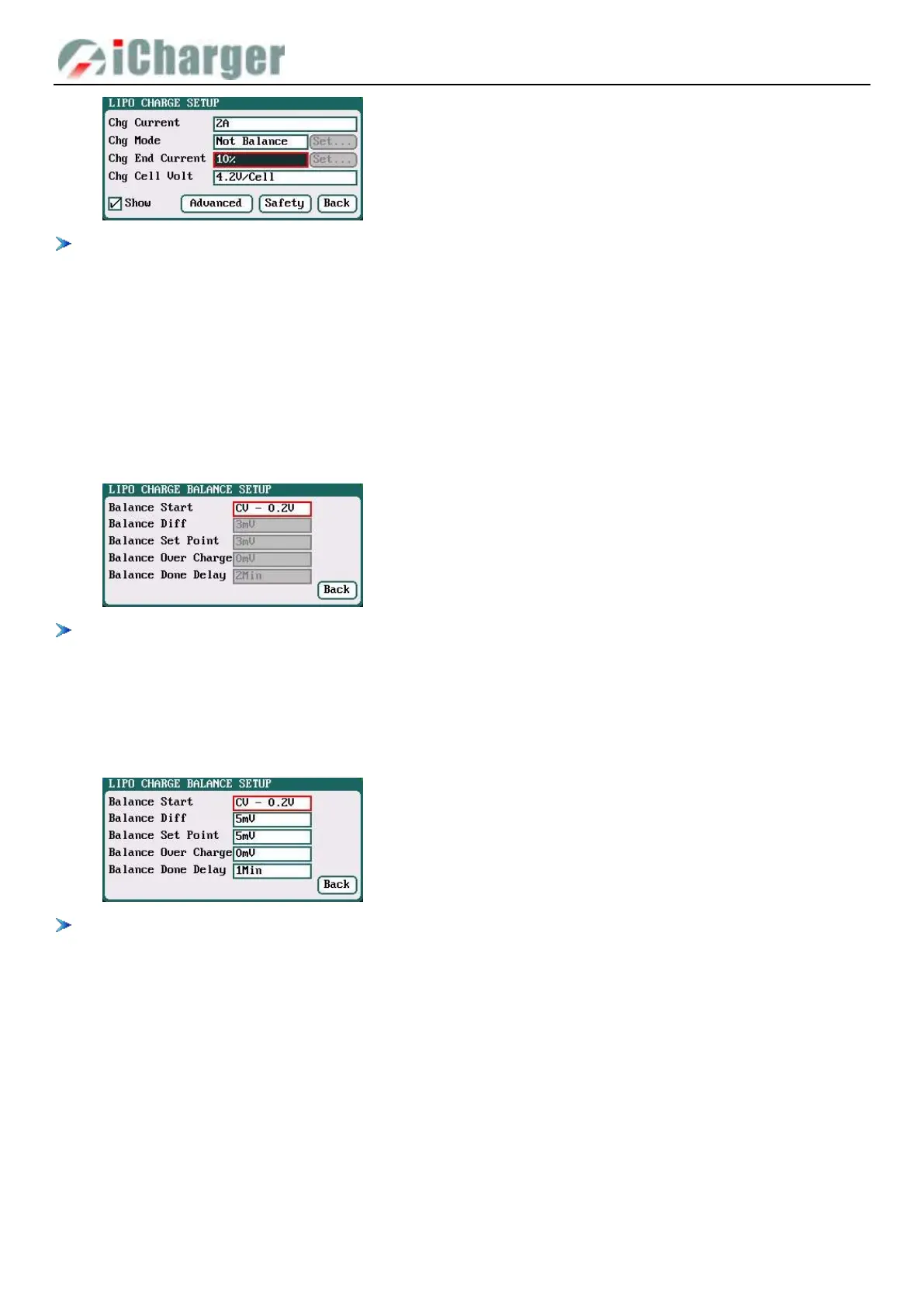
For example: the default value of Chg Current is 2A, and the default value of Chg End Current is 10%
Chg End Current=2A*10%=0.2A
Therefore it stops charging when the charging current reduces to 0.2A.
LiPo/LiIo/LiFe/LiHV/LTO/NiZn/User Balance Charge Setup
Switch to Slow Balance, Normal Balance, Fast Balance or User Balance on Chg Mode as the balance charge mode, and
" Set …" button will be available, click it to enter Balance mode setup interface.
On Balance mode, the charger will monitor the voltage of individual cells to control it within the Chg Cell Volt and
equalize the voltage in all cells, to avoid some cell voltage over-charged or not full. When selecting Balance mode, the
balance port of charger or balance board must be connected with battery except for connecting 1S battery.
When switch to User Balance mode on Chg Mode; the Balance Diff, Balance Set Point, Balance Over Charge and
Balance Done Delay are available, after setting, click "Back" to return to the previous interface.
If Balance Diff value is lower, the voltage difference between individual cells will be lower and the balancing will take
more time before the program ends.
If Balance Set Point value is lower, the battery will be closer to the setting cut-off voltage and the time taken will be
longer before the program ends.
Balance Over Charge, the maximum overcharge compensation voltage acts as accelerated charge, and the larger the
value, the more obvious the accelerated charge.
For example: Charge Lipo with Vstd, set Balance Over charge to Vboc, the cell’s internal Resistance detected is
Ri, when the charge current is Ia, the actual CV value of cells is Va
IF Ri*Ia > Vboc THEN
Va = Vstd + Vboc
ELSE
Va = Vstd+Ri*Ia
Please set this parameter after understanding fully, or keep the default value at 0.
Balance Start : CV,CV-0.1V
—
1V,Alway
Default: CV-0.2
If the balance charge voltage is 4.2V, Balance Start
set to CV-0.2V; therefore the charger will start to
balance the battery cells when the voltage reaches to
4.2V-0.2V=4V
Balance Diff: 1mV-10mV; default:5mV
Balance Set Point: 1mV-50mV; default:5mV
Balance Over Charge: 0mV-50mV; default:0mV
Balance Done Delay: 0Min-20Min; default:1Min



 To Next Page