DX8
Dual Balance Charger/Discharger/DC Power
Charge/Discharge Setup & Use
DX8 can charge/discharge LiVH, LiPo, Lilo, LiFe, LTO, NiZn, NiMH, NiCd, Pb batteries, this manual will explain and
introduce in detail the charger’s features, setup and use.
Power Supply Setup
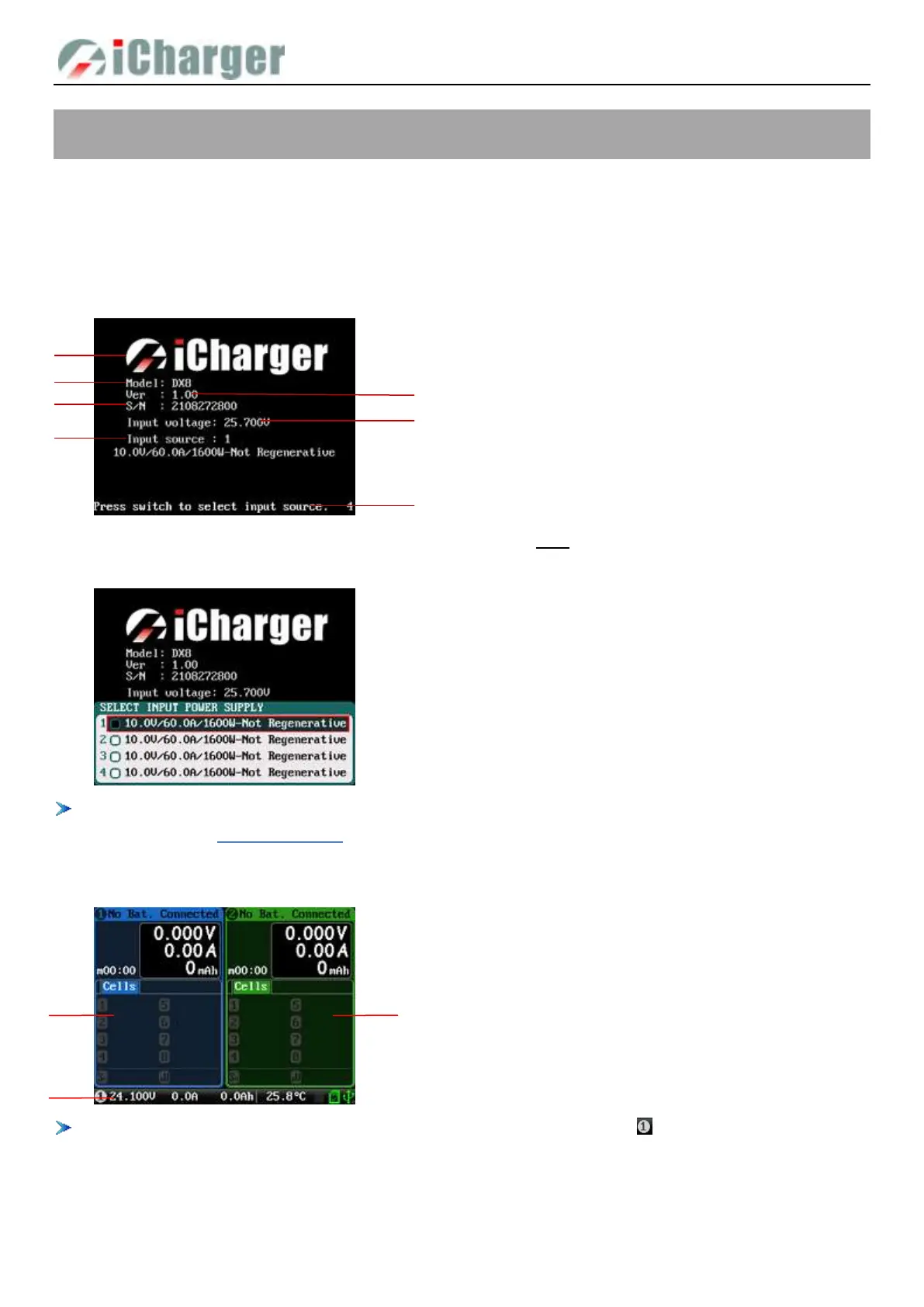
The charger boots automatically when the power is turned on and the initial interface will display LOGO, charger relevant
information, power source and message etc.
System will delay 5 seconds after booting, during this period, long press <> button to change the input source type, while
pressing any other buttons to enter the initial interface.
There are different parameter setting of these four types of power supply, the user can set in SYSTEM MENU
→
Input
Limit see details on “Input Limit Setup”.
After selecting the input power supply, confirm and enter the initial interface.
When the selected input power supply does not support recovery discharge, the icon " " in the lower left corner is gray;
It is displayed in green when recovery discharge is supported.
1. Logo 2. Model
3. Firmware version 4. Serial number
5. Input power voltage 6. Input power source
7. Hint message
1. CH-1Channel Information Display
2. CH-2Channel Information Display
3. Status Display



 To Next Page