22
8
9
10
15
18
13
11
16
14
12
17
1
7
4
2
5
3
6
9
DSC OPERATION
■ DSC address ID
D Entering an Individual or Group ID
You can enter a total of 75 Individual IDs and 25 Group IDs, and assign names to them of
up to 10 characters.
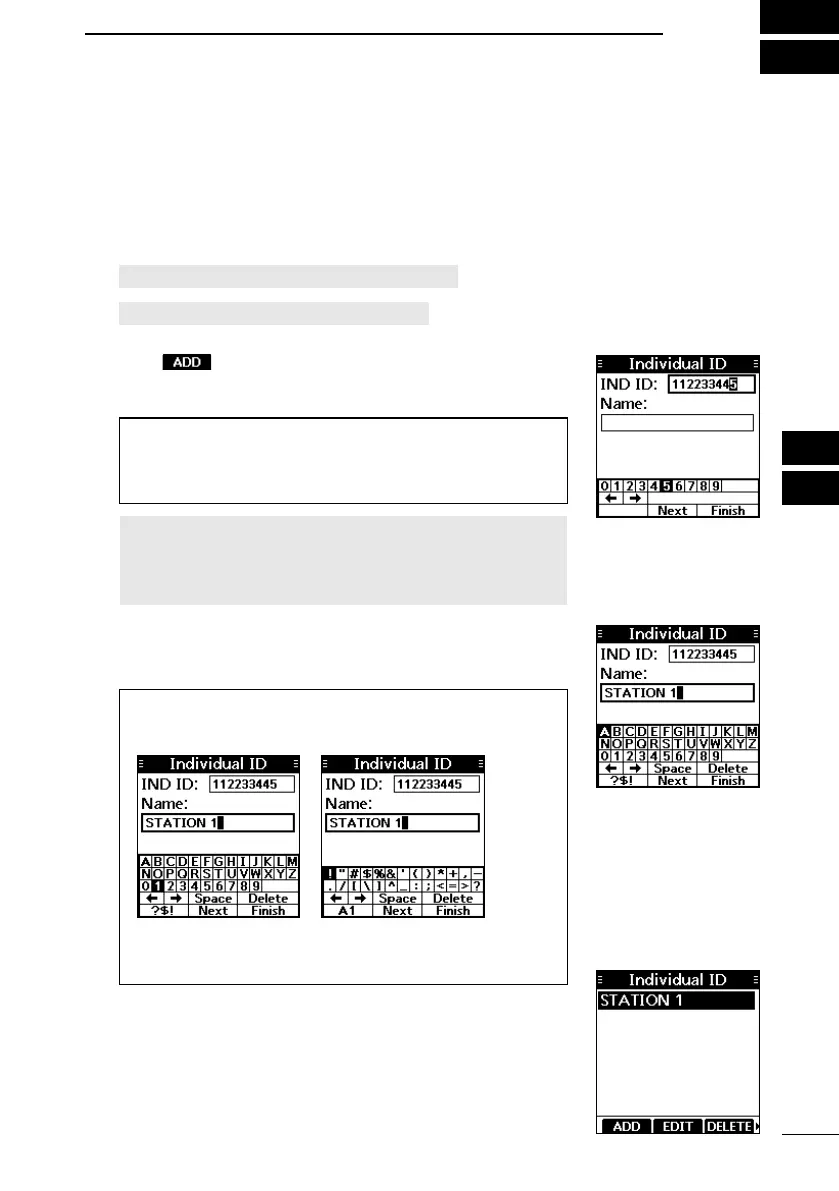
1. Open the “Individual ID” or “Group ID” screen.
[MENU] > Settings > DSC > Individual ID
[MENU] > Settings > DSC > Group ID
• “No ID” is displayed if no ID is entered.
2. Push .
• The ID entry screen is displayed.
3. Enter an Individual or Group ID.
TIP:
• Select a number using [◄]/[►].
• Push [ENT] to set the selected number.
• Select “←” or “→” on the screen to move the cursor.
NOTE:
• For a Group ID, the rst digit is xed as “0.”
• For any coast station ID, the rst two digits are xed as
“0.”
4. Select “Next,” and then push [ENT] to start entering the
name.
5. Enter the ID’ s name.
TIP:
• Select [? $ !] to enter symbols, and select [A1] to enter
numbers and letters.
• Select characters or space using [▲]/[▼]/[◄]/[►].
• Push [ENT] to enter the selected character.
• Select “←” or “→” on the screen to move the cursor.
6. After entering, select “Finish,” and then push [ENT], and
return to the previous screen.
• The entered name is displayed.



 To Next Page