5
3
SELECTING A CHANNEL/FREQUENCY
■ Memory mode/VFO mode
The transceiver has 2 operating modes: memory mode
and VFO mode. Memory mode is used to select pre-
programmed marine channels in one of the 3 channel
groups; VFO mode is used to select frequencies
around preprogrammed channels.
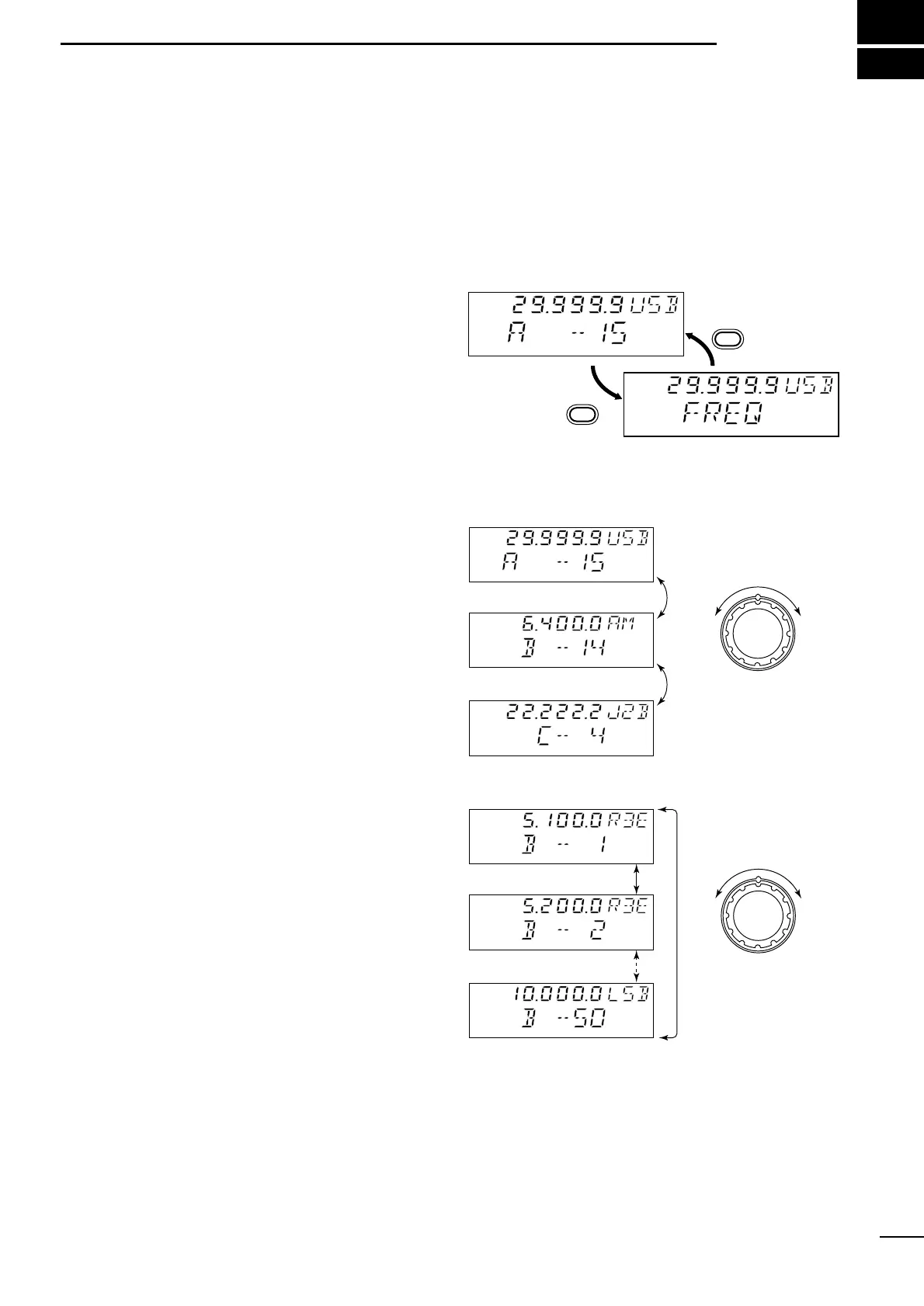
Push [CH/FREQ] to toggle between memory and VFO
modes.
•“FREQ” appears when in VFO mode.
• In VFO mode only simplex operation is possible.
■ Selecting a channel
The transceiver has 150 channels divided into 3
groups of 50 (max.) channels. However, the number of
channels in each group can be restricted in set mode
(pgs. 13, 14) depending on your needs.
☞ NOTE: When channel 0 and/or 2182 kHz is se-
lected with the [2182KHz] switch, channel selection
is NOT possible. In such cases, push [2182KHz] in
advance.
➀ Push [CH/FREQ] to select memory mode, if neces-
sary.
➁ Rotate the [GROUP] selector to select the desired
channel group; then rotate the [CHANNEL] selector
to select the desired channel.


 To Next Page