19
4.3 CUSTOMIZE THE SETTINGS
4.3.1 Prerequisite
The I-SAFE communicates with your PC through a USB stick or a Bluetooth® link (option). Before
beginning the setting of your speed display, you’ll have to install the Icoms Software and, if needed,
the Bluetooth driver.
4.3.2 Installing the Icoms Software
See further in this document, APPENDIX 2: IcomSoft I-SAFE SOFTWARE INSTALLATION, p. 50
4.3.3 Uploading the new settings
4.3.3.1 USB
The I-SAFE is delivered with an « Icoms » USB stick. You’ll find on it:
- The user’s guide
- The default parameters files
- The IcomSoft I-SAFE software
The default parameters files are:
o PARAMS.TXT
o PICTOS1.TXT
o PICTOS2.TXT
o TEXTOS1.TXT
o TEXTOS2.TXT
These files are modified when you customize the display settings. We recommend you save the files
on your PC, in a dedicated folder, in order to easily retrieve them later if necessary.
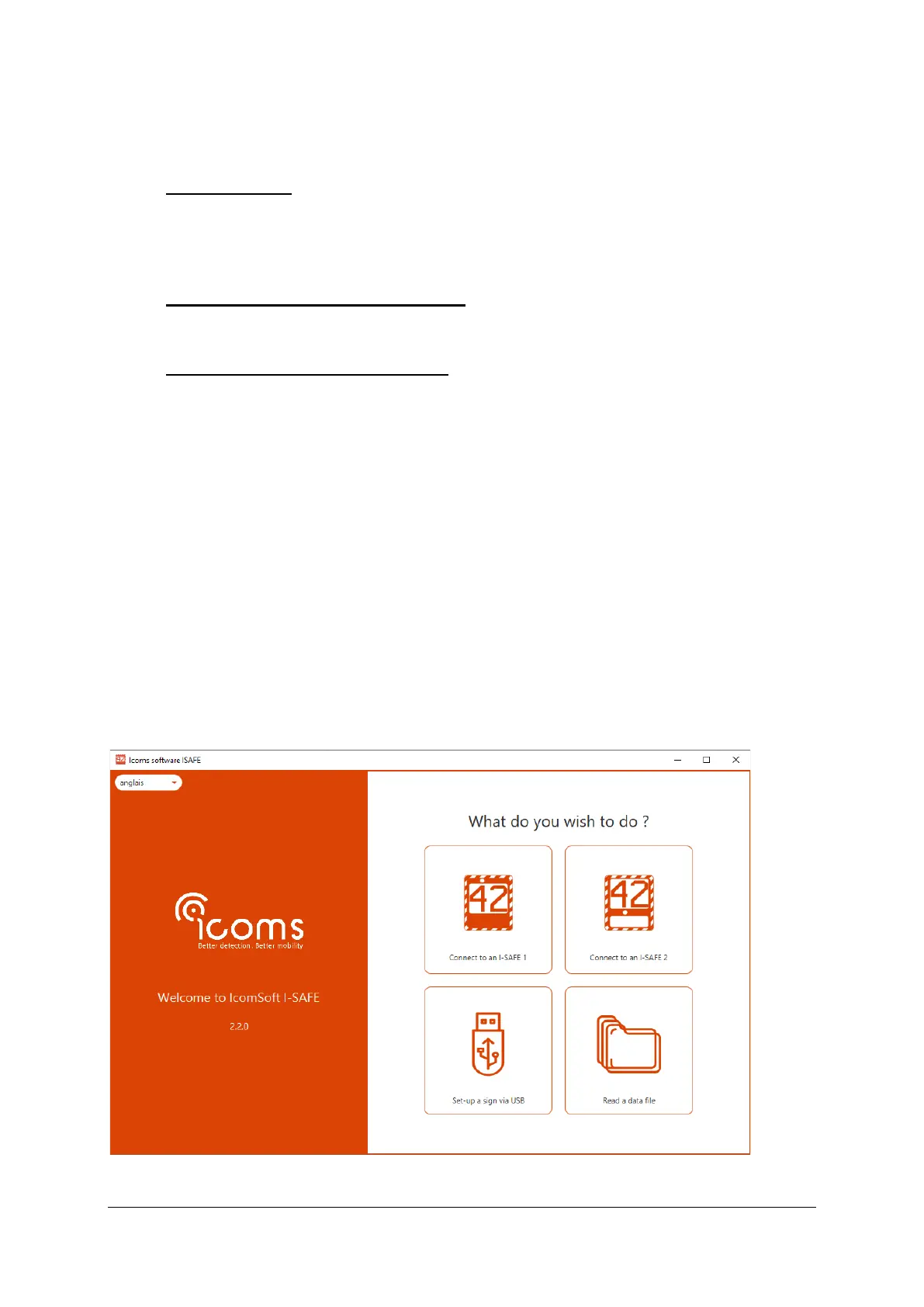
To customize the I-SAFE display settings, create a parameters file with the IcomSoft I-SAFE:
Screenshot 1: assistant, step 1 - connection choice


 To Next Page