HorizontalRightTrapConfiguration(CONTINUED)
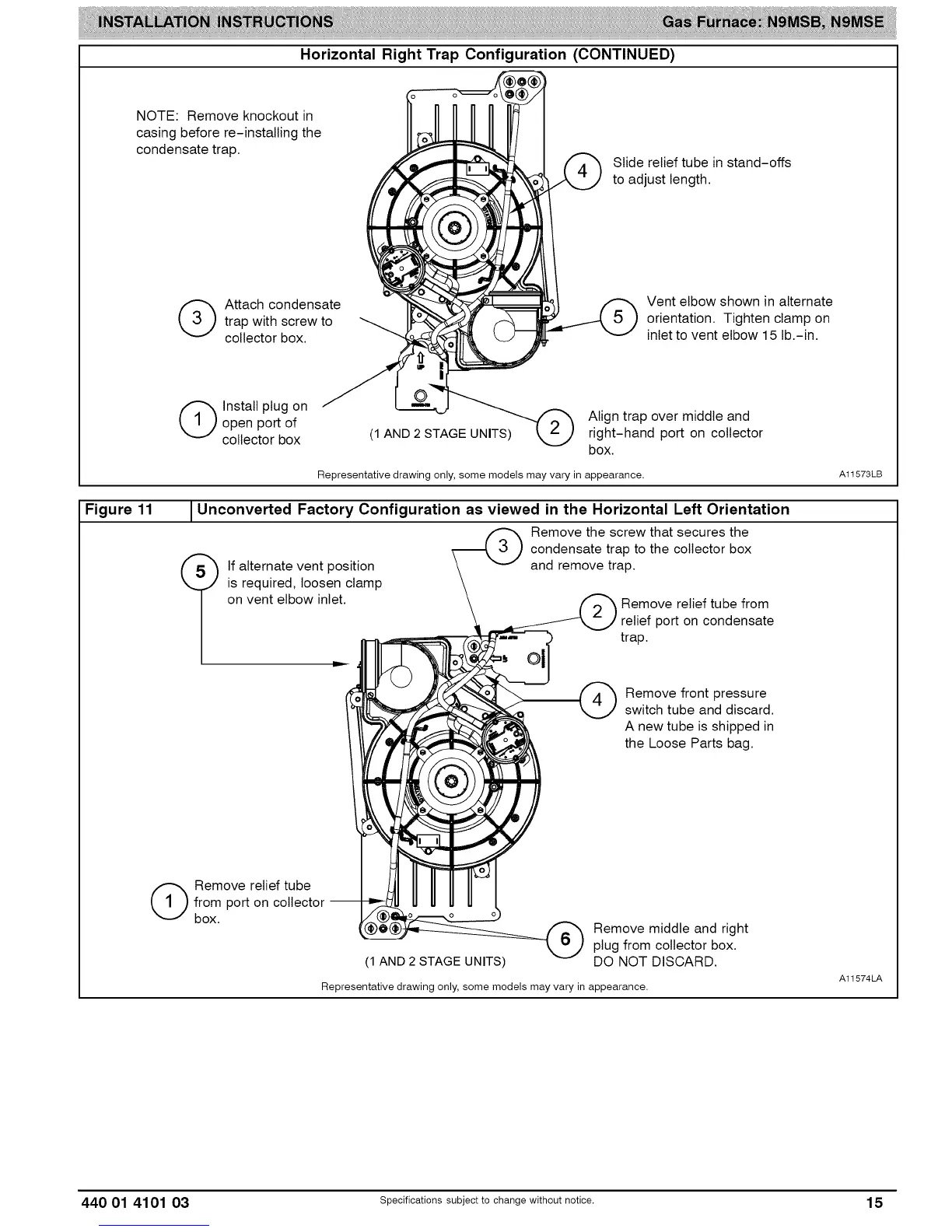
NOTE: Remove knockout in
casing before re-installing the
condensate trap.
Slide relief tube in stand-offs
to adjust length.
(_ ttach condensate
trap with screw to
collector box.
Vent elbow shown in alternate
orientation. Tighten clamp on
inlet to vent elbow 15 lb.-in.
Figure 11
(_ Install plug on
open port of Align trap over middle and
collector box (1 AND 2 STAGE UNITS) right-hand port on collector
box.
Representative drawing only, some models may vary in appearance.
Unconverted Factory Configuration as viewed in the Horizontal Left Orientation
Remove the screw that secures the
condensate trap to the collector box
and remove trap.
If alternate vent position
is required, loosen clamp
on vent elbow inlet.
Remove relief tube from
relief port on condensate
trap.
Remove front pressure
switch tube and discard.
A new tube is shipped in
the Loose Parts bag.
A11573LB
(_ emove relief tube
from port on collector --
box.
(1 AND 2 STAGE UNITS)
Remove middle and right
plug from collector box.
DO NOT DISCARD.
Representative drawing only, some models may vary in appearance.
A11574LA
440 01 4101 03 specificationssubjectto change without notice. 15



 To Next Page