MiniPad – rPad User Guide
19
© 2015-2017 – Identix Inc. All Rights Reserved.
Modifying configuration settings in RAW mode
Once the device is running in RAW mode of operation you can change the settings on the
configuration file in two different ways:
1) By editing the configuration file “Identix-Pad.cfg” and changing the desired settings. While
running in RAW mode, the new settings on the configuration file will only take effect when
the computer is rebooted.
Warning! Use only Windows Notepad to edit the configuration file.
2) The other way of changing the operating parameters without requiring a reboot is via user
commands on the terminal emulation program. In this case, simply open the serial port
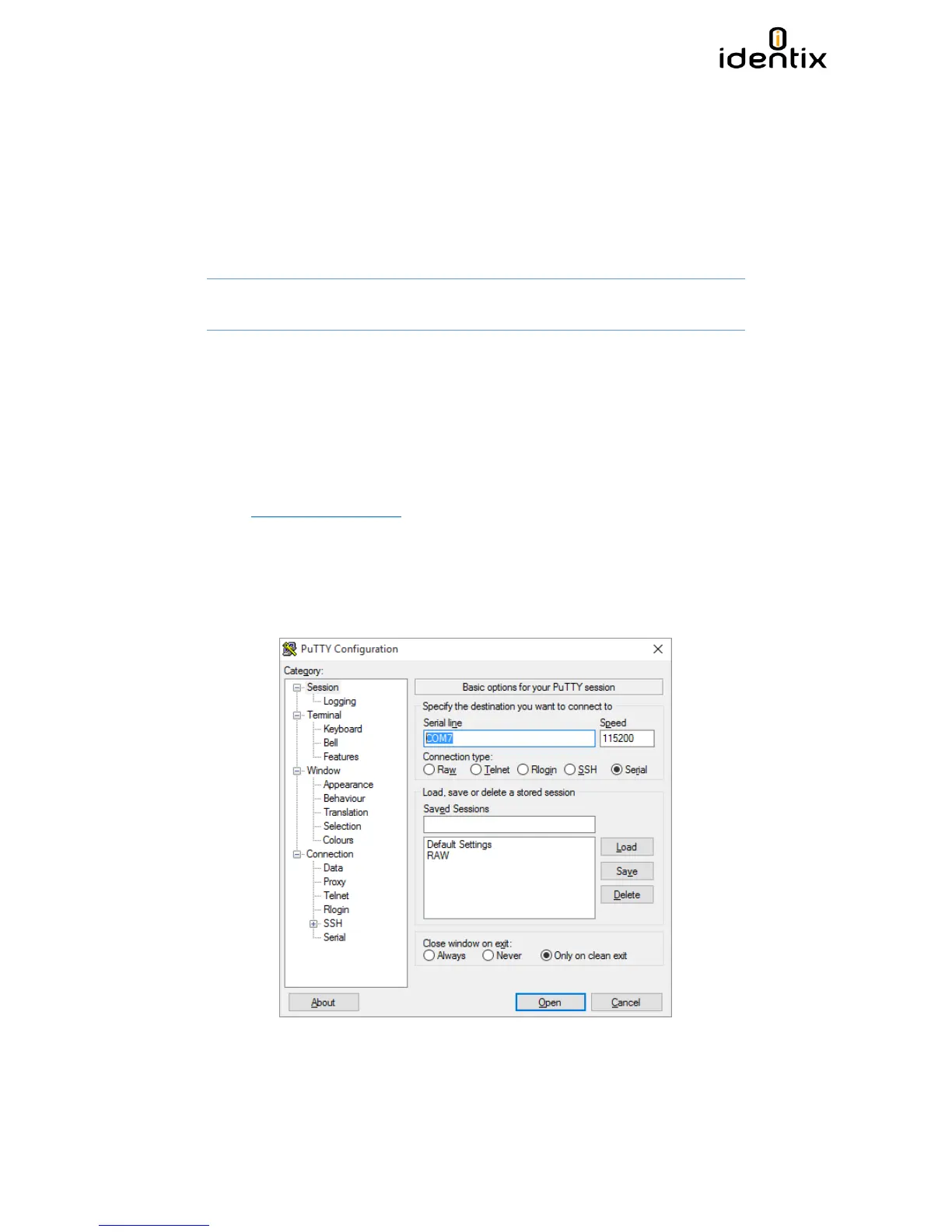
using a terminal emulation program like Putty.
Modifying settings via command line
a. Download a terminal emulation program like Putty. You can get it from:
http://www.putty.org/
b. Execute Putty.exe and a screen similar to the following one will be displayed.
c. Select the COM virtual port
d. Set the Speed to 115.200 Bps
e. Set the Connection type to “Serial”
f. Hit the “Open” button



 To Next Page