MiniPad – rPad User Guide
6
© 2015-2017 – Identix Inc. All Rights Reserved.
Configuring the device operating mode
The MiniPad / rPad device can operate in three different modes:
Transparent Mode
In this mode of operation, a host application controls the MiniPad / rPad device. The host application
communicates with the MiniPad / rPad device using the IRI – Impinj Reader Interface - protocol. The
connection between the host (PC) and the device is via a virtual COM (serial) port over USB.
By default, MiniPad / rPad operates in Transparent Mode.
HID Keyboard Emulation
In this mode of operation, MiniPad / rPad emulates a keyboard wedge. When reading RFID tags,
MiniPad / rPad sends reading data to the host computer as if it were a keyboard. In this scenario, the
device operates autonomously sending data through a virtual keyboard (HID) connected to the USB
port.
RAW Mode
In this mode of operation, a host application controls the MiniPad / rPad device. The host application
communicates with the MiniPad / rPad device using simple ASCII based commands. The connection
between the host (PC) and the device is via a virtual COM (serial) port over USB.
Changing the operating mode
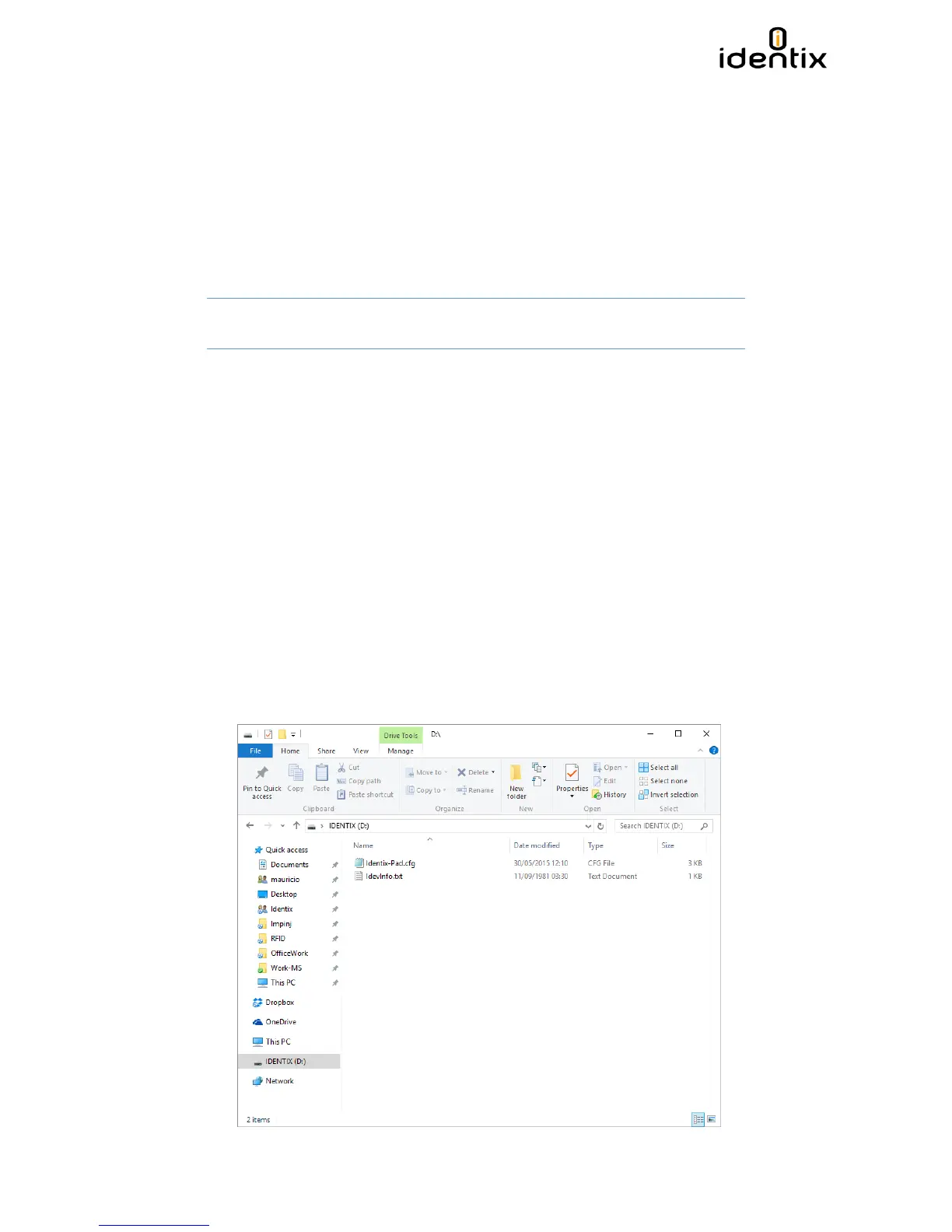
A configuration file (“Identix-Pad.cfg”) is stored inside a removable drive (labeled IDENTIX that
mounts automatically when the MiniPad / rPad device connects to the host computer), allows the
user to switch between Transparent, HID Keyboard Emulation and RAW modes.


 To Next Page