7
Mounting
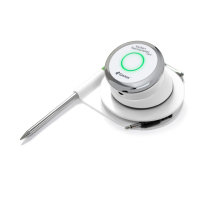
• The Kitchen Thermometer’s base is magnetic for convenient
positioning on a cool portion of your oven, stove or other magnetic
surfaces.
• The Kitchen Thermometer can be taken out of its base, rotated
180°, and set back into its base for two different viewing angles.
• The Kitchen Thermometer comes with an optional magnetic disc
with an adhesive on one side. This allows the Kitchen Thermometer
to magnetically mount on a non-magnetic surface. The magnetic
disc has a protective cover on its face to protect it from being
scratched.
To mount your magnetic disc, please follow the below steps:
• Clean the surface thoroughly where the magnetic disc will be
adhered to ensure proper bonding.
• Remove the lm covering the adhesive on the magnetic disc.
• Adhere the magnetic disc to your desired surface.
• Let the magnetic disc bond to the surface for 6-12 hours before
mounting your Kitchen Thermometer to the disc.
• Place your Kitchen Thermometer on the magnetic disc.
The magnetic base is not designed to withstand high heat
and it must be placed on a cool surface. If the surface is too
hot to touch, it’s too hot for the Kitchen Thermometer base!
Probe Use
• Meat Probe Acceptable Temperature Range: -22°F to 572°F (-30ºC
to 300ºC).
• Pro Meat Probe and Pro Ambient Temperature Probe Acceptable
Temperature Range (sold on iDevicesinc.com): -22ºF to 700ºF (-30ºC



 To Next Page