17
※ iTDC Quick Installation Guide
3.5 INPUT WIRING
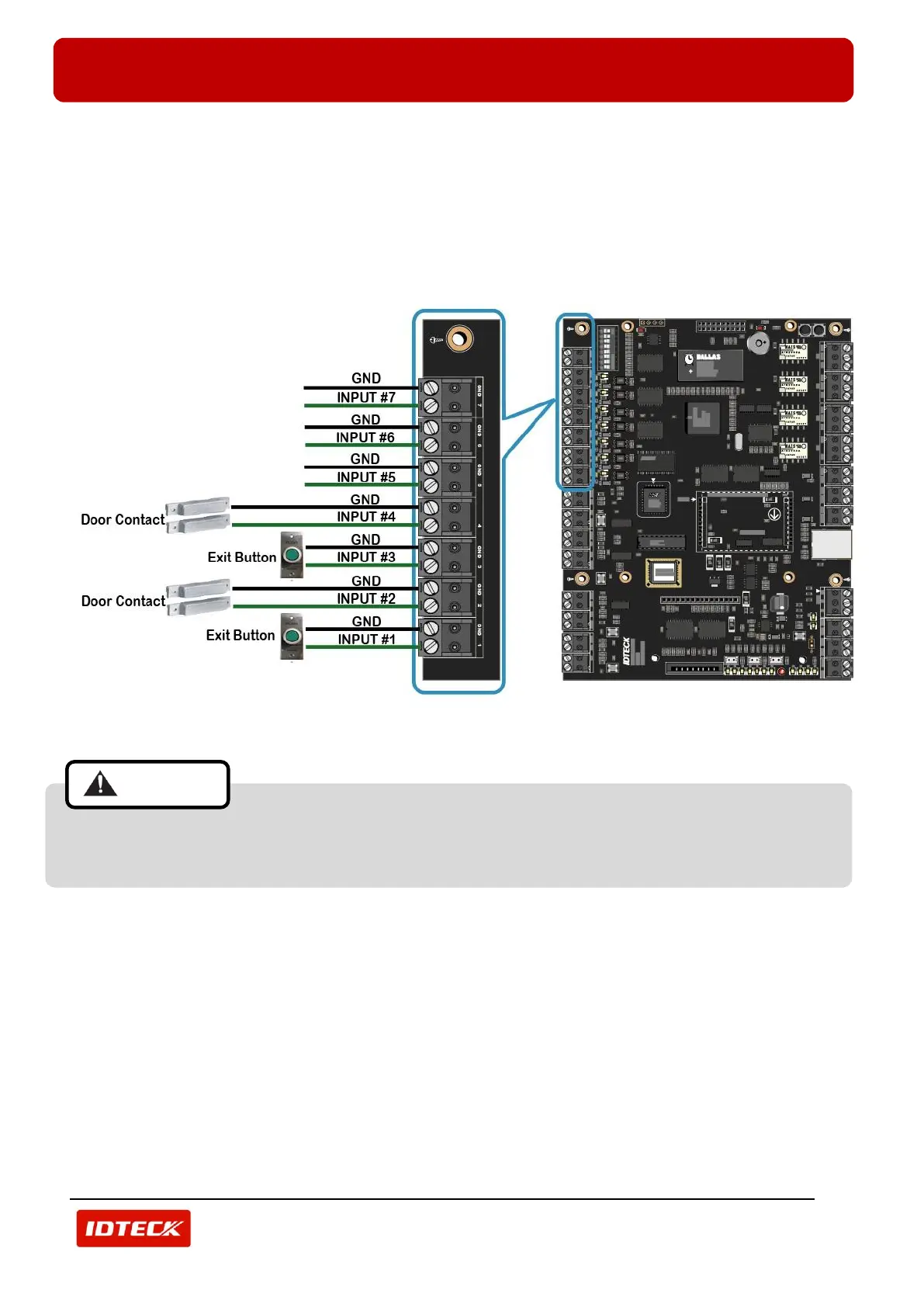
Connect Door contact and exit button to Input Port terminal block (INPUT_1 ~ INTPUT_7) of iTDC/iTDC-SR as
follow.
- Door 1: Connect Exit Button to Input Port terminal block (INPUT_1) of iTDC/iTDC-SR.
- Door 1: Connect Door Contact to Input Port terminal block (INPUT_2) of iTDC/iTDC-SR.
- Door 2: Connect Exit Button to Input Port terminal block (INPUT_3) of iTDC/iTDC-SR.
- Door 2: Connect Door Contact to Input Port terminal block (INPUT_4) of iTDC/iTDC-SR.
(Figure: Input Wiring)
Reader, input and output ports are changed depending on setting of the number of doors. You
have to see the table in 23p of this manual for changes of ports due to the setting of the number of
doors.



 To Next Page