EasyManua.ls Logo

IEI Technology 212eM - User Manual

IEI Technology 212eM
28 pages
Print Icon
To Next Page IconTo Next Page
Loading...
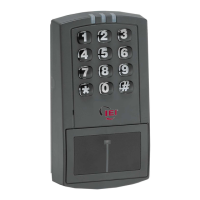
212eM/242eM
Standalone Keypad
Installation/
Programming Manual
This equipment is designed to be installed and serviced by security
and lock industry professionals.
Contents
Section 1: Features and Product Description
Section 2: Specifications
Section 3 : Keypad Tampering
Section 4 : Mounting
Section 5 : Wiring
Section 6 : Testing the Keypad
Section 7: Programming
Section 8: Troubleshooting
Section 9: Programming M ode Loopback
Section 10: Warranty
Manual Revision Date: 02/10/04 Firmware Version: 1.0b
Service Company. Put Contact Information Here:
Company Name:
Service Number:
Document # 6174000, Rev. 1.1 1

Questions and Answers

  • L
    laurenleeAug 3, 2025
    What to do if no LEDs are lit on my IEI Technology Keypad?
    • M
      Marie PierceAug 4, 2025
      If no LEDs are lit on the keypad, it is likely that power is not reaching the keypad. First, use a voltmeter to check for voltage at the keypad on the red and black wires. If there's no voltage, check the power supply. If the power supply also lacks voltage, contact its manufacturer. If the power supply has voltage but the keypad doesn't, inspect the wires for breaks and check continuity along their entire length. You can also test the keypad by powering it with a 12-Volt Battery to verify its functionality.
  • B
    Brandon KellyAug 11, 2025
    Why is my IEI Technology 212eM master code not working?
    • J
      Jonathan WeaverAug 11, 2025
      If the master code on your IEI Technology Keypad isn't working, perform the programming mode loopback and reset the master code using the programming command.
  • C
    Carol PhelpsAug 19, 2025
    What to do if the LEDs on my IEI Technology 212eM are rapidly cycling and the keypad is unresponsive?
    • T
      Tracy JacksonAug 19, 2025
      If the LEDs on your IEI Technology Keypad are rapidly cycling from left to right and the keypad isn't working, it's likely due to an over-voltage threshold set at 36VDC. Lower the voltage to between 12-24V to resolve this.
  • D
    Dawn CollinsAug 26, 2025
    How to fix LEDs slowly cycling on IEI Technology 212eM Keypad with backlighting off?
    • E
      ereeseAug 26, 2025
      If the LEDs on your IEI Technology Keypad are slowly cycling from right to left and the backlighting is off, the under-voltage threshold is probably set to 8.5VDC. Raise the voltage to between 12-24V to fix this.

Summary

Technical Specifications

Keypad Tampering Security

Wiring Procedures

5.2 Wiring to Fail-Safe Maglock

Provides instructions for wiring the keypad to a fail-safe maglock for secure access.

5.3 Wiring to Fail-Secure Electric Strike

Explains how to wire the keypad to a fail-secure electric strike for door control.

5.5 Wiring REX and Door Contacts

Details connecting a REX button and door contacts for the Request to Exit function.

System Programming

7.2 Assigning Virtual to Physical Outputs

Explains how to map virtual functions to physical outputs like relays and audio alerts.

7.3 Output Time Duration Settings

Details how to set the time durations for various outputs like LOCK, OUT2, OUT3, OUT4, OUT5, Propped Door, and Forced Door.

7.4 User Management

Covers the procedures for managing user codes, including master, supervisor, and standard users.

Command 60: Enhanced User Management

Explains how to add or modify users with enhanced types like Toggle, Lockout, Single Use, and Emergency.

Troubleshooting Guide

Programming Mode Loopback Procedure

IEI Technology 212eM Specifications

General IconGeneral
BrandIEI Technology
Model212eM
CategoryKeypad
LanguageEnglish

Related product manuals