12
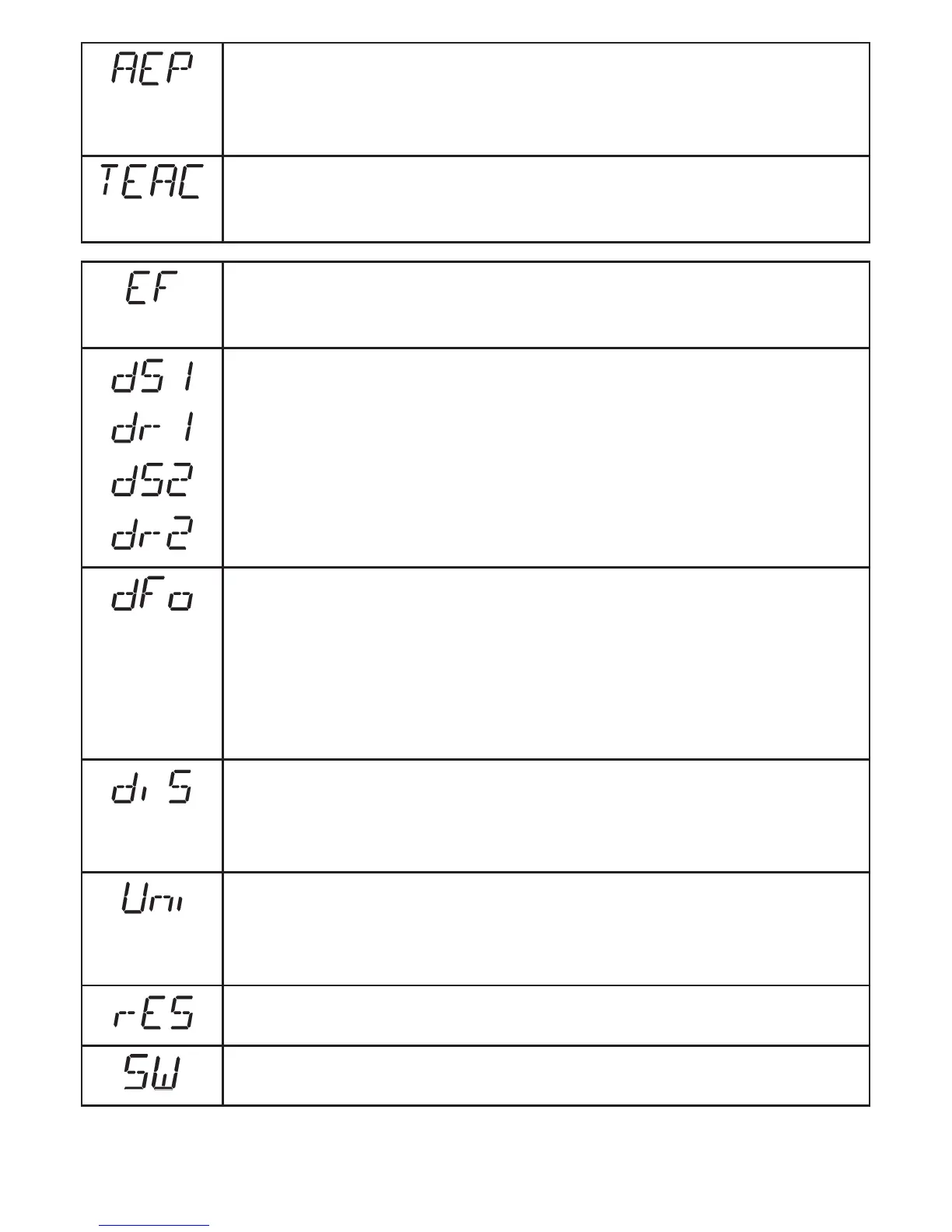
Analogue end point
Measured value at which 20 mA / 10 V are provided�
[AEP] is only active if [OU2] = [I] or [U]�
→ 10.2.11 Scaling of the measuring range (analogue output)
Teach mode
Selection "sampling rate" or "repeatability"
→ 10.3 Teach mode
Extended functions
Press [SET] to open the submenu "Extended functions"
→ 10.4 Extended functions
Delay for the switching outputs
[dSx] = switch-on delay; [drx] = switch-off delay�
The output does not immediately change its switching status when the
switching condition is met but only after the delay has elapsed� If the
switching condition is no longer met after the delay has elapsed, the
switching status of the output does not change�
[dS2] and [dr2] are not effective if [OU2] = [I] or [U]�
→ 10.4.1 Setting of the time delay for switching outputs
Damping of the measured signal
This function allows to suppress short-time saturation of the measuring
element (such saturation can result from direct reflection or strong
fluctuations in brightness)�
During the delay set, the latest valid value measured is displayed, the
output signals remain unchanged�
→ 10.4.2 Setting of the damping of the measured value
Display setting
7 settings can be selected:
[d1], [d2], [d3], [rd1], [rd2], [rd3], [OFF]
→ 10.2.2 Setting of the display
Setting of the display unit
Selection of the unit of measurement for [SP1], [SP2], [ASP], [AEP]
Selection options: [mm] [m] [inch]
→ 10.2.1 Selection of the display unit
Restore factory setting
→ 10.4.3 Reset of all parameters to factory setting
Display of the software version number
→ 10.4.4 Display of the software version number





 To Next Page