5
5.
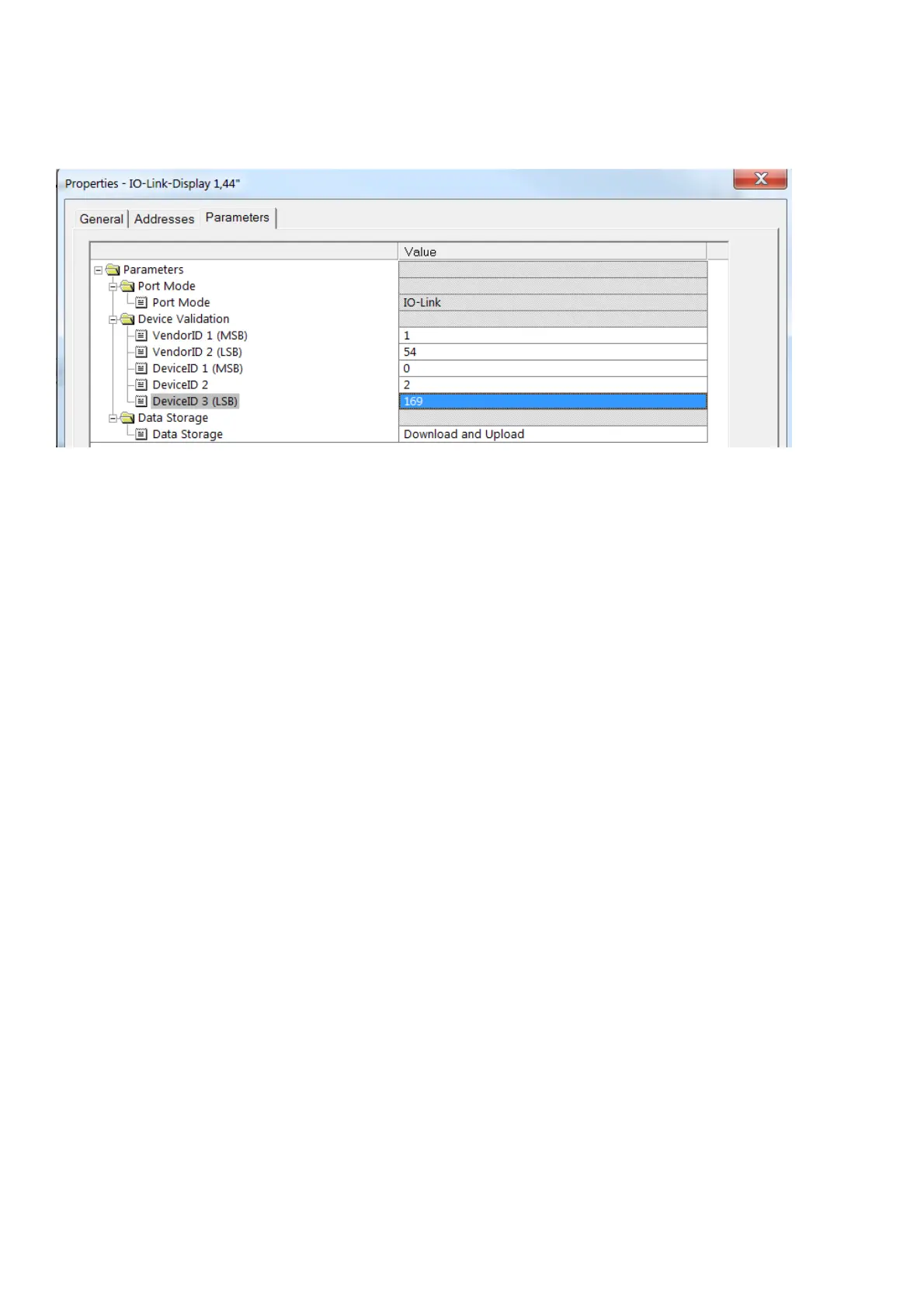
Enter vendor ID and device ID to ensure that only an IO-Link
Display 1,44” can be operated at that port.
6.
Set the data storage according to the application's requirements:
7.
Write the configuration to the controller or PLC.
8.
Connect the IO-Link Display to the master using a 3-wire cable.
3. Parameter setting (acyclic communication)
Settings can be made and predefined text can be entered by
means of the IO-Link parameter setting tool or a PLC by writing
the corresponding parameters.
The LINERECORDER DEVICE can for example be used as
IODD-based parameter setting tool (→ 3.1).
It is possible to configure the following properties:
•
Process value display (unit, description text, decimal places) →
3.2
•
Text content for info pages → 3.3
•
Background colour of the info page → 3.4
•
Text instead of process values → 3.5; → 0
•
Display layout → 3.7
•
Content of a QR code → 3.8
The process values, colours and layout switching are controlled
via the cyclic communication of the controlling PLC. (→ 4 )


 To Next Page