30/53
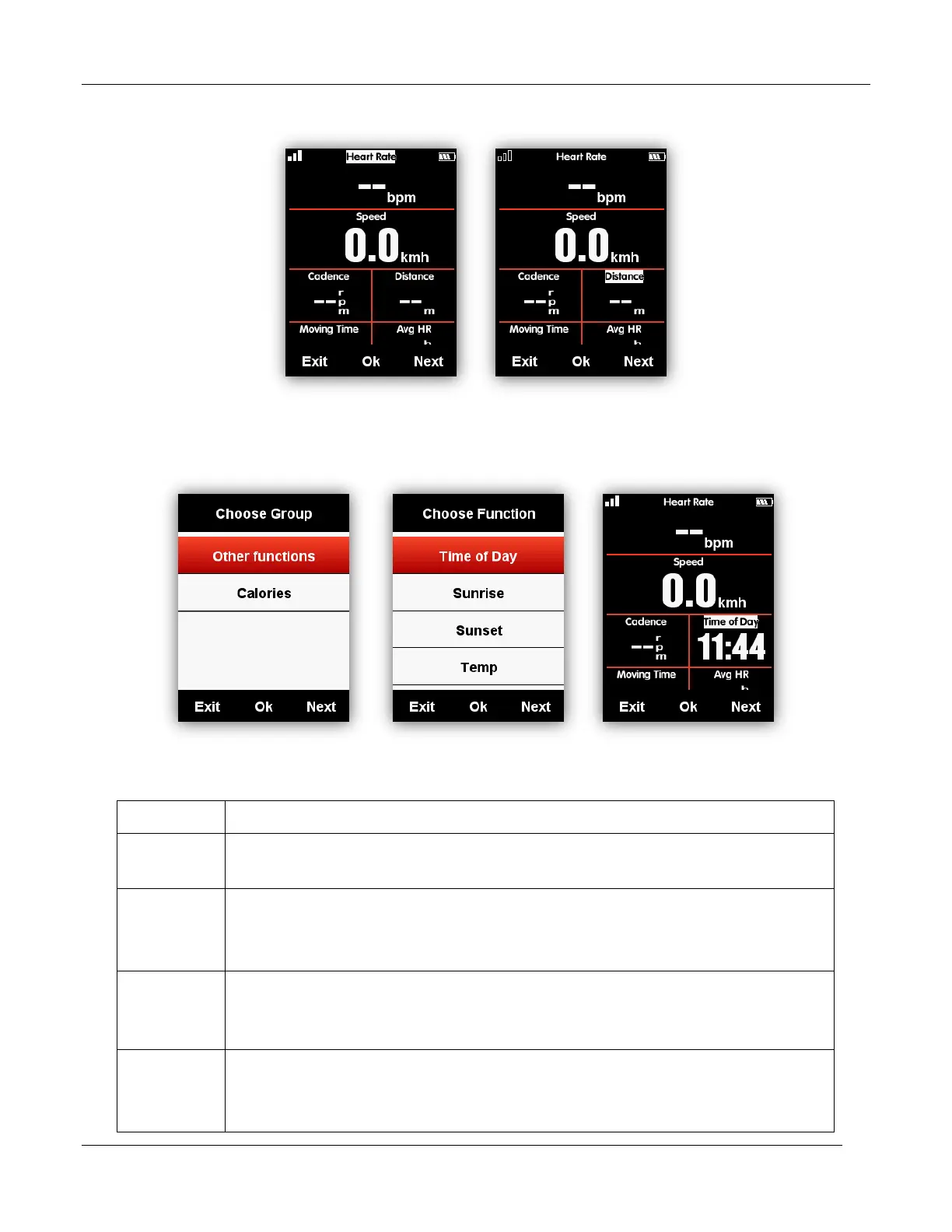
Below is the setting example for change the Distance into Time of Day:
Select right button till the cursor blink on Distance column, select middle button to enter Choose
Group, select Other Functions, select Time of Day, select left button to save and exit.
Data items supported for selection are as below:
Speed/Avg Speed Tot./Avg Speed Mov./Max Speed/Lap Speed /Pre Lap
Spd /Max Lap Spd/Max Pre Lap Spd
Cadence/Avg Cad/Max Cad/Lap Cad /Pre Lap Cad /Max Lap Cad/Max
Pre Lap Cad / Cadence Zone
Heart Rate/Avg HR/Max HR/Lap HR/Max Lap HR/Pre Lap HR/Max Lap
HR/Max Pre Lap HR/HR Zone/Heart Rate %/Avg HR%/ Max HR%/Lap
HR%/Pre Lap HR%/Max Lap HR%/Max Pre Lap HR%
Power/Avg Pwr/Max Pwr/Lap Pwr/Pre Lap Pwr/Max Lap Pwr/Max Pre Lap
Pwr/Pwr Zone/Pwr3s/Pwr10s/Pwr30s/Pwr %FTP/Pwr IF/Pwr NP Avg/Pwr
TSS/Pwr watts/kg/kilojoules/Pwr Left%//Pwr



 To Next Page