User’s Manual REVEXplus, REVEXplus USB
Copyright © 2006–2019 ILLKO, s.r.o.
4. MEASUREMENTS
4.1. Measurement mode control - the START key
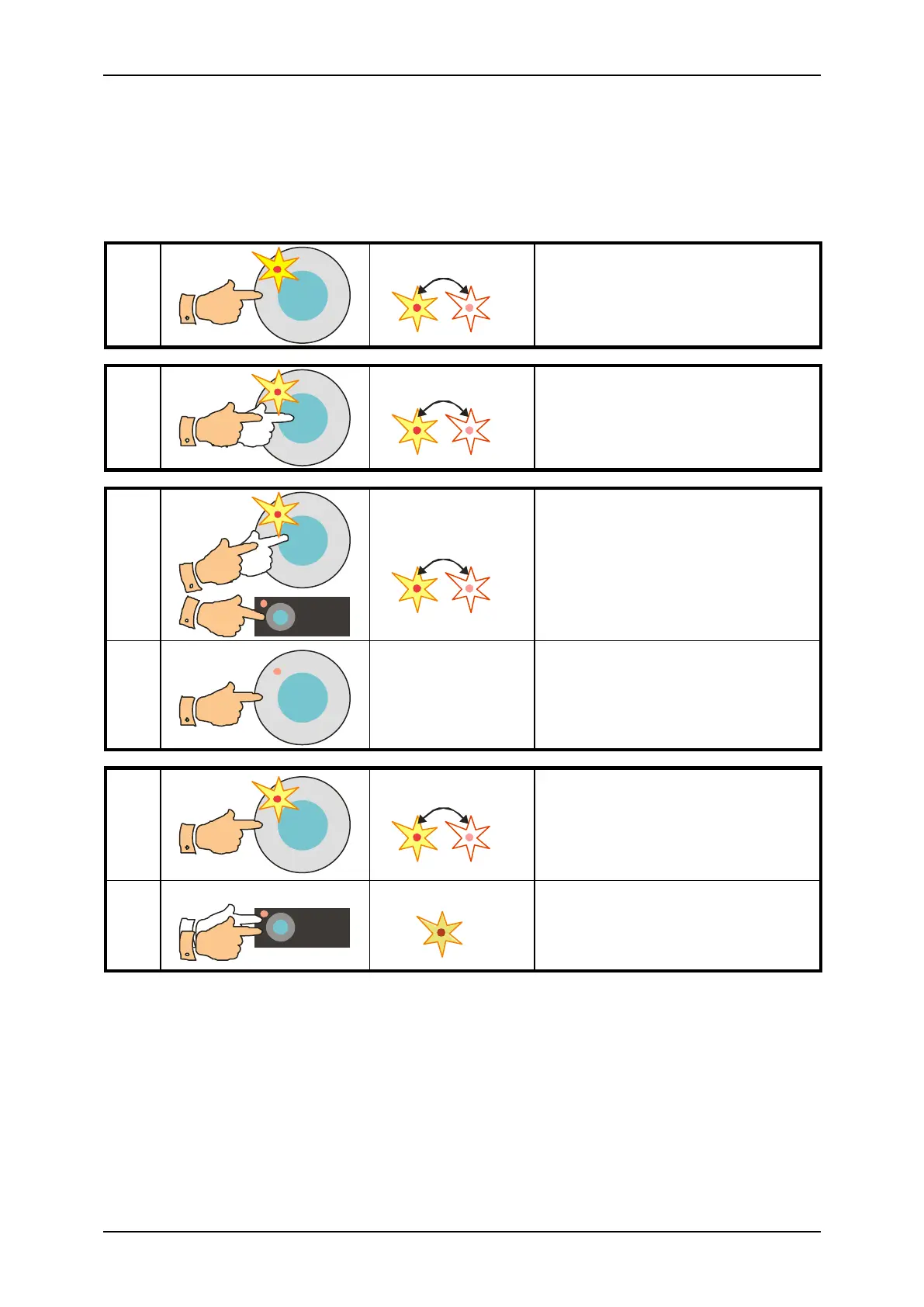
Beginning, process and ending of measurements is controlled by the START key.
One measuring cycle
One measuring cycle starts an it is
completed.
Continuous measurement
Measurement is in progress until
the START key is released.
Locking of measurement
Measurement continues though
both keys are released.
Holding of displayed data
Measurement is in progress and
displayed result is periodically
updated.
Measurement is in progress and last
displayed result is displayed.
To cancel the HOLD mode press
and release the [HOLD] key again.
Fig. 2 – Measurement mode control
4.1.1. Measurement mode
The instrument enables to accomplish measurements in following three modes:
• One measuring cycle – after the START key is pressed and released, one measuring
cycle starts and it is completed after few seconds. The result of measurement is displayed.
• Continuous measurement – press the START key; measurement is in progress and
current measured values are displayed until the START key is released.



 To Next Page