GETTING STARTED
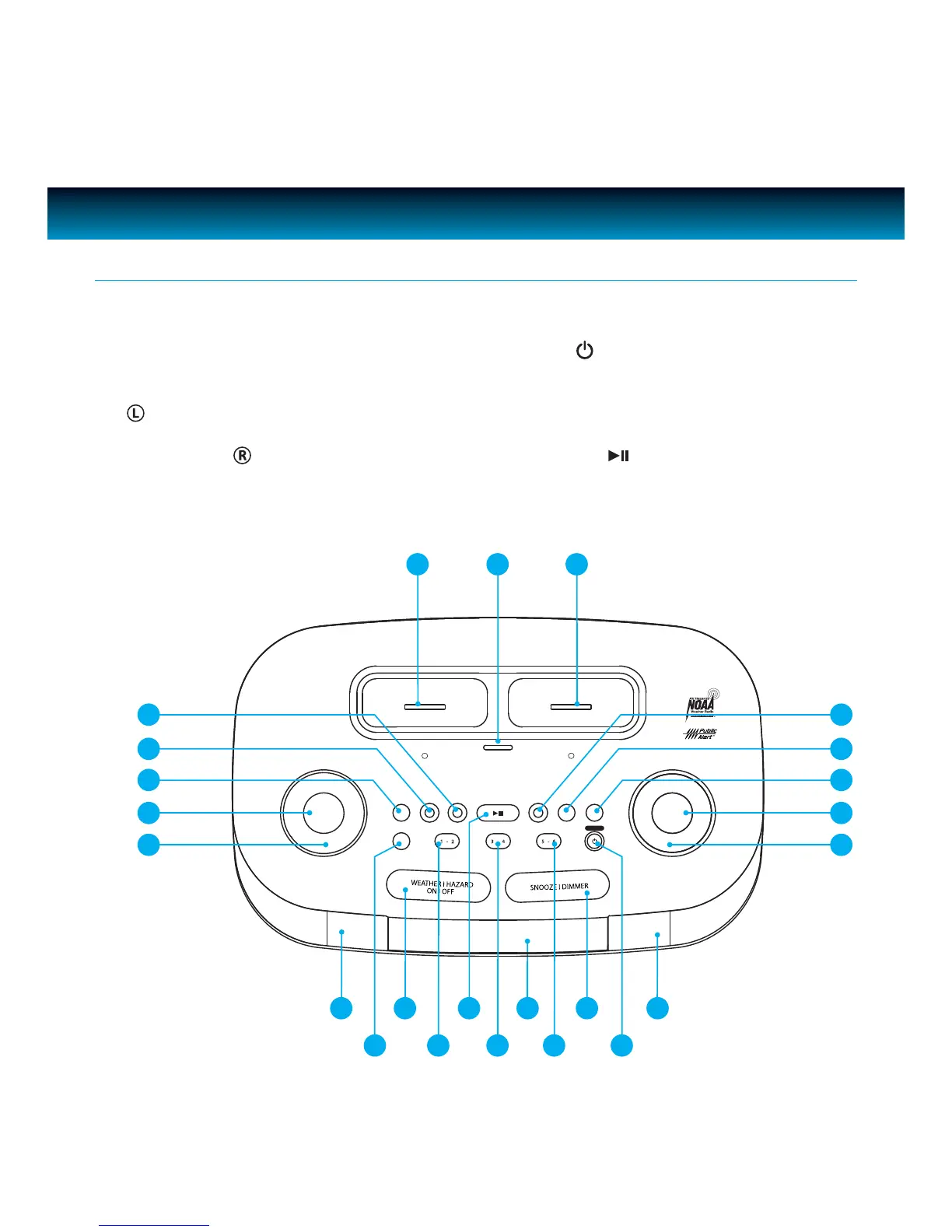
1. VOLUME knob
2.
MODE button
3. AL SET button
4.
AL 1 button
5. AL 2 button
6.
iPod / iPhone dock
7.
SELECT button
8. iPod / iPhone
dock
9.
SLEEP button
10. BASS/TREBLE button
11.
SETUP button
12.
ENTER button
Location of Controls on the Main Unit
SELECT
MODE ENTER
VOLUME
SEARCH
L R
AL OFF
POWER
AL1 AL2 SLEEP BASS/TREBLE SETUPAL SET AUTO SCAN
1 - 2
ALERT
3 - 4 5 - 6
13. SEARCH knob
14. Speakers
15.
POWER
AL OFF button
16. SNOOZE/DIMMER button
17. Preset Number (5-6) button
18. LCD display
19. Preset Number (3-4) button
20.
AUTO SCAN
button
21. Preset Number (1-2) button
22.
WEATHER/HAZARD ON/OFF button
23.
ALERT button
6 7 8
1
2
21
2022
7 | iLuv
3
4
5
13
12
11
10
9
23 19
18
17
14 16
15
14



 To Next Page