Manuel d’installation / Installation manual IMEON 3.6 – Rev A.2
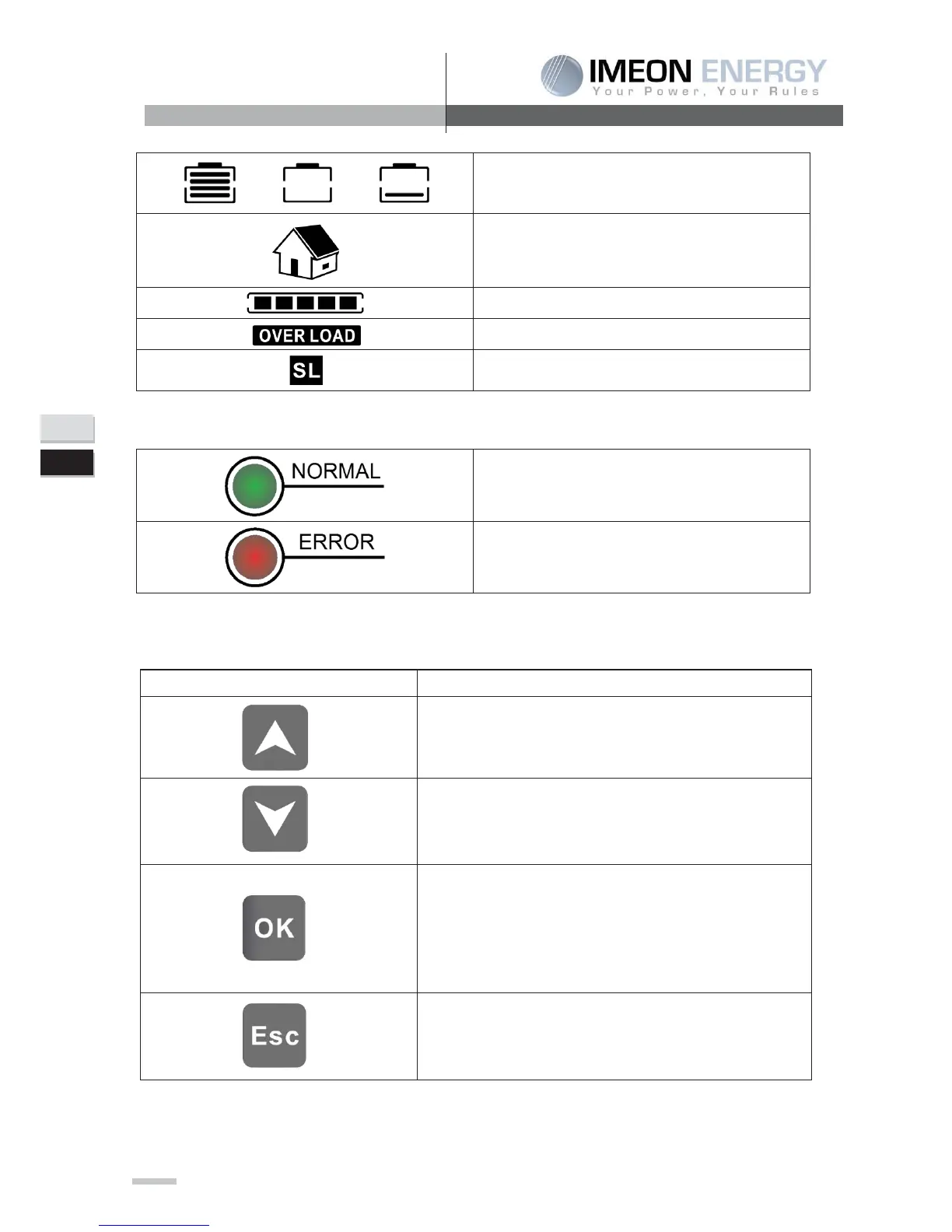
Indicates the battery state of charge.
If the icon flashes, that
means the battery is unavailable (center icon) or it has a low
Indicates the AC Output is activated and that loads are
delivered.
Indicates the percentage of charge in AC Output.
Indicate that the «Smart Load » Output is activated
6-2 Display by indicator light
Indicates the IMEON is supplied and functional
Indicates an anomaly in the system
6-3 Button definition
> Press this button to reach the next choice or increase the value.
> If you are in the menu, press this button to reach the previous choice or
> If you are not in the menu, press this button to put the alarm on mute (only
on battery mode or standby mode).
> Press this button to enter the sub
> If you are not in the menu, Press this button up to a sound emission to
activate the AC output.
Press this button to go out of the sub-menu.
> If you are not in the menu, Press this button up to a sound emission to
deactivate the AC output.


 To Next Page