IN3144_IN3146_IN3148HD User’s Manual
— 24 —
Advanced Features
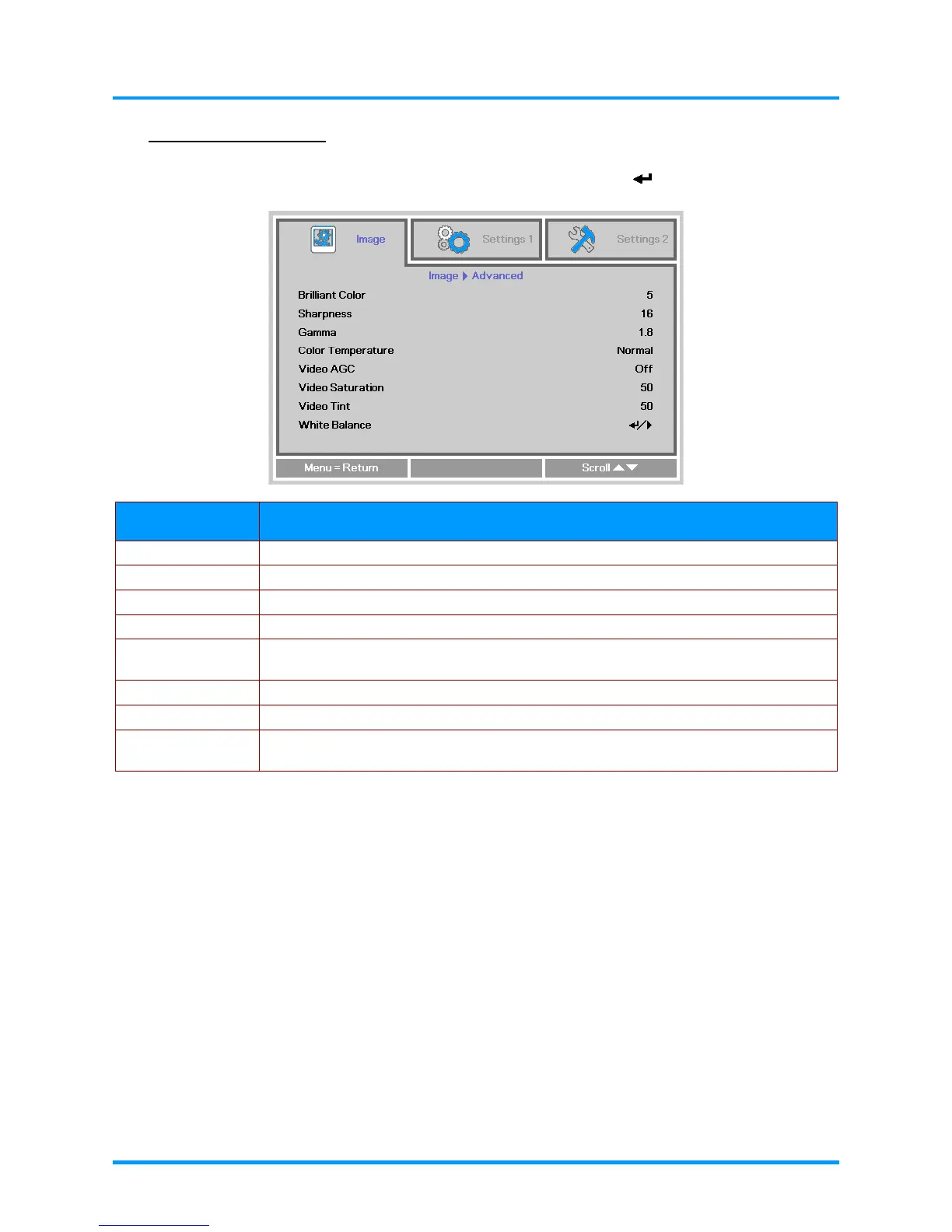
Press the Menu button to open the OSD menu. Press the ◄► buttons to move to the Image menu.
Press the ▼▲ buttons to move to the Advanced menu and then press (Enter) or ►. Press the
▼▲ buttons to move up and down in the Advanced menu.
ITEM DESCRIPTION
Brilliant Color Press the ◄► buttons to adjust the Brilliant Color value.
Sharpness Press the ◄► buttons to adjust the display sharpness.
Gamma Press the ◄► buttons to adjust the gamma correction of the display.
Color Temperature Press the ◄►
buttons to adjust the color temperature.
Video AGC
Press the ◄► buttons to enter and enable or disable the Automatic Gain Control for
video source.
Video Saturation Press the ◄► buttons to adjust the video saturation.
Video Tint Press the ◄► buttons to adjust the video tint/hue.
White Balance
Press the ENTER/ ► button to enter the White Balance sub menu.
See White Balance on page 25










 To Next Page