EasyManua.ls Logo

InFocus P111 - Display and Image Commands; Display Mode and Image Adjustment Commands

InFocus P111
74 pages
Print Icon
To Previous Page IconTo Previous Page
Loading...
IN3144_IN3146_IN3148HD User’s Manual
67
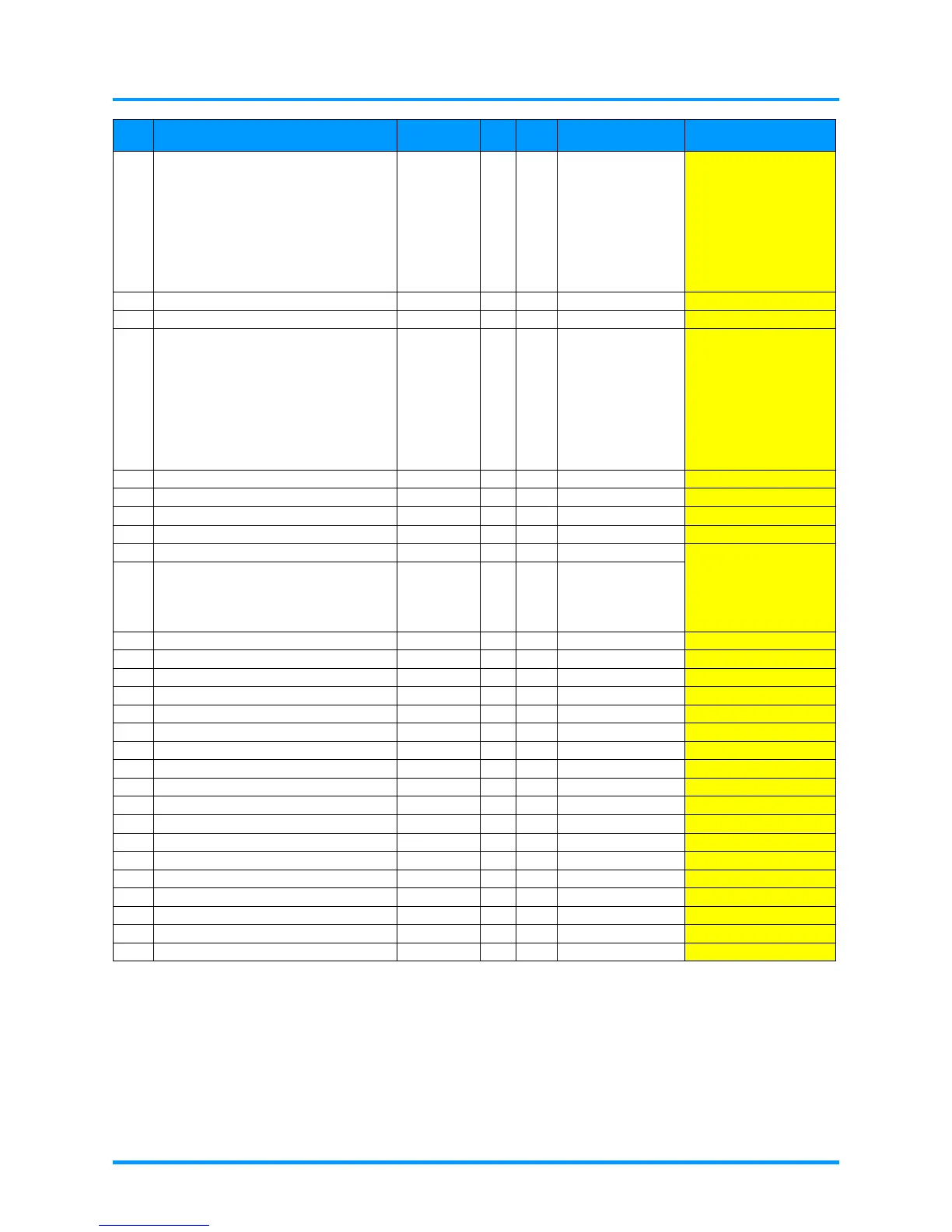
Item
Function Command
Min
Max Return Note
66 Get display mode (PST?) -- -- (0-7,0)
0: Presentaion
1: Bright
2: Game
3: Movie
4: TV
5: sRGB
6: BlackBoard
7: User
67
Set next display mode
(PST+)
--
--
68
Set upper display mode
(PST-)
--
--
69 Set display mode (PSTn) 0 7
0: Presentaion
1: Bright
2: Game
3: Movie
4: TV
5: sRGB
6: BlackBoard
7: User
70
Get FW version
(FVS?)
--
--
("IN3148HD P01")
71
Get projector info
(PRI1)
--
--
72
Get Model name
(MDL?)
--
--
("IN3144")
73
Get input resolution
(NRS?)
--
--
("1920x1080")
74
Get blank screen
(DSU?)
--
--
(0-4,0)
0: Black
1: Red
2: Green
3: Blue
4: White
75 Set blank screen (DSUn) 0 4
76
Get sharpness value
(SHP?)
--
--
(0-31,0)
77
Set sharpness value
(SHPn)
0
31
78
Get color tint value
(TNT?)
--
--
(0-100,50)
79
Set color tint value
(TNTn)
0
100
80
Get tracking value
(MTS?)
--
--
(-5-5,0)
81
Set tracking +1
(MTS+)
--
--
82
Set tracking -1
(MTS-)
--
--
83
Set tracking value
(MTSn)
-5
5
84
Get keystone value
(DKV?)
--
--
(-40-40,0)
85
Set keystone
(DKVn)
-40
40
86
Get V position value
(VPS?)
--
--
(-5-5,0)
87
Set V positon +1
(VPS+)
--
--
88
Set V position -1
(VPS-)
--
--
89
Set V position value
(VPSn)
-5
5
90
Get volume value
(VOL?)
--
--
(0-10,0)
91
Set volume
(VOLn)
0
10
92
Get Brilliant color value
(BCL?)
--
--
(0-10,0)
93
Set Brilliant color
(BCLn)
0
10

Table of Contents

Related product manuals