EasyManua.ls Logo

INFOSEC E6 LCD RT EVOLUTION (S) 1000 - Setting up the UPS; Install the UPS; Tower Installation

INFOSEC E6 LCD RT EVOLUTION (S) 1000
Print Icon
To Next Page IconTo Next Page
To Previous Page IconTo Previous Page
Loading...
INFOSEC UPS SYSTEM 4 rue de la Rigotière 44700 Orvault France www.infosec-ups.com
Hot Line Tel: +33 (0)2 40 76 15 82 fax: +33(0)2 40 94 29 51 hotline@infosec.fr 11 12 AA 59 203 06
39
2-2. Setting up the UPS
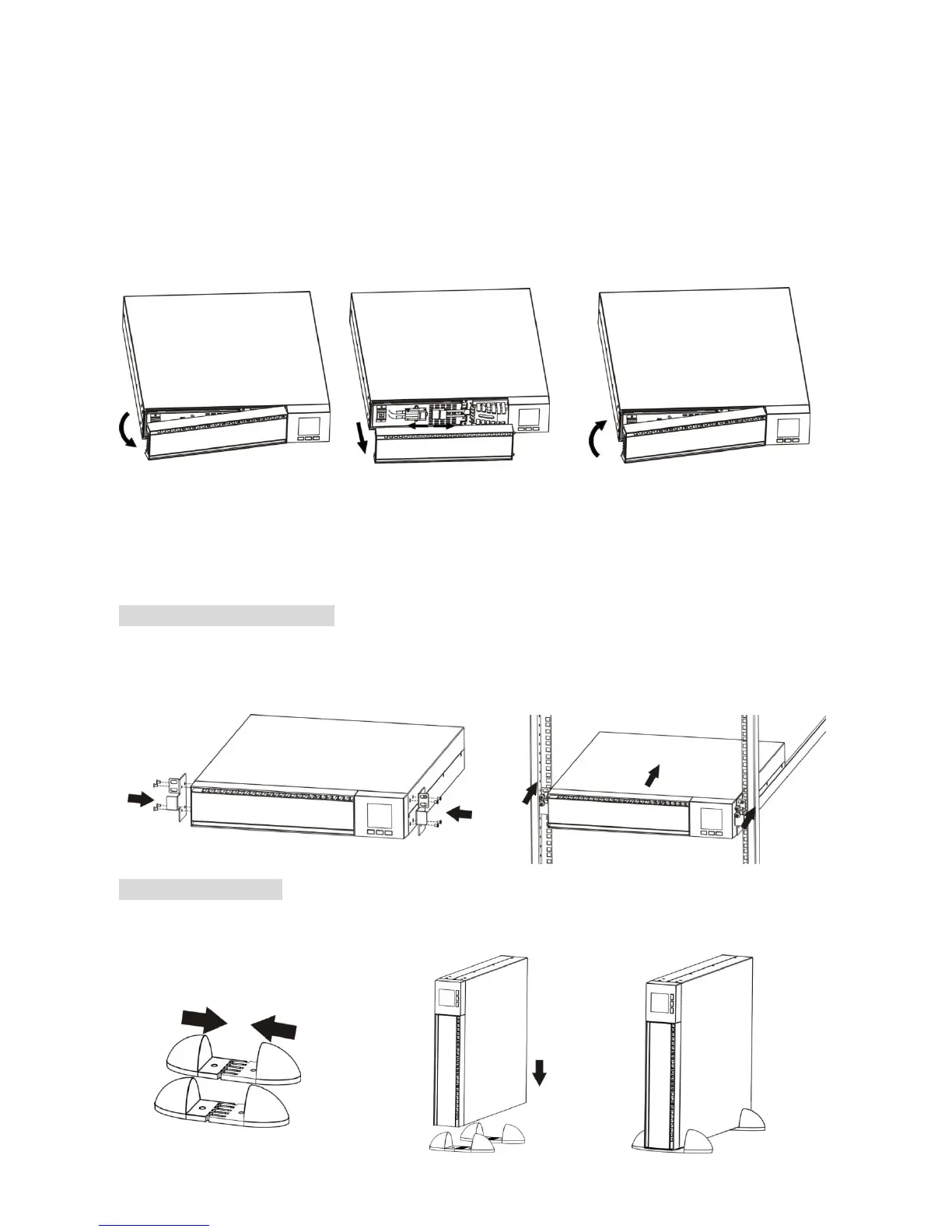
2-2-1. Install the UPS
For safety consideration, the UPS is shipped out from factory without connecting battery wires.
Before install the UPS, please follow below steps to re-connect battery wires first.
Step 1
Step 2
Step 3
Remove front panel.
Connect the AC input and
re-connect battery wires.
Put the front panel back to the
unit.
This UPS can be either displayed on the desk or mounted in the 19 rack chassis. Please choose
proper installation to position this UPS.
Rack-mount Installation
Step 1
Step 2
Tower Installation
Step 1
Step 2
Step 3

Related product manuals