INFOSEC UPS SYSTEM – 4 rue de la Rigotière – 44700 Orvault – France – www.infosec-ups.com
Hot Line Tel: +33 (0)2 40 76 15 82 – fax: +33(0)2 40 94 29 51 – hotline@infosec.fr – 11 12 AA 59 203 06
2-3-2. Battery Kit Assembly (option)
NOTICE: Please assemble battery kit first before installing it inside of UPS. Please select
correct battery kit procedure below to assemble it.
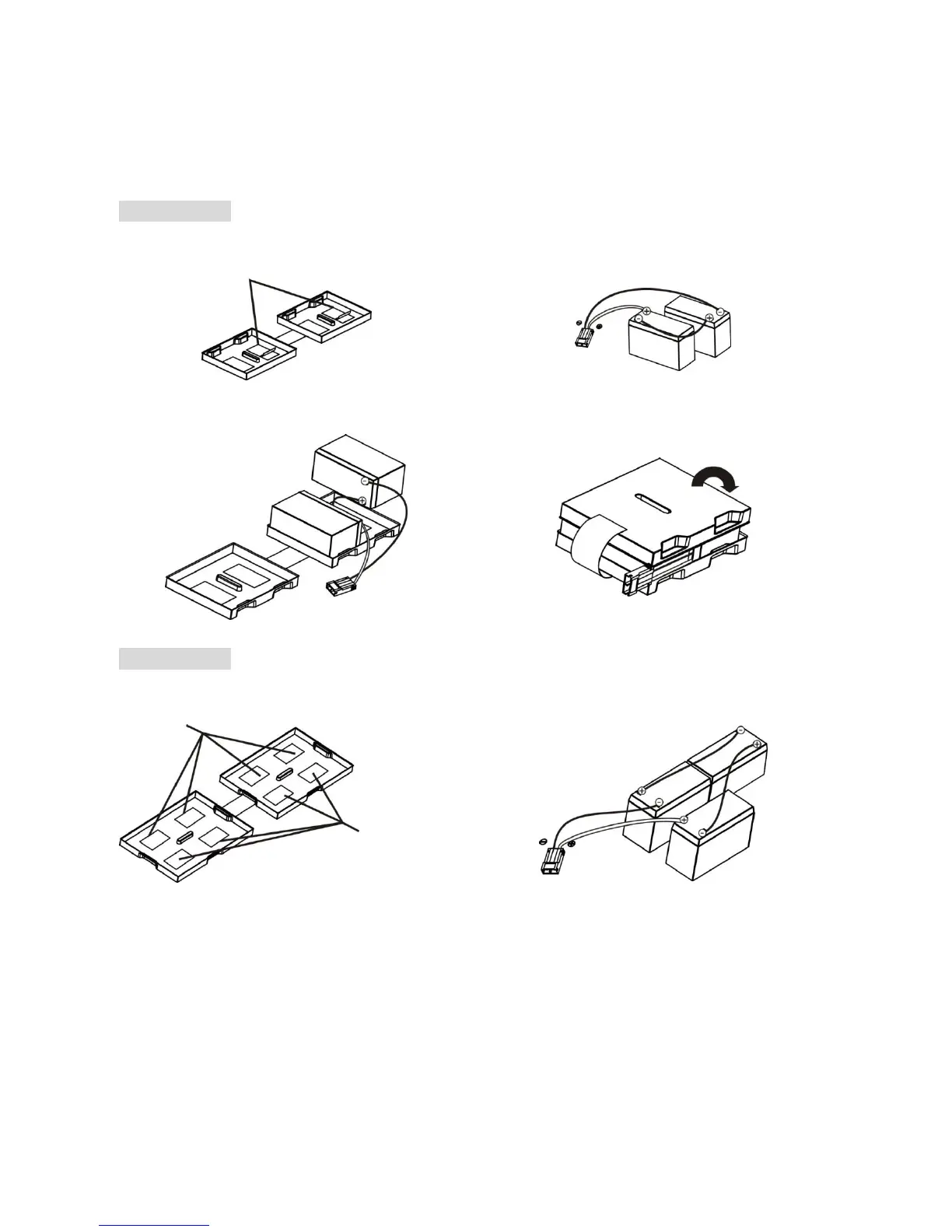
2-battery kit
Step 1: Remove adhesive tapes.
Step 2: Connect all battery terminals by
following below chart.
Step 3: Put assembled battery packs on
one side of plastic shells.
Step 4: Cover the other side of plastic shell as
below chart. Then, battery kit is assembly well.
Step 1: Remove adhesive tapes.
Step 2: Connect all battery terminals by
following below chart.
Step 3: Put assembled battery packs on
one side of plastic shells and insert one
more defect battery on the space.
Step 4: Cover the other side of plastic shell as
below chart. Then, battery kit is assembly well.















 To Next Page