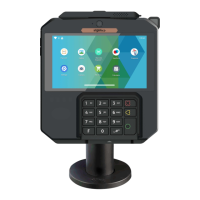
5.4 Cleaning the terminal
Unplug all wires from the terminal prior to cleaning.
Apply soapy water or other approved cleaning product to a soft,
non-abrasive cloth.
CLEANING PRODUCT SHOULD BE APPLIED TO THE CLEANING CLOTH
AND NOT DIRECTLY APPLIED OR SPRAYED TO THE TERMINAL. Failure
to follow this step may result in damage to the terminal.
Do not clean the electrical connections.
Do not use solvents, detergents or abrasive products: Those materials
might damage the plastic or electrical contacts.
Good rules for proper cleaning of the terminal are:
ADVICE
Positioning of the terminal on check stand must be in such a
way to make cardholder PIN (Personal Identification Number)
spying infeasible.
Installing device on an adjustable stand must be in such a way
that consumers can swivel the terminal sideways and/or tilt it
forwards/backwards to a position that makes visual
observation of the PIN-entry process difficult.
Positioning of in-store security cameras such that the PIN-
entry keypad is not visible.
NEVER ask the customer to divulge their PIN Code. Customers
should be advised to ensure that they are not being
overlooked when entering their PIN Code.
24
AXIUM DX4000 Portable
10/24
Copyright© 2022 Ingenico –
Banks and Acquirers International Holding SAS
All rights reserved



 To Next Page
 Loading...