900024281 R11 000 05/1016
All rights reserved
29
6_3_3 Reading Contactless (Optional)
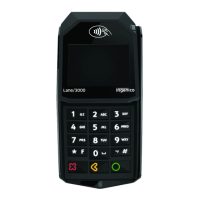
Bring the card firmly up to the active zone
above (at about 1cm) the contactless logo
located on paper trapdoor button.
Keep the card close to the contactless logo
during the transaction
Your contactless terminal provides four
contactless status lights located on display/
lens.
When a contactless transaction
is
started
the
first
(left hand) status light
will
be
lit
steadily;
this
indicates that the contactless
is
in
use but a card
is
not being read.
When a contactless card
is
presented to
the contactless active zone (*) during a
transaction the second,
third
and fourth
status lights
will
be
lit
in turn. The card read
is
successful when all
four
status lights are
lit
and a confirmation tone can be heard.
Contactless
Status lights
(*): Contactless Symbol is a trademark owned by and used with the
permission of EMVCo, LLC.
CAUTION
Do not stick any conductive label on to contactless active
zone located on paper trapdoor button. It can decrease
seriously contactless efficiency.
WARNHINWEIS
Keine leitende Etikett Kleben Sie nicht an kontaktlosen
aktiven Zone auf Papier Falltür-Taste befindet. Es kann
ernsthaft kontakt Effizienz verringern.
Active zone



 To Next Page
 Loading...