Morpheus8 Body Applicator Operator
Manual
Section 4: Device Description
The Utility Screen contains:
This function allows the user to adjust the System volume.
Change the password by entering the old password and then
entering another 4-digit password.
Return to the Main Menu to select an applicator.
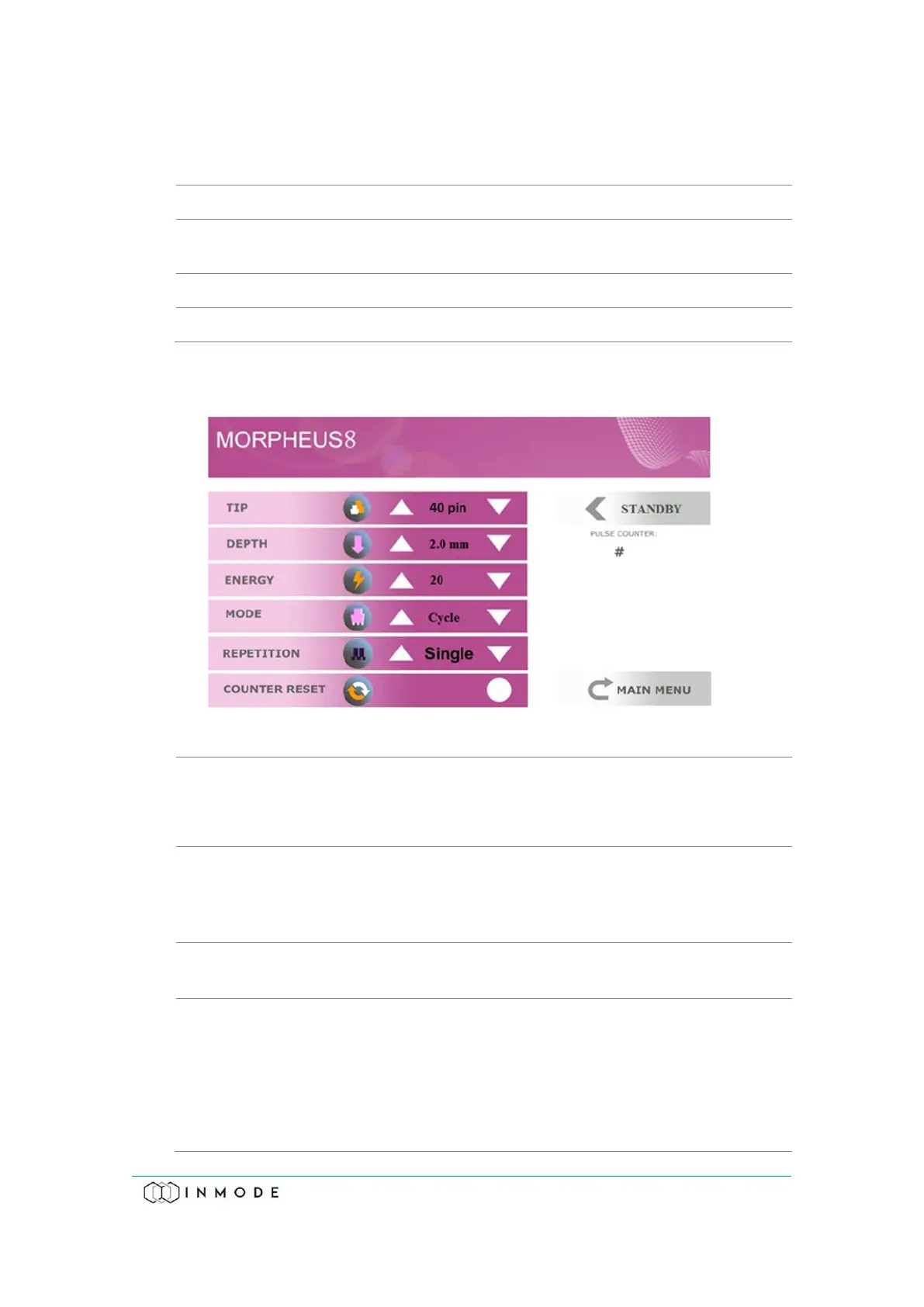
After returning to the Menu Screen and choosing the application on the Menu
Screen, the corresponding Treatment Screen appears.
Figure 4-5: Morpheus Treatment Screen
Allows selecting the Tip.
Available Tips are:
• Morpheus8 Body Applicator: 40 Pin tip.
Allows selecting the pins length and penetration depth
according to dermis thickness in treated area to provide
effective sub-dermal treatment. Available depths are: for 40
pins tip 2, 3, 4, 5, 6 and 7mm.
Delivered energy is changed from level 5 to 60 energy levels
and the System starts up at the minimal energy setting.
• Selects between:
• Cycle mode when needle goes out and in at each pulse
• Fixed mode when needles goes out at foot switch
pressing and stay protruded until Footswitch is
released. In Fixed mode RF pulses are applied
automatically with predetermined pulse repetition rate.



 To Next Page