User’s Manual
INNO Instrument, Inc.
22
PAGE
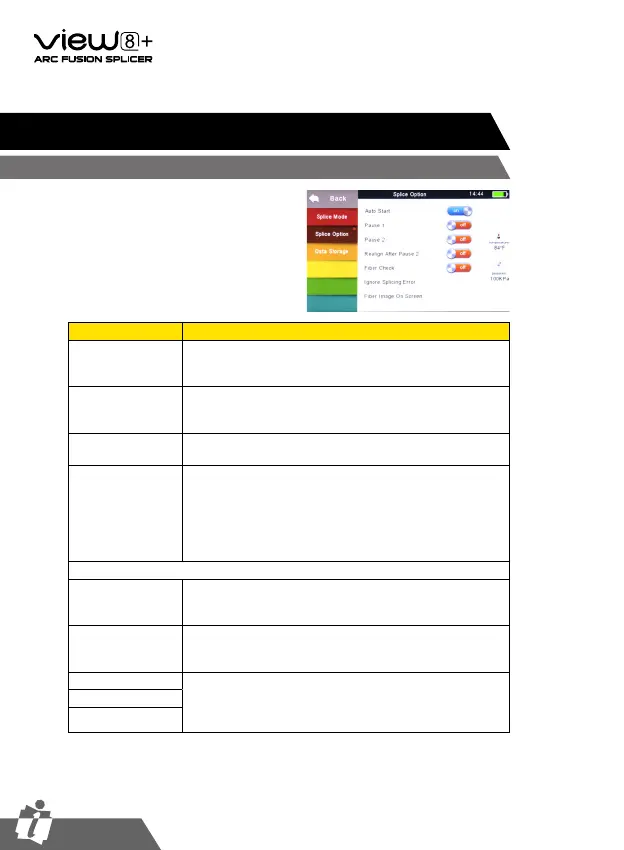
1 Select [Splice option] in menu.
2 Select a parameter to be changed.
Chapter 5 - Splice Option
Splice Mode Setting
Parameter Description
Auto start
If “Auto start” is set to ON, splicing starts automatically
as soon as the wind protector is closed. Fibers should be
prepared and placed into the splicer in advance.
Pause 1
If “Pause 1” is set to ON, splicing operation pauses when
fibers are forwarded to gap-set position. Cleave angles are
displayed during the pause.
Pause 2
If “Pause 2” is set to ON, splicing operation pauses after
fiber alignment is completed.
Realign after pause
2
Alignment failure may appear after “Pause2” for a long
period. Therefore, realign after “Pause2” is needed.
Setting to “OFF” will prevent the implementation of
realign function. Manual splicing, rather than setting the
realign to “OFF”, is recommended when there is an axial
displacement of the splicer
Ignore splice error
Cleave angle
Setting to “OFF” ignores the faults and continues to
complete the splicing even if the message “Cleave Angle
Error” appears.
Core angle
Setting to “OFF” ignores the faults and continues to
complete the splicing even if the message “Core Angle
Error” appears.
Loss Setting to “OFF” ignores the faults and continues to
complete the splicing even if the message “Loss Error”,
“Cleave Shape Error”, “Fat Error”, or “Thin Error”
appears.
Fat
Thin


 To Next Page