5.5
5.6
5.7
5.8
5.9
Activation
Heating/cooling operation modes setting
Stand By
Temperature selection
One of the two symbols flashing means that the water
temperature (hot or cold) is not sufficient, and stops
the fan until the temperature reaches a level suitable for
reaching the required temperature.
The adjustment range is from 15 to 30°C in intervals of
1°C, but out-of-range values are also accepted, from 5°C
(Lo) to 40°C (Hi).
Only set these values for brief periods, and then set a
intermediate value.
The controller is very precise - set it to the required value
and wait for the controller to regulate itself according to the
actual room temperature detected.
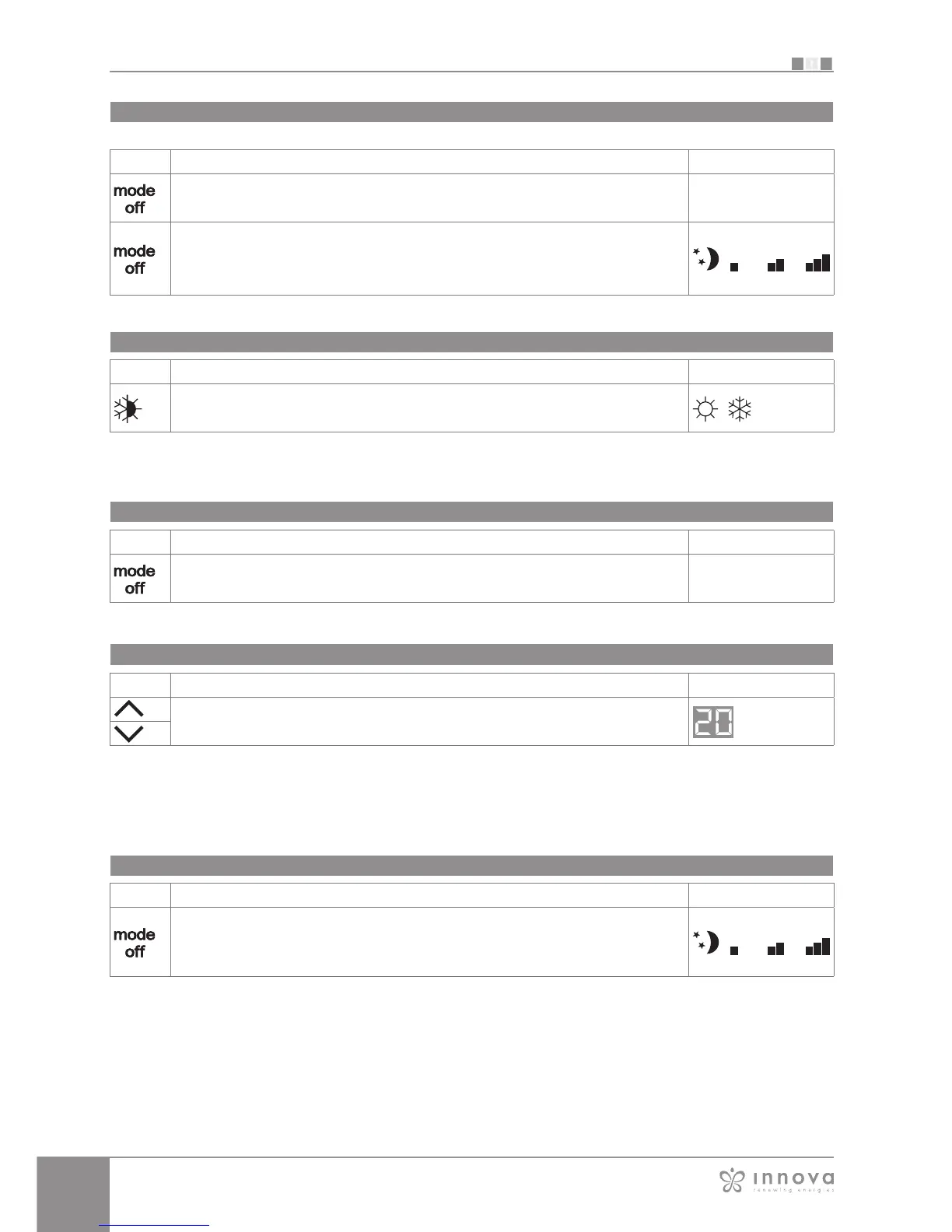
To activate the device
Key Operation Display
Press the mode/off key Off → On
Select one of the 4 operating speeds by pressing the relative mode/off key. When
heating, the symbol displays when the set point is higher than ambient temperature,
both are off when the set point is lower. When cooling, the symbol displays when the
set point is lower than ambient temperature, both are off when the set point is higher.
Key Operation Display
Keep the Heating / Cooling key pressed for approx. 2 seconds to change the mode
between heating and cooling, which is indicated by the 2 symbols that appear if heating
or cooling is active.
Key Operation Display
Press and hold the mode/off key for approx. 2 seconds. No illuminated signals on the
display at all means that the system is in stand-by (no operation).
On → Off
Key Operation Display
Set the required room temperature using the two increase/decrease keys to set the
temperature value on the 2-digit display.
Ventilation speed regulation
The super silent setting activates powerful dehumidifying
when cooling and only radiation (with the fan off, and
solenoid valve activated) when heating.
By setting the highest speed, the maximum possible
power level is activated immediately whether heating or
cooling.
Once the desired room temperature is reached, we
recommend selecting one of the other 3 operation modes
for increased comfort and sound levels.
Key Operation Display
Each time the mode/off button is pressed the fan speed moves between supersilent,
minimum, medium and maximum.
The function being activated is indicated by the relevant symbol appearing on the
display.








 To Next Page