9.11
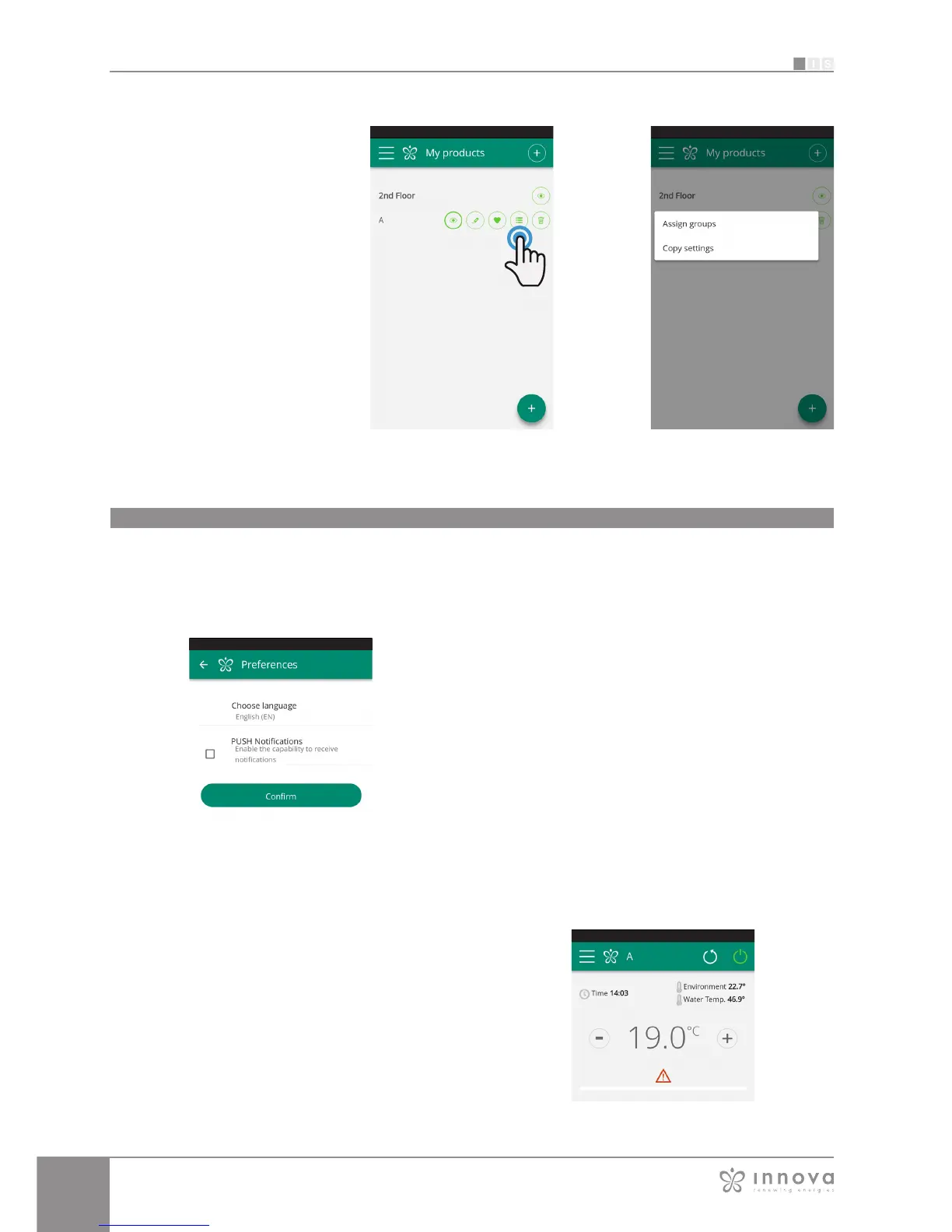
Figure 9-42 Figure 9-43
You can also associate a fancoil with
the group through the fancoil itself.
Select the penultimate icon on the row
of the fancoil (icon list with three rows)
and click "Assign groups"
(Figure 9-42).
Assign the fancoil to one of the groups
shown on the list.
When, on the other hand, you click
"Copy settings", the settings of that
fancoil are applied to the group that
will be selected.
ALARM SIGNAL
If the alarm symbol appears as shown in Figure 9-45, click
on it to display the error message.
See section 1.18 on page 9 for explanations.
PREFERENCES
Figure 9-44
Figure 9-45
In the "Preferences" section which can be selected on
the menu, the App language and the PUSH notification
settings can be changed.
To receive notifications on the fancoil's operation directly
on your smartphone even when you are not using the
App, tick the "PUSH Notifications" option.
Preferences








 To Next Page