9.13 Troubleshooting
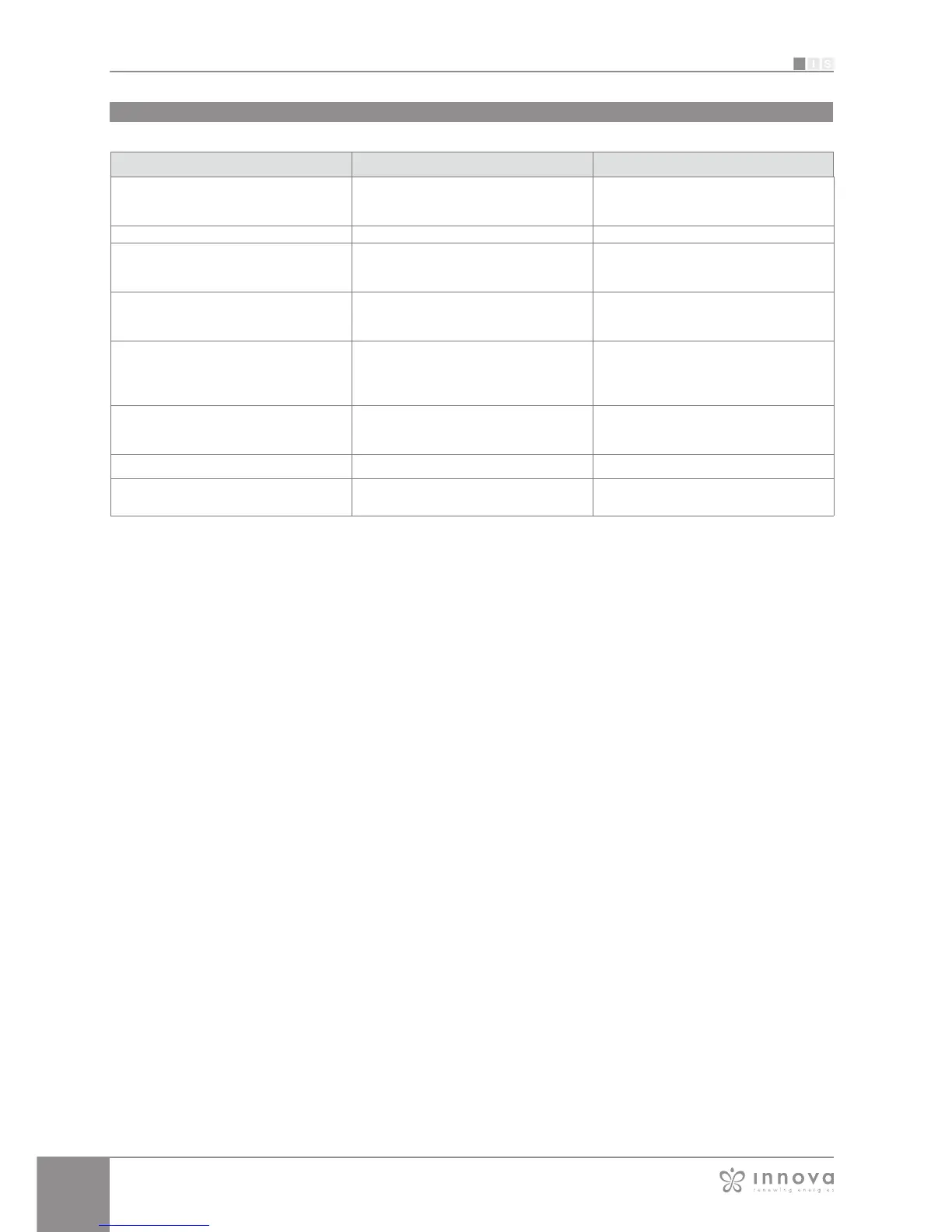
Effect Causa Solution
The fancoil cannot be configured on the iOS
smartphone
iOS smartphones do not automatically identify
the WiFi network which was renamed during
configuration of the App
Go to the telephone's settings and select
the fancoil unit's WiFi network with the name
assigned to it during configuration of the App
Remote configuration is unsuccessful The WiFi network may be weak Check the signal power
The fancoil's WiFi cannot be found
The WiFi transmitter may be switched off or
the fancoils may already be configured in
"Remote Access"
Ensure that there is power to the device
Several fancoils in the house cannot be
configured
During configuration, two or more fancoils
are on
Configure one fancoil at a time: therefore,
switch on one at a time, keeping all the
others off, and start the configuration
The fancoil scheduling section cannot be
accessed
Scheduling of the fancoil is possible only after
remote control has been configured.
Ensure that you have configured remote
control, accessing the dedicated section
from the App menu. Otherwise, configure it
as explained on page 38.
Immediately after carrying out remote
configuration, the name of the fancoil is
"TEMP"
This is a synchronisation problem between
the fancoil, the server and the smartphone.
Wait a few minutes. Otherwise, shut down
and restart the fancoil.
MQTT Server Problem The server is in maintenance Wait
Faults on the display:
errors E7, E6 and other alarms
See page 11








 To Next Page