9.3
9.4
9.5
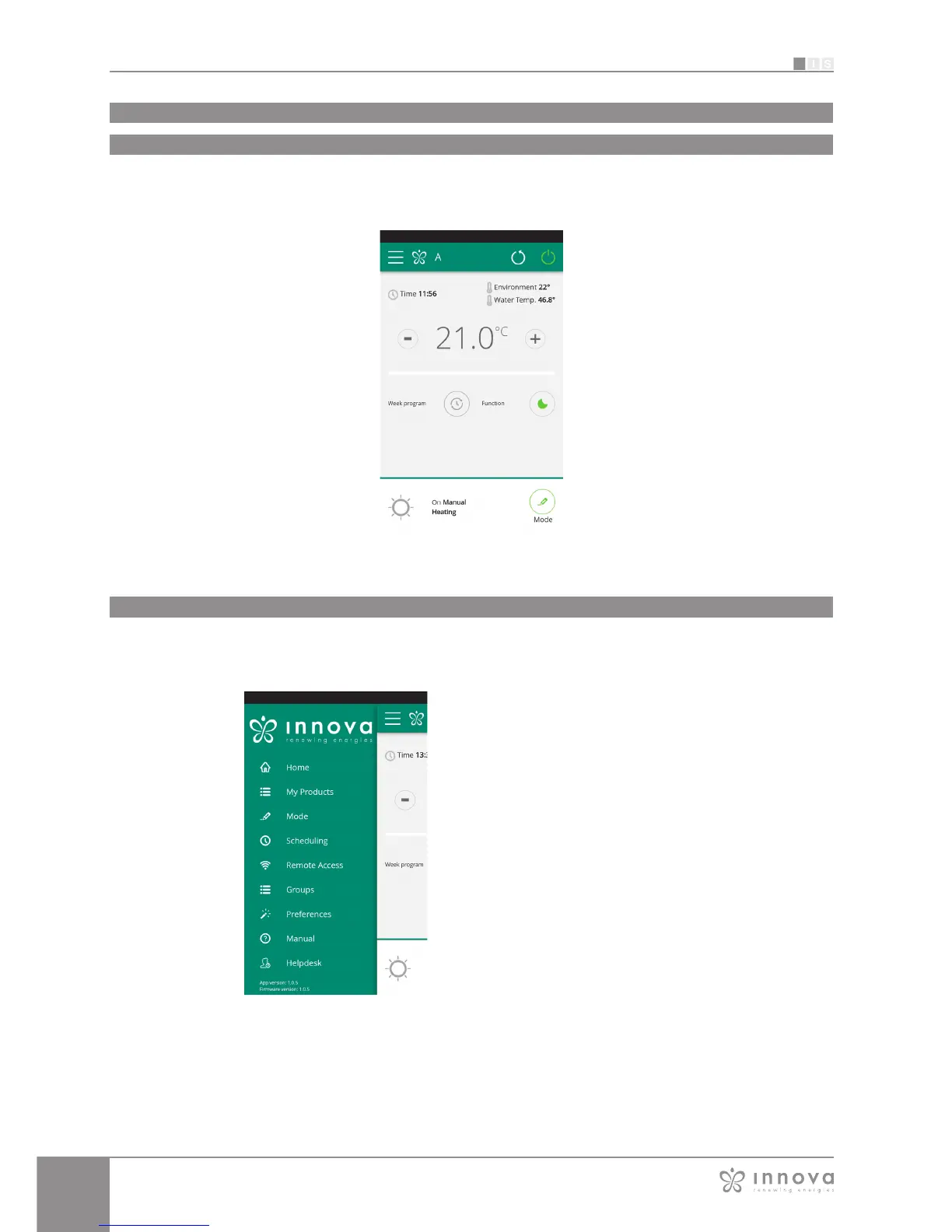
GENERAL CONTROL SCREEN
of the fancoil
Update page.
Fancoil start-up/shut off
Adjustment settings
temperature
Current state and the
possibility of changing
the fancoil operating
mode
Menu and
fancoil name
Current conditions (time
and temperature)
Fancoil operating
settings
(week program,
function)
Fancoil start-up/shut off
(as at the top right)
General control screen
App features
Figure 9-10
Menu
MENU
menu items
HOME
general control screen
(Figure 9-10)
MY PRODUCTS
list of the fancoils and groups of fancoils configured in the App
MODE
list of possible fancoil management modes
SCHEDULING
section dedicated to the weekly scheduling of the fancoil.
Note: this is possible only if remote control has been configured
REMOTE CONTROL
visible only when the device is configured in standalone mode and
used to move to the cloud
ADVANCED
visible only when the device is configured in cloud mode and allows
DHCP / IP configuration of the network
GROUPS
list of groups of several fancoils (e.g. 1st floor, 2nd floor,...).
PREFERENCES
language and PUSH notifications
MANUAL
link to the INNOVA website where you can find the necessary
documentation
www.innovaenergie.com/en/documents-products-airconditioners-innova/
manuals/
HELPDESK
to ask for support
Figure 9-11








 To Next Page