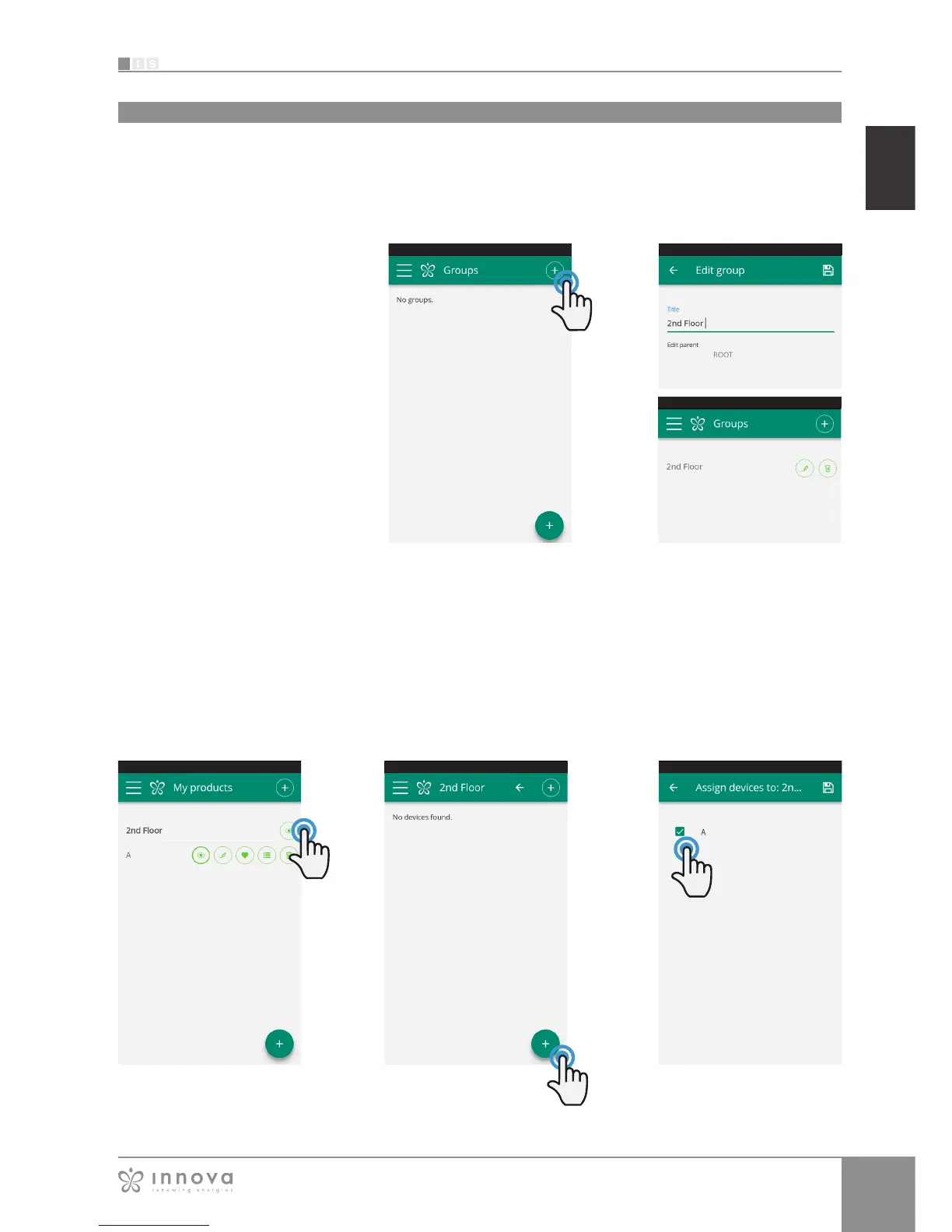
Figure 9-39 Figure 9-40 Figure 9-41
Figure 9-36 Figures 9-37 e 9-38
Groups
To associate a fancoil to a group, select “My Devices” item
from the menu.
The section contains the list of all the configured fancoils
and groups.
Click on the eye beside the group name and then on the
"+" symbol and select the fancoils to associate.
Lastly, save using the icon at the top right.
If you have several fancoils, you can
combine them in groups to simplify
scheduling and management of them.
(For example, the fancoils in a hotel
could be grouped by floor).
First of all, select "Groups" in the menu
and create a new group by clicking on
"+". (Figure 9-36)
Then give a "Title" to the group and
save using the icon at the top right.
(Figures 9-37 e 9-38)
The group has been created but it
has still not been associated with any
fancoil.
Returning to the "Groups" screen, the
new group will appear and it can be
edited or deleted using the adjacent
icons.
GROUPS
list of groups of several fancoils








 To Next Page