117
General Maintenance Procedures
Product Support: www.instron.com
Replace a Fuse
Electrical Hazard - Shut down the system and disconnect the power cable from the
main power source before replacing a fuse. Dangerous voltages can cause
personal injury.
Hazard - Do not remove covers to any component of your system, unless it is
specified in a procedure.
There are dangerous voltages and rotating machinery inside the machine that may
cause bodily injury or damage to equipment.
Replace a fuse with the same type and size as the original. Installing the wrong fuse
could damage the electrical circuits inside the machine.
1. Ensure that the power switch is in the Off (0) position and disconnect the power cable
from the power source. Verify that no LEDs are illuminated on the frame control
panel.
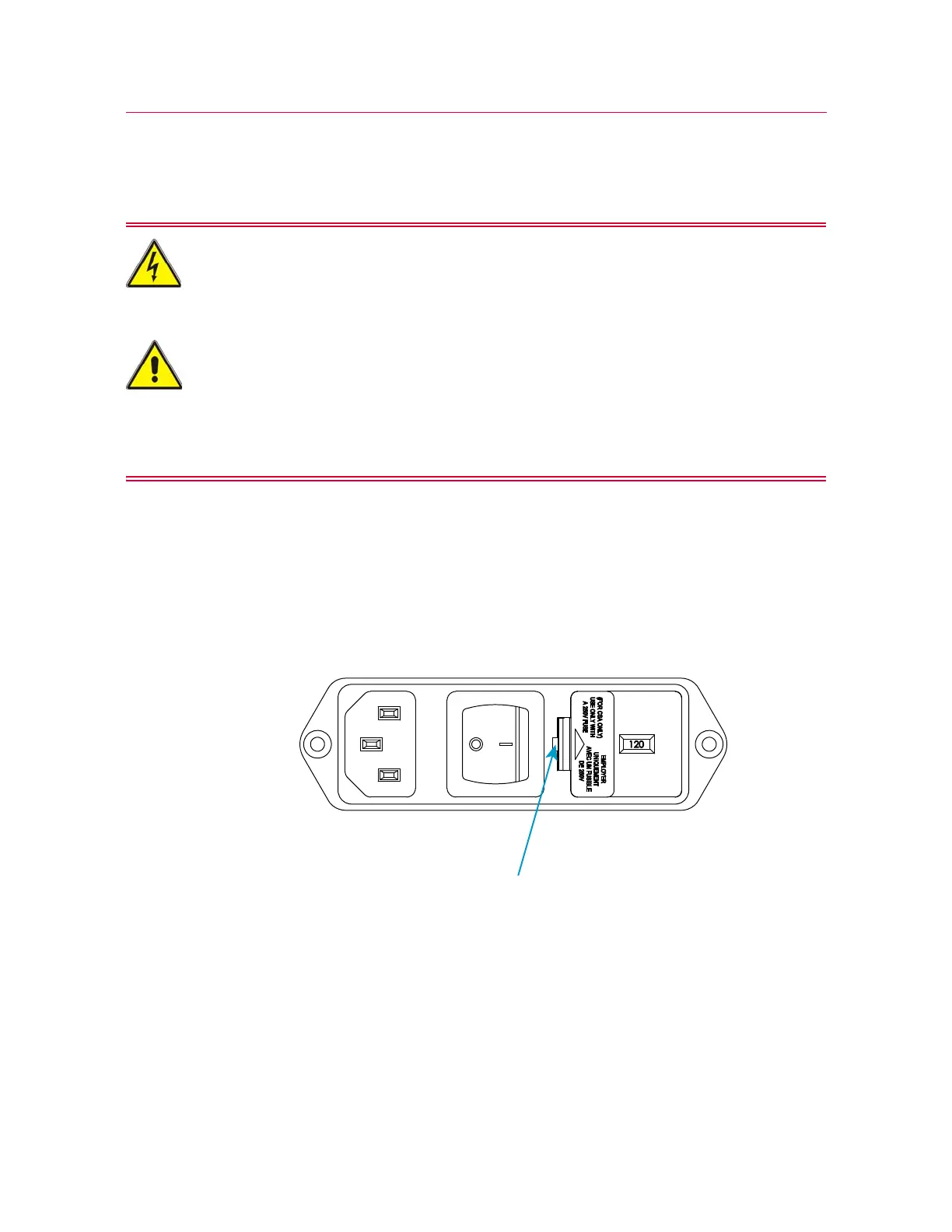
2. Insert a small flat-head screwdriver into the middle of the connector and pry out the
fuse holder, as shown below.
3. Remove the fuse holder from the power input connector and remove the fuses.
4. Install new fuses in the holder. Spare fuses are supplied with the system (refer to
“Ancillary parts” on page 118).
5. Re-install the fuse holder into the connector.
6. Reconnect the power cable to mains power and turn on the system. Verify that the
white LED above the
DISABLED indicator on the frame control panel illuminates.



 To Next Page