43
> Specifications > Advanced Setup > Listening Modes
> Network Functions > Basic Manual
|Troubleshooting Supplementary Information, etc.
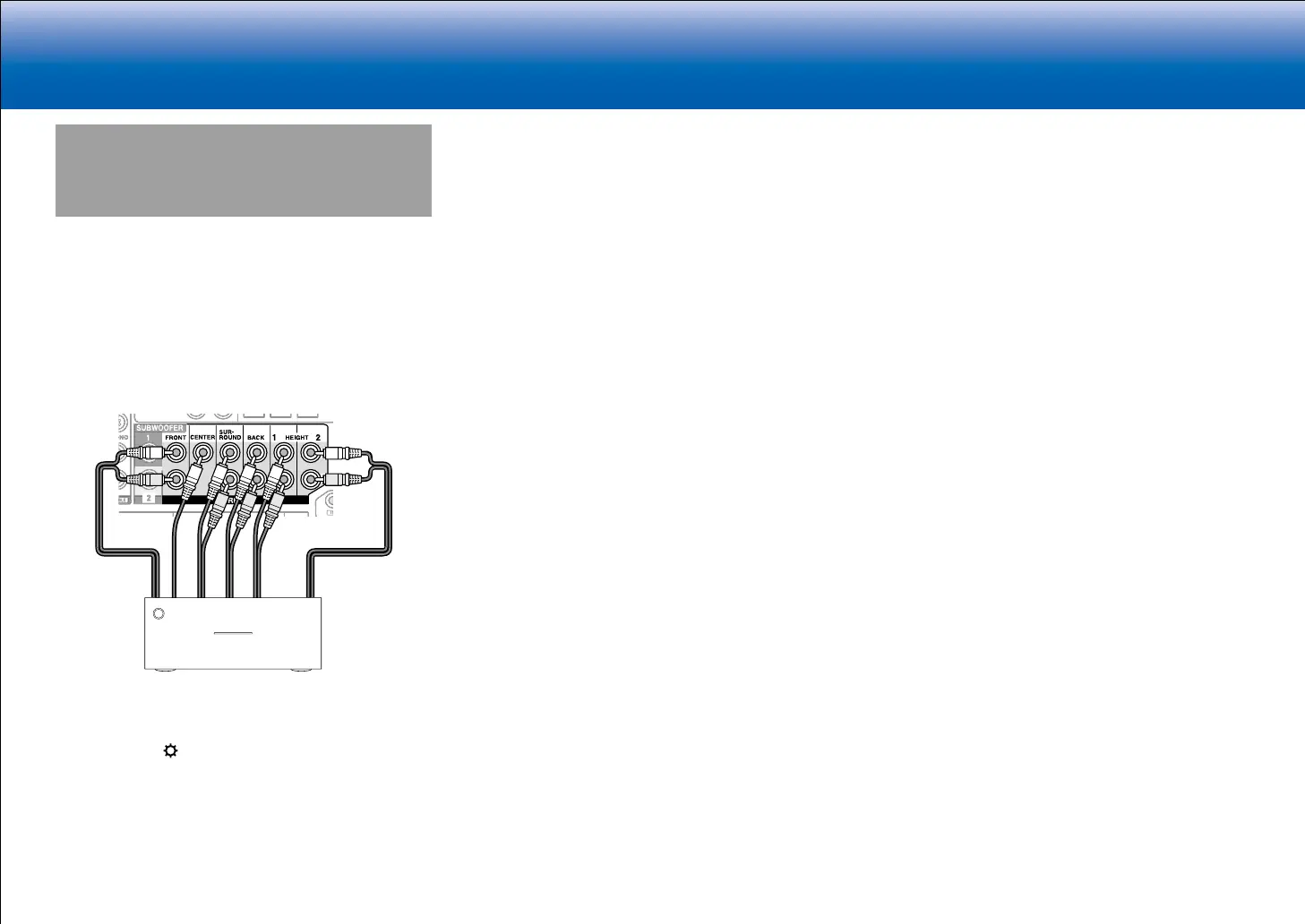
Connecting a Power Amplifier
You can connect a power amplifier to the unit and use the
unit as a pre-amplifier in order to produce a large volume
that cannot be output with the unit only. Connect the
speakers to the power amplifier. For details, refer to the
power amplifier's instruction manual.
■ Connections
1. Connect as below using the PRE OUT terminals.
•
Set to suit the number of speaker channels
connected.
−
Press
on the remote controller to display
the Setup menu. Select "2. Speaker" -
"Configuration" - "Speaker Channels" in order
with the cursors, and set the number of speaker
channels.
•
You can reduce power consumption by turning
off the power of the SPEAKERS terminals you
are not using on this unit. Make the setting in "8.
Miscellaneous" - "Preamp Mode" in the Setup menu.


 To Next Page