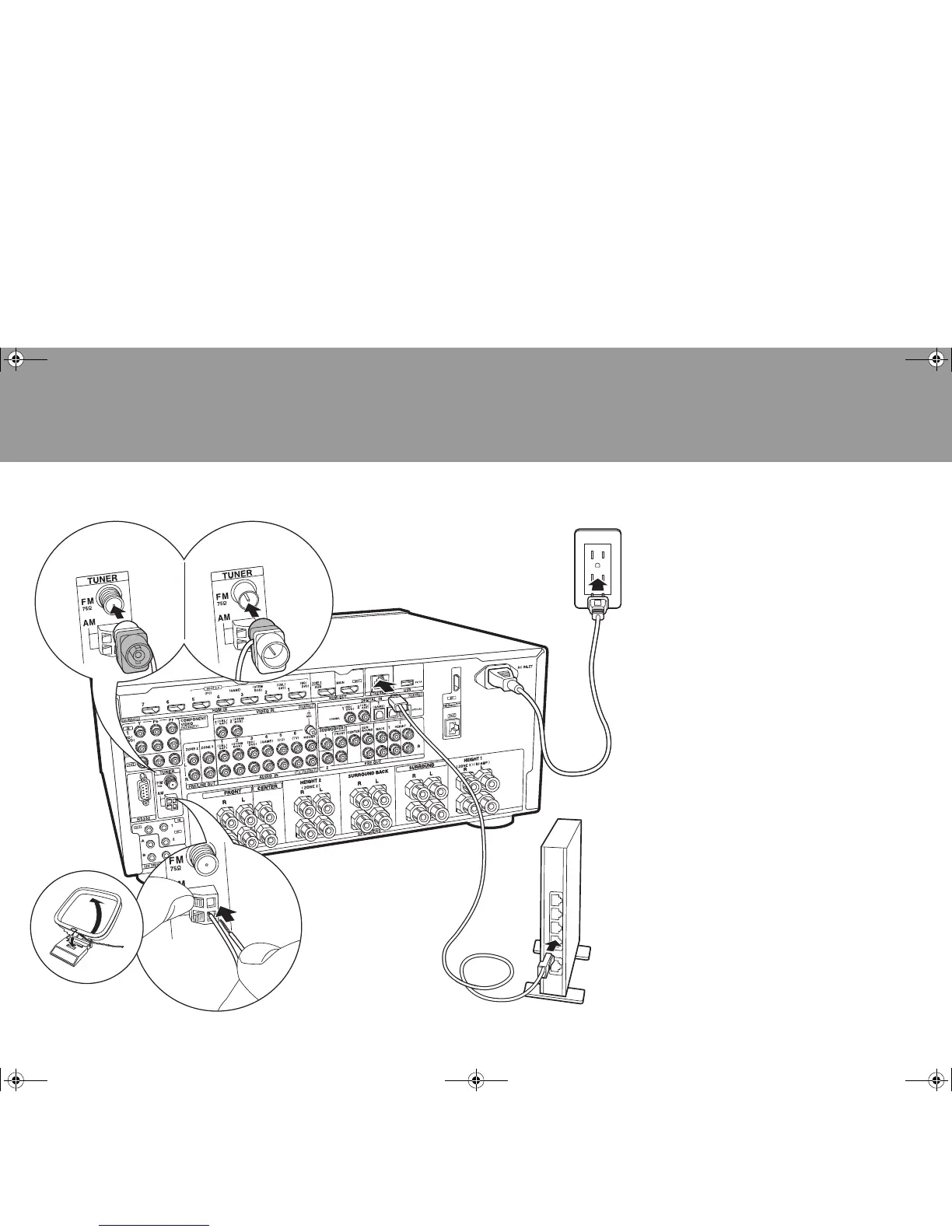
1 AM loop antenna, 2 Indoor FM antenna, 3 Ethernet cable, 4 Power cord
Antenna Hookup
Move the antenna around while playing the radio to find
the position with the best reception. Use a thumb tack or
similar to attach the indoor FM antenna to a wall.
Network Hookup
Connect this unit to the network using wired LAN. You can
enjoy network features such as internet radio, Music
Server, and AirPlay by connecting the unit to the network.
If you connect by wired LAN, connect with an Ethernet
cable to the ETHERNET port as shown in the illustration.
Power Cord Hookup
This unit includes removable power cords. Connect the
power cord to the power outlet after completing all other
connections. Connect the power cord to AC INLET of the
unit and then connect to the outlet. Always disconnect the
outlet side first when disconnecting the power cord.
SN29402430_DRX-7_BAS_En_1606XX.book 20 ページ 2016年6月14日 火曜日 午前11時4分


 To Next Page