10
Front & Rear Panels—Continued
For detailed information, see the pages in parentheses.
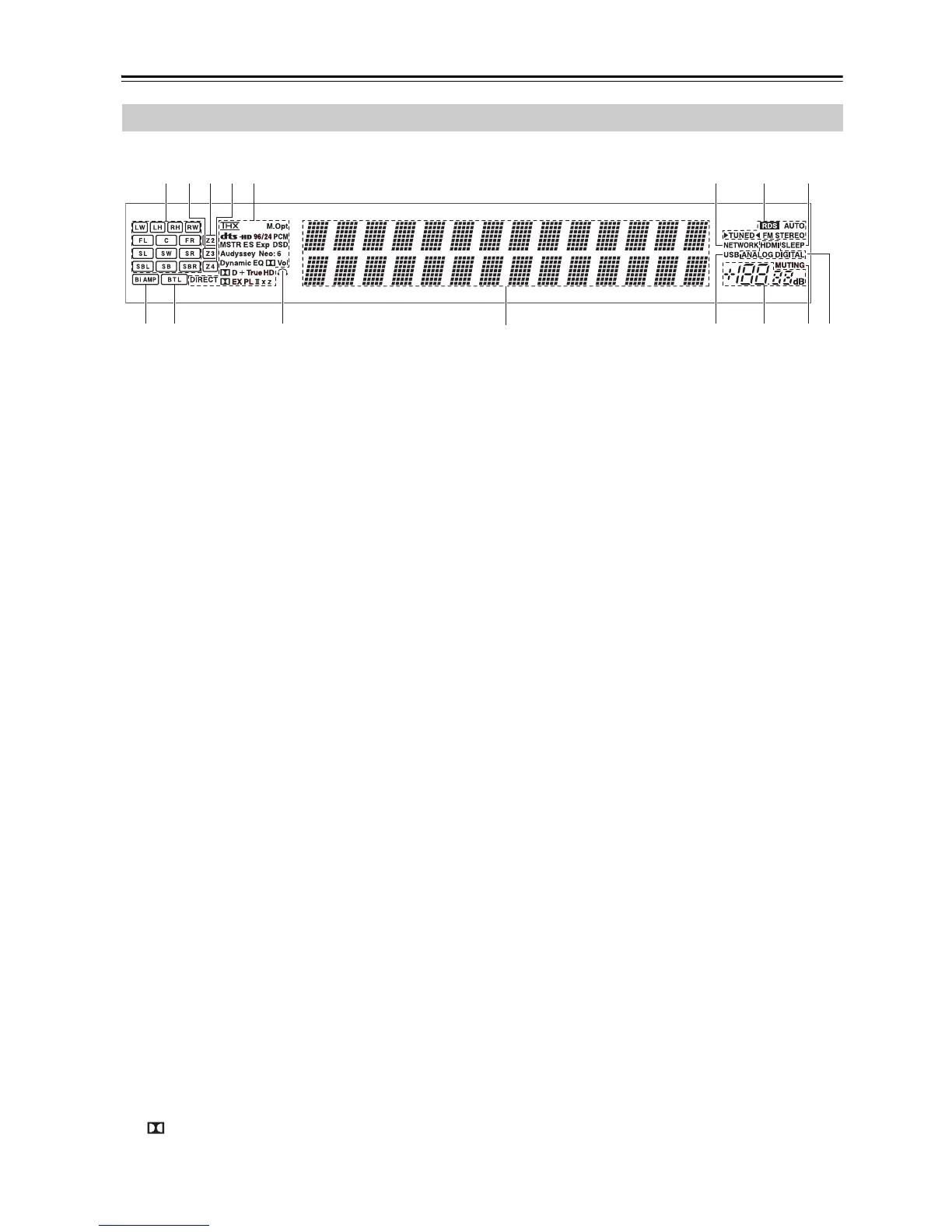
a Speaker/channel indicators
Indicate the speaker channels used by the current
listening mode.
The following abbreviations indicate which audio
channels are outputted for the current listening
mode.
b Z3 indicator (143)
Lights when Powered Zone 3 is being used.
c Z2 indicator (143)
Lights when Powered Zone 2 is being used.
d Z4 indicator (143)
Lights when Powered Zone 4 is being used.
e Listening mode and format indicators (88)
Show the selected listening mode and audio input
signal format.
Audyssey (58, 104):
Flashes during Audyssey MultEQ
®
XT Room Cor-
rection and Speaker Setup. Lights when the “Equal-
izer Settings” is set to “Audyssey” or
Audyssey Dynamic Surround Expansion™ listen-
ing mode is selected.
Dynamic EQ (108):
Lights when “Dynamic EQ” is enabled.
Vol (108, 124):
Lights when “Dynamic Volume” is enabled.
Vol (107, 124):
Lights when “Dolby Volume” is enabled.
f NETWORK indicator (127)
Lights when the Net input selector is selected.
g Tuning indicators
RDS (Australian models) (82):
Lights when tuned to a radio station that supports
RDS (Radio Data System).
AUTO (69):
Lights when Auto Tuning mode is selected for AM
or FM radio. Goes off when Manual Tuning mode is
selected.
TUNED (69):
Lights when tuned to a radio station.
FM STEREO (69):
Lights when tuned to a stereo FM station.
h SLEEP indicator (66)
Lights when the Sleep function has been set.
i Bi AMP indicator (21)
Lights when the “Speakers Type(Front)” setting is
set to “Bi-Amp”.
j BTL indicator (22)
Lights when the “Speakers Type(Front)” setting is
set to “BTL” for bridged front speaker operation.
k Headphone indicator (66)
Lights when a pair of headphones are plugged into
the Phones jack.
l Message area
Displays various information.
m USB indicator (134)
Lights up when a USB mass storage device is
detected.
n Volume level (64)
Displays the volume level.
o MUTING indicator (66)
Flashes while the AV receiver is muted.
p Audio input indicators
Indicate the type of audio input that’s selected as the
audio source: HDMI, ANALOG, or DIGITAL.
Display
bedgfa ch
i jk
l
mno
p
LW: Front wide left
LH: Front high left
RH: Front high right
RW: Front wide right
FL: Front left
C: Center
FR: Front right
SL: Surround left
SW: Subwoofer (Low Frequency Effects)
SR: Surround right
SBL: Surround back left
SB: Surround back
SBR: Surround back right



 To Next Page