Product Description
25
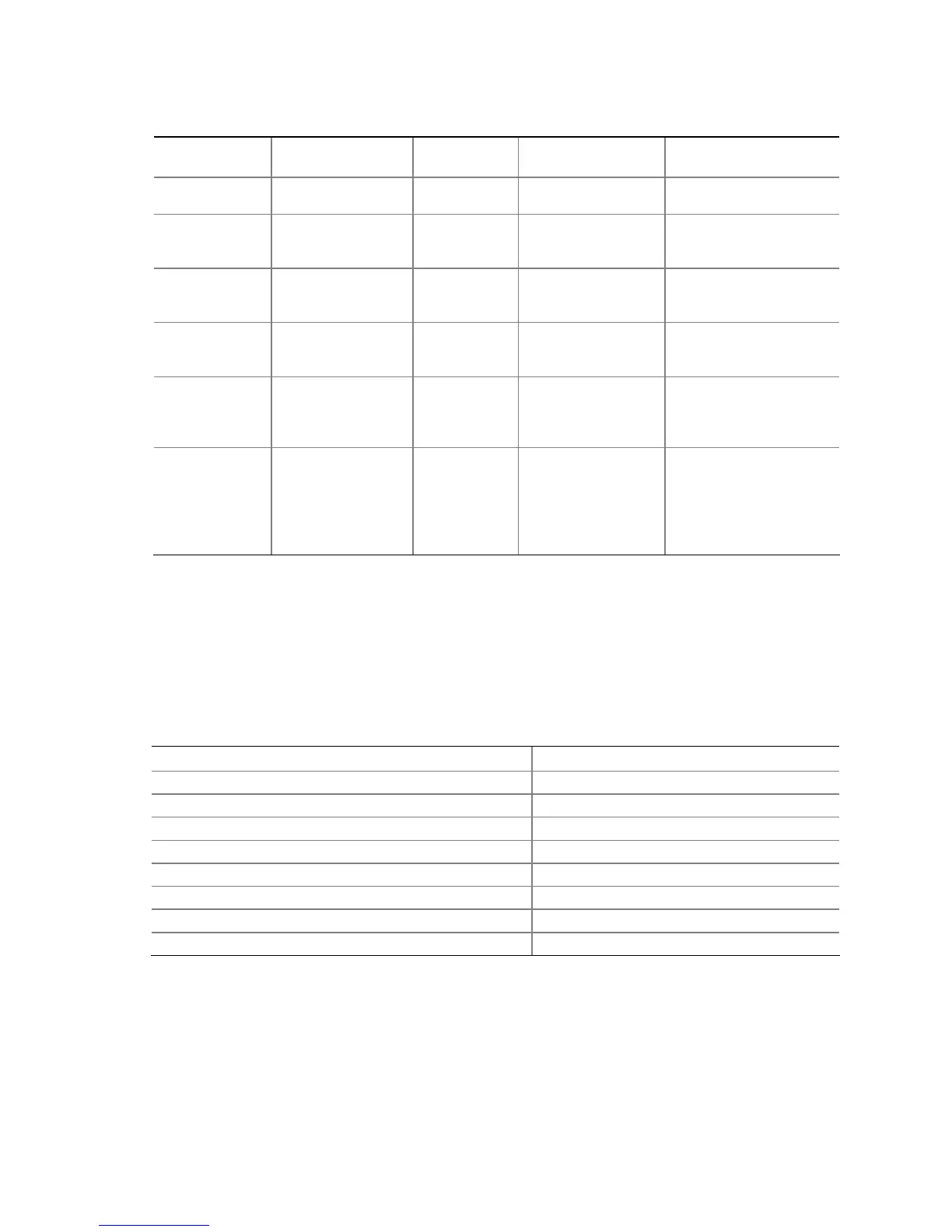
Table 7. Power States and Targeted System Power
Global States
Sleeping States
Processor
States
Device States
Targeted System
Power
(Note 1)
G0 – working
state
S0 – working C0 – working D0 – working state. Full power > 30 W
G1 – sleeping
state
S1 – Processor
stopped
C1 – stop
grant
D1, D2, D3 – device
specification
specific.
5 W < power < 52.5 W
G1 – sleeping
state
S3 – Suspend to
RAM. Context
saved to RAM.
No power D3 – no power
except for wake-up
logic.
Power < 5 W
(Note 2)
G1 – sleeping
state
S4 – Suspend to
disk. Context
saved to disk.
No power D3 – no power
except for wake-up
logic.
Power < 5 W
(Note 2)
G2/S5 S5 – Soft off.
Context not saved.
Cold boot is
required.
No power D3 – no power
except for wake-up
logic.
Power < 5 W
(Note 2)
G3 –
mechanical off
AC power is
disconnected
from the
computer.
No power to the
system.
No power D3 – no power for
wake-up logic,
except when
provided by battery
or external source.
No power to the system.
Service can be
performed safely.
Notes:
1. Total system power is dependent on the system configuration, including add-in boards and peripherals powered
by the system chassis’ power supply.
2. Dependent on the standby power consumption of wake-up devices used in the system.
1.11.1.2 Wake-up Devices and Events
Table 8 lists the devices or specific events that can wake the computer from specific states.
Table 8. Wake-up Devices and Events
These devices/events can wake up the computer… …from this state
LAN S1, S3, S4, S5
(Note)
Modem (back panel Serial Port A) S1, S3
PME# signal S1, S3, S4, S5
(Note)
Power switch S1, S3, S4, S5
PS/2 devices S1, S3
RTC alarm S1, S3, S4, S5
USB S1, S3
WAKE# signal S1, S3, S4, S5
Note: For LAN and PME# signal, S5 is disabled by default in the BIOS Setup program. Setting this option to Power On
will enable a wake-up event from LAN in the S5 state.




 To Next Page