Technical Reference
45
2.8 Jumper Block
CAUTION
Do not move the jumper with the power on. Always turn off the power and unplug the power cord
from the computer before changing a jumper setting. Otherwise, the board could be damaged.
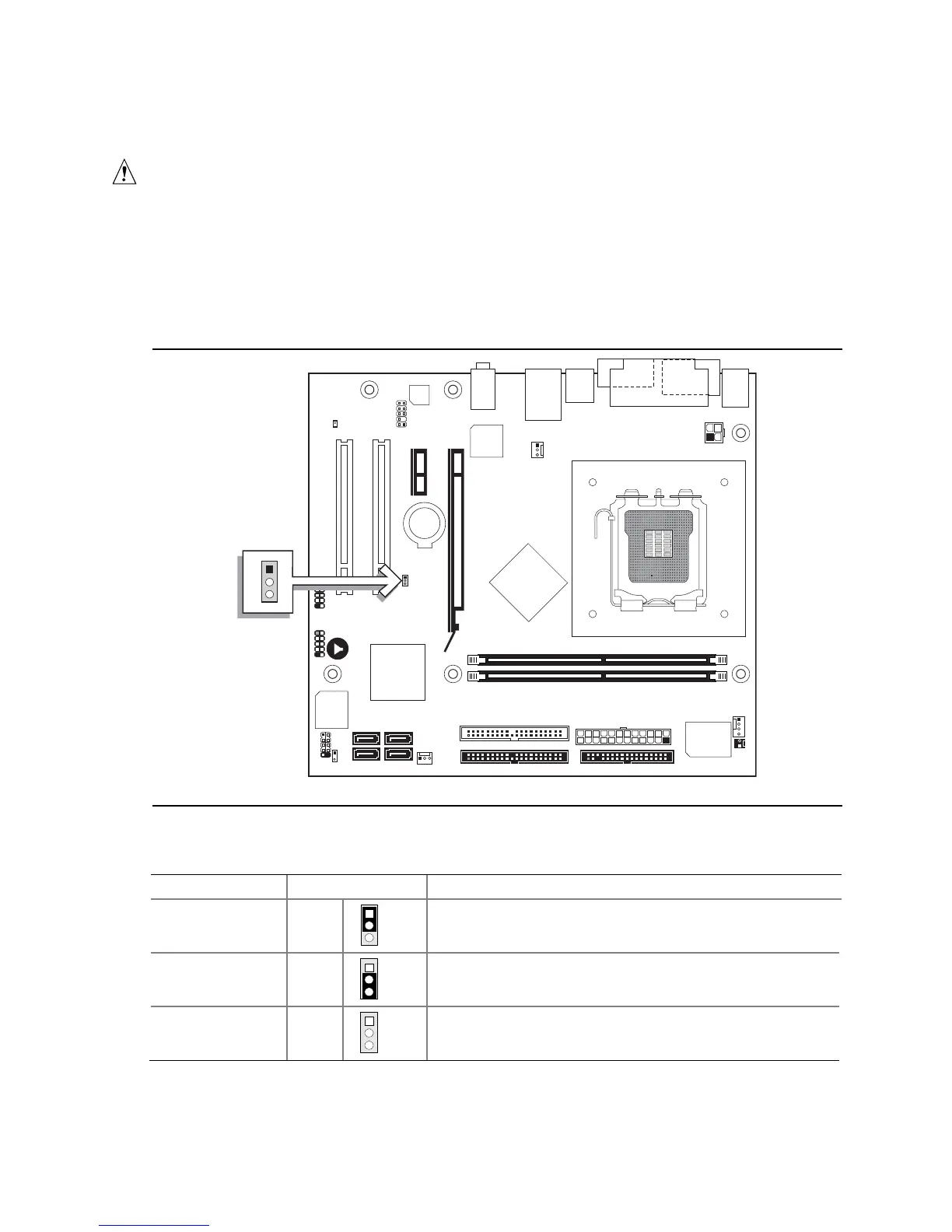
Figure 10 shows the location of the jumper block. The jumper block determines the BIOS Setup
program’s mode. Table 28 describes the jumper settings for the three modes: normal, configure, and
recovery. When the jumper is set to configure mode and the computer is powered-up, the BIOS
compares the processor version and the microcode version in the BIOS and reports if the two match.
OM19011
1
3
Figure 10. Location of the Jumper Block
Table 28. BIOS Setup Configuration Jumper Settings
Function/Mode Jumper Setting Configuration
Normal 1-2
1
3
The BIOS uses current configuration information and
passwords for booting.
Configure 2-3
1
3
After the POST runs, Setup runs automatically. The
maintenance menu is displayed.
Recovery None
1
3
The BIOS attempts to recover the BIOS configuration. A
recovery diskette is required.




 To Next Page