Technical Reference
37
2.7.1 Back Panel Connectors
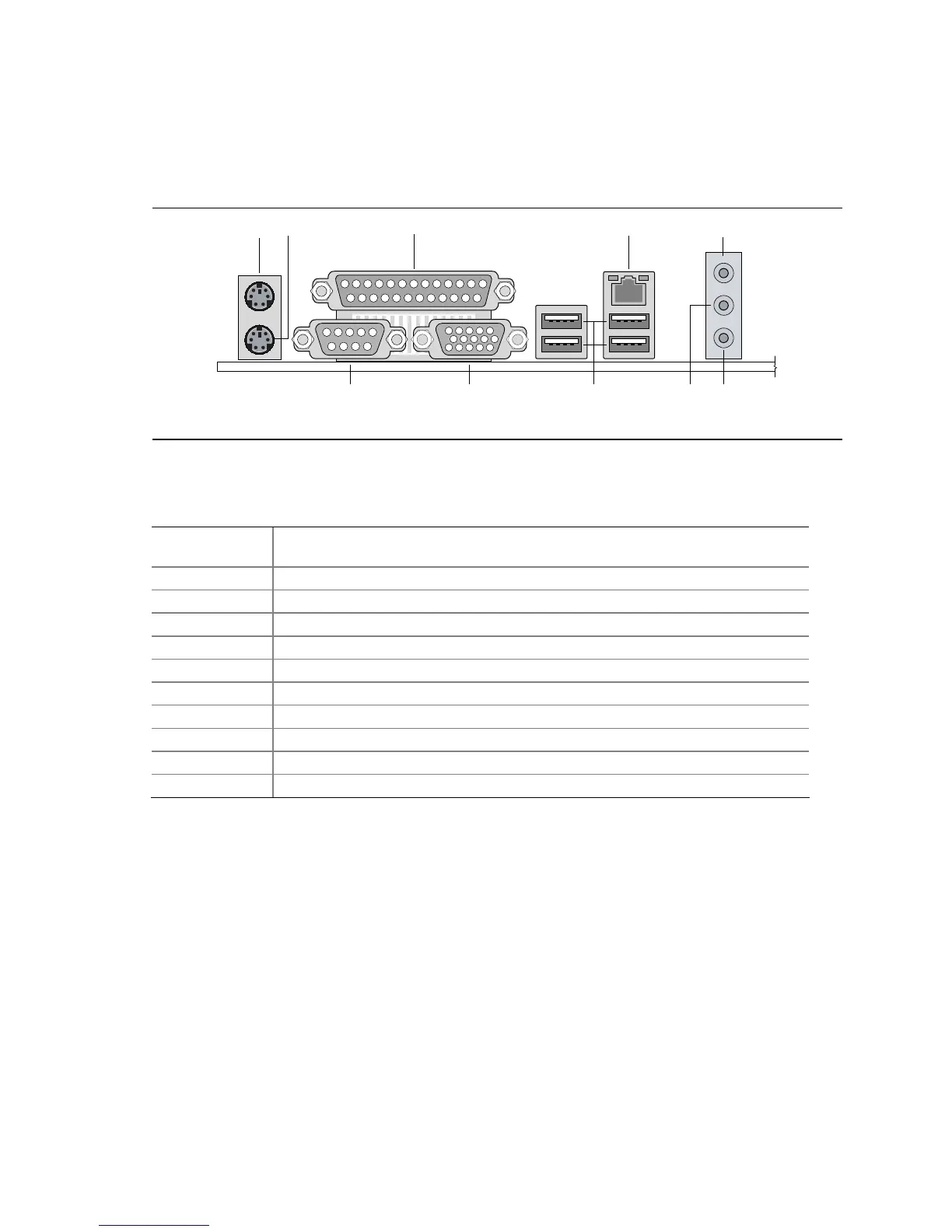
Figure 6 shows the location of the back panel connectors. The back panel connectors are
color-coded. The figure legend (Table 15) lists the colors used (when applicable).
OM18248
A
B
GC
FD E
I
H J
Figure 6. Back Panel Connectors
Table 15. Back Panel Connectors Shown in Figure 6
Item/callout
from Figure 6
Description
A
PS/2 mouse port (Green)
B
PS/2 keyboard port (Purple)
C
Parallel port (Burgundy)
D
Serial port A (Teal)
E
VGA port
F
USB ports [4]
G
LAN
H Line in or Rear Left/Right Out
I
Line out or Front Left/Right Out
J Mic in or Center/LFE (Subwoofer) Out
NOTE
The back panel audio line out connector is designed to power headphones or amplified speakers
only. Poor audio quality occurs if passive (non-amplified) speakers are connected to this output.




 To Next Page