10
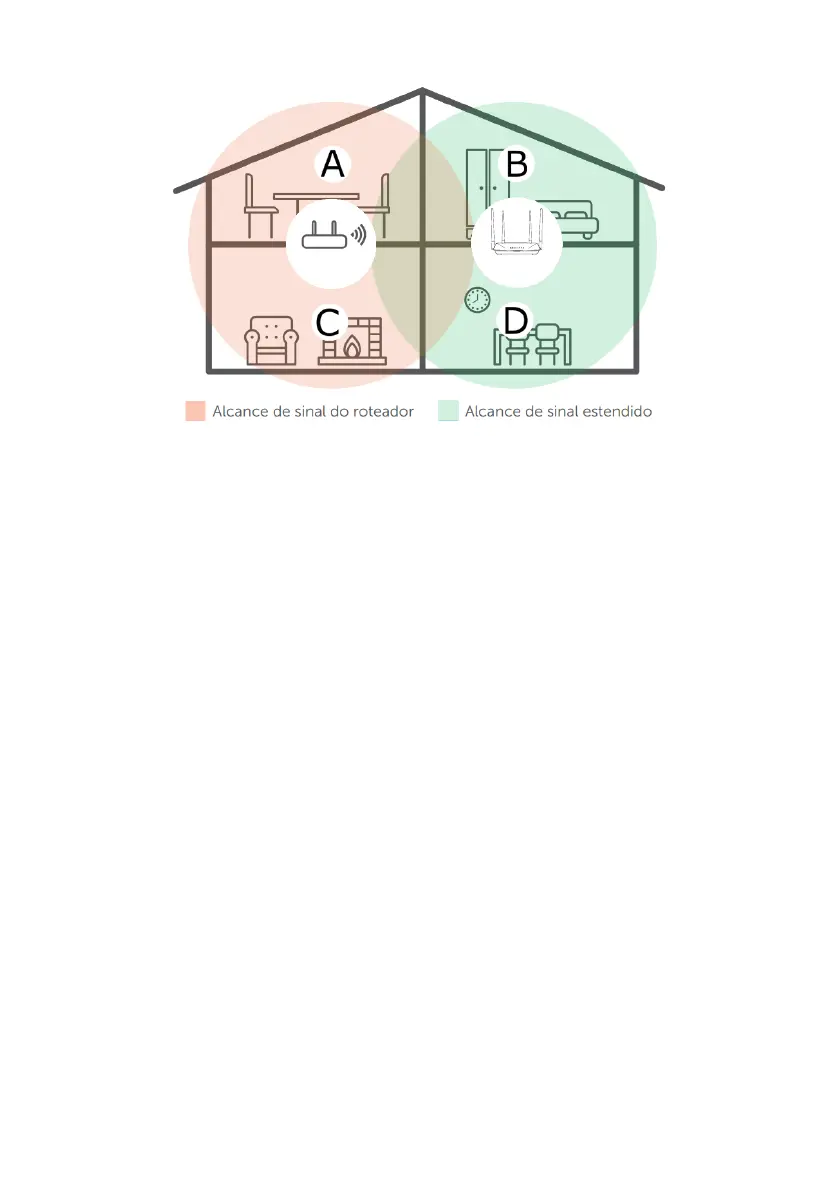
See the following sample image:
Router Repeater
Residence with Wi-Fi signal repeater
Note that the router’s coverage area does not cover the entire residence, so an ACtion RF 1200 is used as a Wi-Fi
repeater to solve this problem. It is important to note that in this scenario, depending on the room you are in, when
connecting a device (a laptop or smartphone, for example) to the Wi-Fi network it may connect either to the router or
the repeater. Examples:
» If you are in the living room (C) and connect to Wi-Fi, you are connecting to your main router’s Wi-Fi network.
» If you are in the kitchen (D) and connect to the Wi-Fi network, you are connecting to the ACtion RF 1200 (repeater)
Wi-Fi network.
» If you connect to the Wi-Fi network while in the dining room (A) and then you move to the bedroom (B), and the main
signal network still reaches it, even if weak, your device will still be connected to the main router, not automatically
switching to Wi-Fi on the ACtion RF 1200 (repeater). If you want your device to connect to the repeater and thus get
a stronger signal, disable and enable your device’s Wi-Fi network again (if you don’t know how to do this, you can try
restarting it so that the Wi-Fi connection with the stronger signal network occurs). The same goes for the move in the
direction area covered by the repeater > area covered by the router (from the bedroom to the dining room, for example).
In short: when moving between the rooms, disconnect and reconnect your device to the Wi-Fi network so that it con-
nects to the network with the best signal. This process may be waived if your device automatically switches between
networks.
To congure the product as a wireless repeater for an existing Wi-Fi network, do the following:
1. Enable the function
Wi-Fi Repeater
by changing the option
Wi-Fi Repeater
to enabled (the button will turn green);
2. Choose the connection mode
Wi-Fi Repeater
in the option
Wi-Fi Connection Mode
;
3. Select the Wi-Fi network you wish to repeat in the eld
Main Wi-Fi Network Name
;
4. After choosing the Wi-Fi network, if it requires a password, you must enter it in the eld
Main Wi-Fi Network Password
;
5. Click on
Save
;
6. In the conrmation message, click on
Ok
and ACtion RF 1200 will reboot applying the settings.
7. ACtion RF 1200 will now connect to your main network and repeat it with the SSID and password set in the installation
wizard or on the page
Wi-Fi Network Settings>Wi-Fi Network Name and Password
;
8. If you want the ACtion RF 1200 to repeat the same SSID and password as your main network, go to the web page at
http://meuintelbras.local
(item
4.5. Wi-Fi network settings
) and congure the Wi-Fi network with the same SSID and
password as your main network.



 To Next Page